


Event document template
Registration confirmation letter
A confirmation letter with a registration summary table: code, package, amount paid, and check-in time, personalized per attendee. Confirm the whole registration list in one mail merge run.
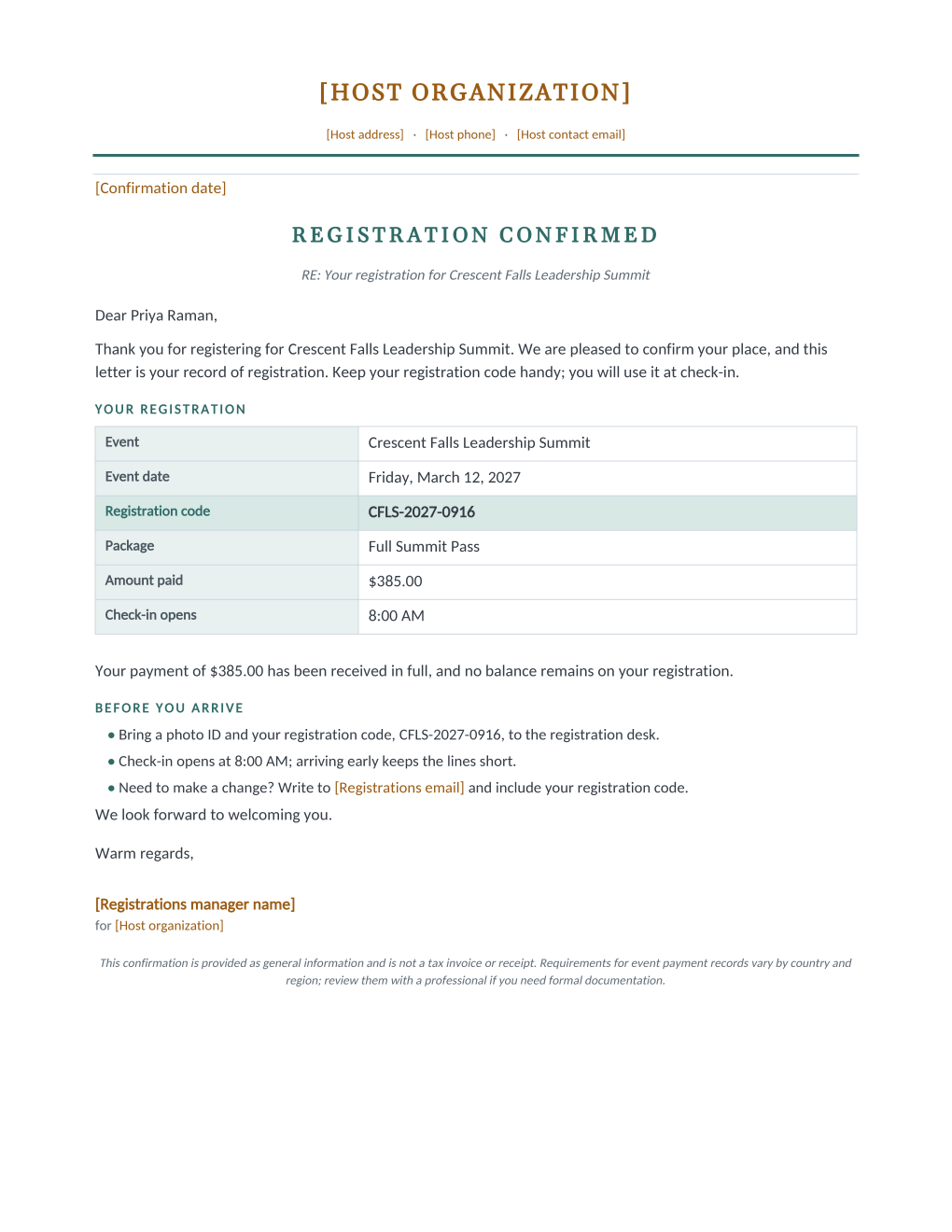
The confirmation attendees actually keep is the one with the details in a table. This letter confirms each attendee's place, restates their registration code in a highlighted row, lists the package, amount paid, and check-in time, and closes with a short what-to-bring list, all filled per row from the registration spreadsheet through seven mail merge fields.
This confirmation is a payment record for the attendee, not a tax invoice. The document says so in its own footer, because the difference matters: attendees who need a formal invoice for an expense claim should receive one from your billing system, and this letter is careful not to pretend otherwise.
What is in the Word document
More than a block of text an AI chat can improvise: a complete, formatted document built for event teams who use it for real.
- A letterhead letter with a REGISTRATION CONFIRMED heading and RE line
- A registration summary table: event, date, code, package, amount paid, check-in time
- The registration code highlighted in its own row and restated in the arrival checklist
- A before-you-arrive bullet list and a payment-received-in-full sentence
- Seven mail merge fields; the registrations desk contact is static text set once
Field reference
Copy the plain field list below, or download the formatted Word document with the design and layout built in.
[Confirmation date]

RE: Your registration for [Event Name]

Dear [Attendee Name],

Thank you for registering for [Event Name]. We are pleased to confirm your place, and this letter is your record of registration. Keep your registration code handy; you will use it at check-in.

YOUR REGISTRATION
Event ............... [Event Name]
Event date .......... [Event Date]
Registration code ... [Registration Code]
Package ............. [Registration Package]
Amount paid ......... [Amount Paid]
Check-in opens ...... [Check In Time]

Your payment of [Amount Paid] has been received in full, and no balance remains on your registration.

We look forward to welcoming you.

Warm regards,
[Registrations manager name]
for [Host organization]

FIELD REFERENCE

MAIL MERGE FIELDS (one spreadsheet column each)
Attendee Name ....... Priya Raman
Event Name .......... Crescent Falls Leadership Summit
Event Date .......... Friday, March 12, 2027
Registration Code ... CFLS-2027-0916
Registration Package  Full Summit Pass
Amount Paid ......... $385.00
Check In Time ....... 8:00 AM

STATIC LINES (edit once in the template)
Host organization ... The Meridian Foundation
Host address ........ 812 Meridian Plaza, Crescent Falls, WA
Host phone .......... (555) 014-2960
Host contact email .. events@meridianfoundation.example
Confirmation date ... February 2, 2027
Registrations email . registrations@meridianfoundation.example
Registrations manager Colin Mercer
Merge fields, one spreadsheet column each
- Amount Paid
- $385.00
- Attendee Name
- Priya Raman
- Check In Time
- 8:00 AM
- Event Date
- Friday, March 12, 2027
- Event Name
- Crescent Falls Leadership Summit
- Registration Code
- CFLS-2027-0916
- Registration Package
- Full Summit Pass
Sender settings, edit once in the template
- Confirmation date
- February 2, 2027
- Host address
- 812 Meridian Plaza, Crescent Falls, WA
- Host contact email
- events@meridianfoundation.example
- Host organization
- The Meridian Foundation
- Host phone
- (555) 014-2960
- Registrations email
- registrations@meridianfoundation.example
- Registrations manager name
- Colin Mercer
Before you send
- 1.Reconcile the Amount Paid column against your payment records before the run; a confirmation stating the wrong amount creates the exact support email it was meant to prevent.
- 2.The letter states that payment was received in full; hold back rows with open balances and run them separately once they settle.
- 3.Send confirmations from the same sheet that will run check-in, so the code on the letter and the code on the desk list can never disagree.
- 4.If attendees may need formal invoices, decide now where those come from; this letter deliberately is not one.
When to use this template
Conferences and summits
Confirm hundreds of registrations in one run, each letter carrying its own code, package, and paid amount.
Paid workshops and courses
The amount-paid row gives each attendee a personal payment record for their files without a support request.
Races and community events
Swap the package values for distance or category in the spreadsheet; the letter structure holds unchanged.
Generate it for the whole guest list at once
One document, one spreadsheet, one personalized copy per guest. That is what MailMergic is for.
Upload the document template
Use the Word download as-is, or edit it first. The mail merge fields are already in place.
Upload your guest list
One row per guest: names, tables, codes, menu choices, whatever the document needs. Excel, CSV, and Google Sheets all work.
Generate and deliver
One personalized document per guest, generated in a single run. Download them all as PDFs, or email each guest their own with delivery and open tracking.
Registration confirmation FAQ
Is this a receipt or an invoice?
When should confirmations go out?
What if someone's package changes?
Can it carry joining instructions?
Other event templates
Formal invitation
Traditional wording with each guest's name set into the card, one per guest.
Gala invitation
Black-tie invitation with each guest's table and menu choice on the card.
Conference invitation
Business invitation letter with an agenda and a per-attendee registration code.
Save the date
Minimalist announcement card, every guest greeted by name months ahead.
Event ticket
Admit-one ticket with a numbered stub, one named ticket per guest.
Name badge
Two badges per sheet with cut guides, one per attendee from your list.
Place card
Fold-over tent card with name, seat, and menu cue from the seating chart.
Speaker confirmation
Logistics letter confirming each speaker's session, room, and arrival plan.
Thank-you letter
Morning-after thank-you with highlights, a survey ask, and the next date.
All event templates
Browse the full set of free event templates.