


Event document template
Event ticket template
A printable admit-one ticket with the guest's name on the face and the ticket number, seat, and type on a dashed stub. Number one ticket by hand, or mail merge the whole guest list so every ticket is named and numbered.
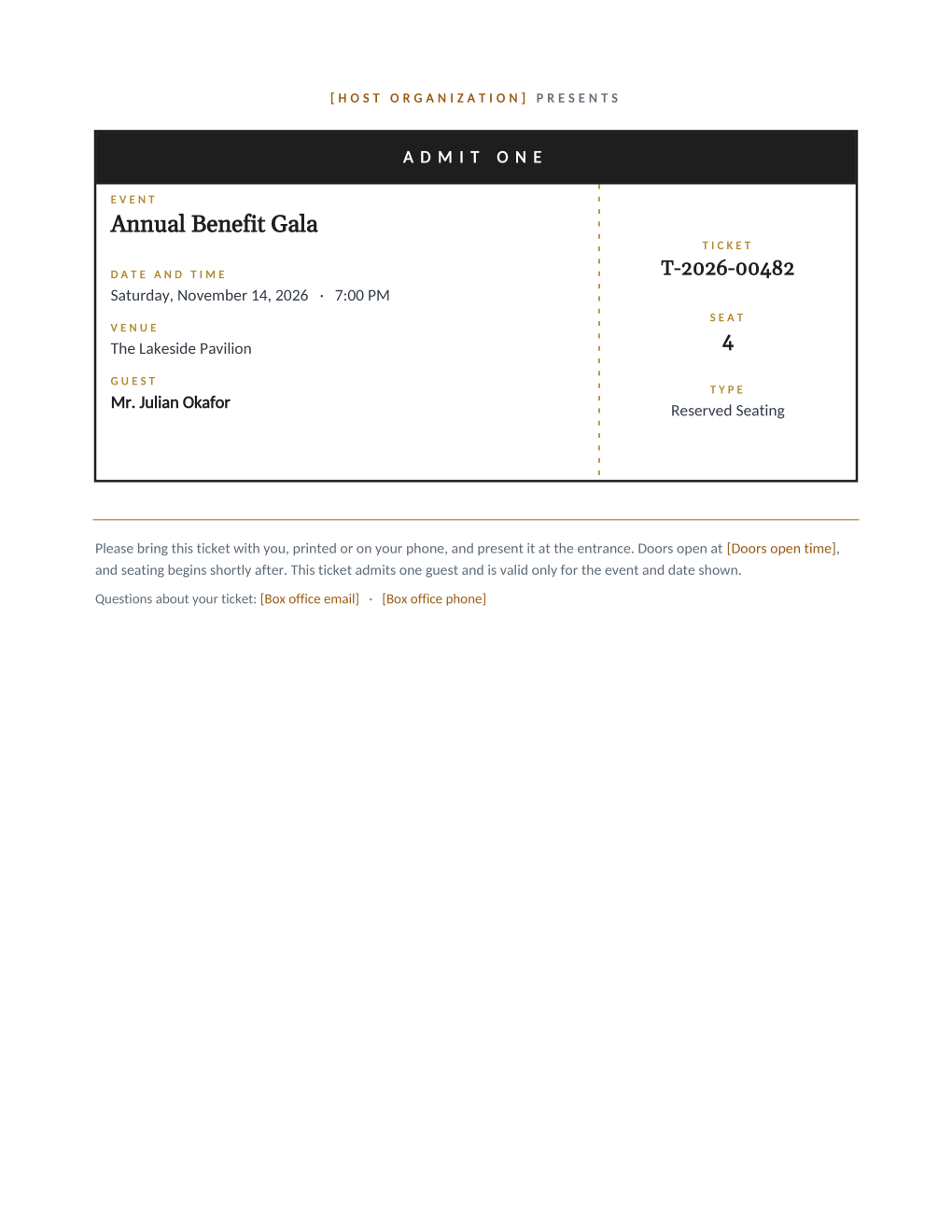
Named tickets change the door: "one of 300 general admissions" becomes "Mr. Okafor, seat 4, ticket T-2026-00482", and double-claiming gets noticeably harder with nothing at the entrance beyond a printed list. This template puts the event, date and time, venue, and guest name on the ticket face, and the number, seat, and type on a dashed stub for reconciliation.
Eight mail merge fields fill every ticket from your guest list, so numbering is a spreadsheet column instead of a hand edit, and the box office contact and doors-open time are static lines you set once. Generate the run, print on card stock, or email each guest their own PDF ticket.
What is in the Word document
More than a block of text an AI chat can improvise: a complete, formatted document built for event teams who use it for real.
- An admit-one ticket layout with a dark header band and a dashed stub divider
- Event, date and time, venue, and guest name on the ticket face
- Ticket number, seat, and ticket type on the stub for door reconciliation
- Static admission notes: doors-open time and box office contact lines
- Eight mail merge fields, so the whole numbered run comes from one spreadsheet
Field reference
Copy the plain field list below, or download the formatted Word document with the design and layout built in.
FIELD REFERENCE (ticket face, then stub)

TICKET FACE
Event Name .......... Annual Benefit Gala
Event Date .......... Saturday, November 14, 2026
Event Time .......... 7:00 PM
Venue Name .......... The Lakeside Pavilion
Guest Name .......... Mr. Julian Okafor

STUB
Ticket Number ....... T-2026-00482
Seat Number ......... 4
Ticket Type ......... Reserved Seating

STATIC LINES (edit once in the template)
Host organization ... The Meridian Foundation
Doors open time ..... 6:00 PM
Box office email .... boxoffice@meridianfoundation.example
Box office phone .... (555) 014-2968
Merge fields, one spreadsheet column each
- Event Date
- Saturday, November 14, 2026
- Event Name
- Annual Benefit Gala
- Event Time
- 7:00 PM
- Guest Name
- Mr. Julian Okafor
- Seat Number
- 4
- Ticket Number
- T-2026-00482
- Ticket Type
- Reserved Seating
- Venue Name
- The Lakeside Pavilion
Sender settings, edit once in the template
- Box office email
- boxoffice@meridianfoundation.example
- Box office phone
- (555) 014-2968
- Doors open time
- 6:00 PM
- Host organization
- The Meridian Foundation
Before you print
- 1.Keep the ticket number column in the same sheet as your door list; the numbers only help if the desk can look them up.
- 2.Fix the Ticket Type values once (Reserved Seating, General Admission, VIP) and use them consistently; the stub prints the cell exactly as written.
- 3.If seats are unassigned, put something deliberate in the seat cell, like "Open", rather than shipping a printed ticket with a blank.
- 4.The stub divider is a printed dashed line, not a perforation; if the door plan involves tearing stubs, score the line first or collect whole tickets instead.
When to use this template
Fundraisers and galas
Named, numbered tickets that reconcile against the guest list at check-in, without paying a ticketing platform for a private event.
Community theater and concerts
Seat-numbered runs straight from the seating spreadsheet, reprintable one row at a time when a seat changes hands.
Workshops and open days
The ticket type field distinguishes member, guest, and staff admissions in a single run over one list.
Generate it for the whole guest list at once
One document, one spreadsheet, one personalized copy per guest. That is what MailMergic is for.
Upload the document template
Use the Word download as-is, or edit it first. The mail merge fields are already in place.
Upload your guest list
One row per guest: names, tables, codes, menu choices, whatever the document needs. Excel, CSV, and Google Sheets all work.
Generate and deliver
One personalized document per guest, generated in a single run. Download them all as PDFs, or email each guest their own with delivery and open tracking.
Event ticket template FAQ
Can these tickets be scanned at the door?
Do numbered tickets actually prevent fraud?
Can I sell tickets with this?
What paper should tickets print on?
Other event templates
Formal invitation
Traditional wording with each guest's name set into the card, one per guest.
Gala invitation
Black-tie invitation with each guest's table and menu choice on the card.
Conference invitation
Business invitation letter with an agenda and a per-attendee registration code.
Save the date
Minimalist announcement card, every guest greeted by name months ahead.
Registration confirmation
Confirmation letter with a summary table and per-attendee registration code.
Name badge
Two badges per sheet with cut guides, one per attendee from your list.
Place card
Fold-over tent card with name, seat, and menu cue from the seating chart.
Speaker confirmation
Logistics letter confirming each speaker's session, room, and arrival plan.
Thank-you letter
Morning-after thank-you with highlights, a survey ask, and the next date.
All event templates
Browse the full set of free event templates.