


School document template
Welcome back to school letter
A warm start-of-year letter with the panel every family photographs: grade, homeroom teacher, room number, doors-open time, and the first day, beside a short what-to-pack list. One letter per student from the class assignment sheet, in one mail merge run.
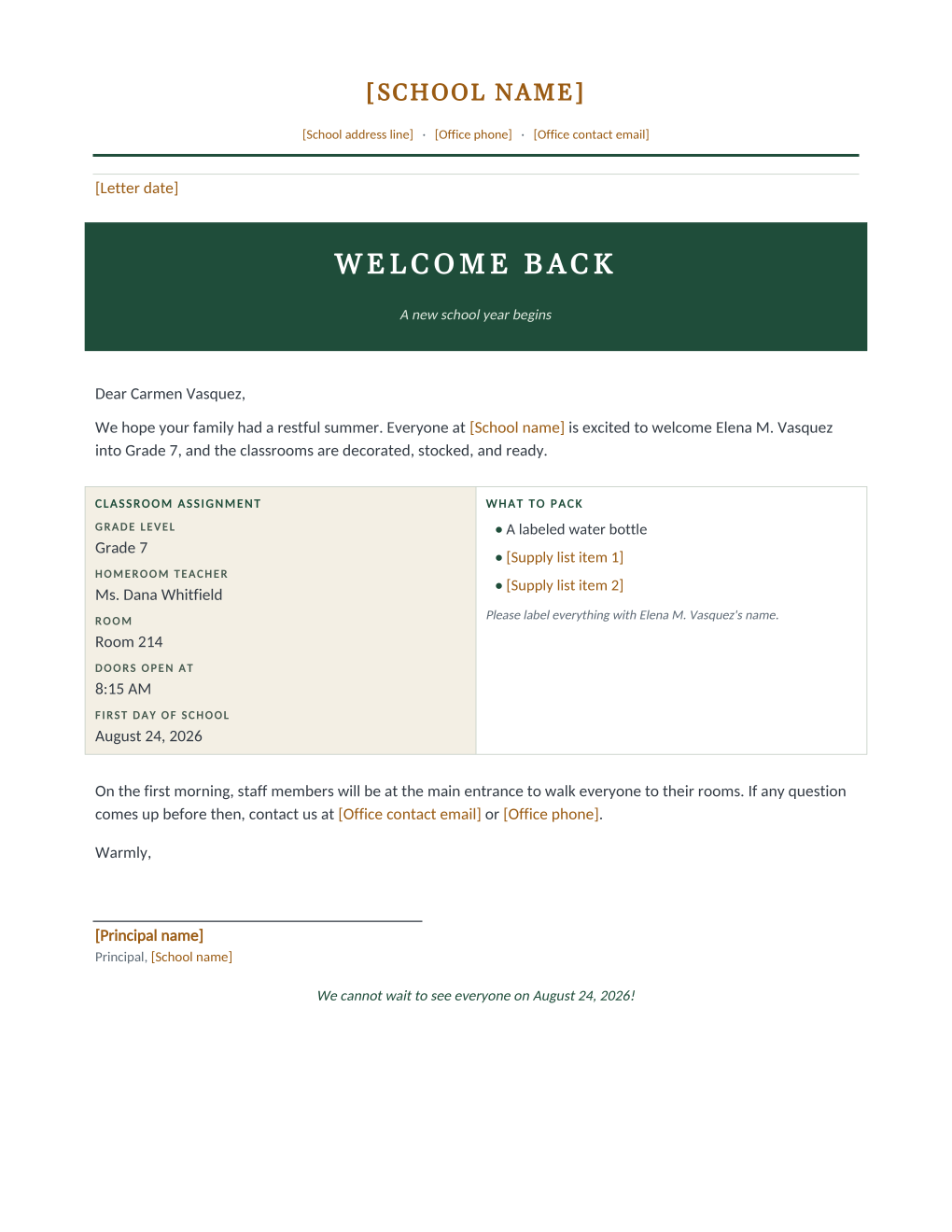
The week before school starts, every family is looking for the same four facts: which grade, whose class, which room, what day. This letter opens with a full-width welcome banner, greets the parent warmly, and then answers exactly that in a two-column panel families photograph and pin up: the classroom assignment (grade, homeroom teacher, room, doors-open time, first day) beside a what-to-pack list with a built-in reminder to label everything with the student’s name. A closing note promises staff at the main entrance on the first morning to walk students to their rooms, which is the sentence nervous first-week families actually need.
Assignments are per-student mail merge fields, so the entire school’s letters generate from the class assignment sheet in one run, the day assignments are final.
What is in the Word document
More than a block of text an AI chat can improvise: a complete, formatted document built for school offices that use it for real.
- A full-width dark green welcome banner with a new-school-year subtitle
- A two-column panel pairing the classroom assignment (grade, homeroom, room, doors-open time, first day) with a what-to-pack list
- A built-in label-everything reminder that names the student
- A first-morning note promising staff at the main entrance to walk students to their rooms
- Seven mail merge fields, so one assignment-sheet row fills each letter
The document
Copy the plain text below, or download the formatted Word document with the letterhead and layout built in.
[Letter date]

WELCOME BACK
A new school year begins

Dear [Parent Name],

We hope your family had a restful summer. Everyone at [School name] is excited to welcome [Student Name] into [Grade Level], and the classrooms are decorated, stocked, and ready.

CLASSROOM ASSIGNMENT
Grade level ......... Grade 7
Homeroom teacher .... Ms. Dana Whitfield
Room ................ Room 214
Doors open at ....... 8:15 AM
First day of school . August 24, 2026

WHAT TO PACK
A labeled water bottle
[Supply list item 1]
[Supply list item 2]
Please label everything with [Student Name]'s name.

On the first morning, staff members will be at the main entrance to walk everyone to their rooms. If any question comes up before then, contact us at [Office contact email] or [Office phone].

Warmly,
[Principal name]
Principal, [School name]

We cannot wait to see everyone on [First Day Date]!
Merge fields, one spreadsheet column each
- Classroom Number
- Room 214
- First Day Date
- August 24, 2026
- Grade Level
- Grade 7
- Homeroom Teacher
- Ms. Dana Whitfield
- Parent Name
- Carmen Vasquez
- School Start Time
- 8:15 AM
- Student Name
- Elena M. Vasquez
Sender settings, edit once in the template
- Letter date
- August 10, 2026
- Office contact email
- office@rosemont-academy.example
- Office phone
- (555) 318-2260
- Principal name
- Dr. Howard Bellamy
- School address line
- 18 Whitfield Road, Rosemont, OH
- School name
- Rosemont Academy
- Supply list item 1
- Two wide-ruled composition notebooks
- Supply list item 2
- A pack of sharpened #2 pencils
Before you send
- 1.Wait for assignments to be locked; this is the letter families act on, and a corrected-assignment letter costs more goodwill than a few days of patience.
- 2.Send with enough lead time for the supply run; one to two weeks before the first day works for most families.
- 3.Check the room numbers against the final room plan; summer maintenance moves classrooms more often than schedules admit.
- 4.Emailing the letters? Open the first generated PDF and check the two-column panel before releasing the batch; it is the part families pin up.
When to use this template
Start of the school year
The assignment sheet becomes every family’s letter the day assignments are final, printed or emailed per family.
Mid-year changes
Room or teacher changes go to only the affected rows with the same letter; everyone else keeps what they have.
New families
Pairs with the enrollment confirmation letter: that one confirms the place in spring, this one starts the year in August.
Generate it for the whole class at once
One document, one class list, one personalized copy per student. That is what MailMergic is for.
Upload the document template
Use the Word download as-is, or edit it first. The mail merge fields are already in place.
Upload your class list
One row per student: names, grades, homerooms, whatever the document needs. Excel, CSV, and Google Sheets all work.
Generate and deliver
One personalized document per student. Download the whole set as PDFs, or email each family with delivery and open tracking.
Welcome back letter FAQ
When should the letters go out?
Can each student have a different homeroom and room?
Our supply list is longer than two lines. What then?
Print or email?
Other school document templates
Enrollment confirmation
Admissions letter with a boxed enrollment details table, one per accepted student.
Attendance certificate
Course title, dates, and hours on a formal record, one per student on the roster.
Absence notification
Recorded absences, the period reviewed, and a reserved meeting time, one per family.
Field trip permission slip
Trip details plus a detachable signed return stub, one per student.
Student report card
Five-subject grade table with GPA and comments, one per student from your gradebook.
Tuition statement
Itemized fees, a highlighted total due, and a remittance stub, one per family.
Scholarship award letter
Award box with the amount in large type, plus conditions stated plainly.
Course completion letter
Registrar-signed verification of completion, result, and hours, one per participant.
Parent event notice
Event name in large type, a when-where-RSVP band, and a bring list, per family.
All school document templates
Browse the full set of free school document templates.