


School document template
Tuition invoice template
A tuition and fees statement with an itemized summary of charges, a highlighted total due, and a detachable remittance stub for mailed payments. Bill one family, or run statements for the whole school from one billing spreadsheet in a single mail merge run.
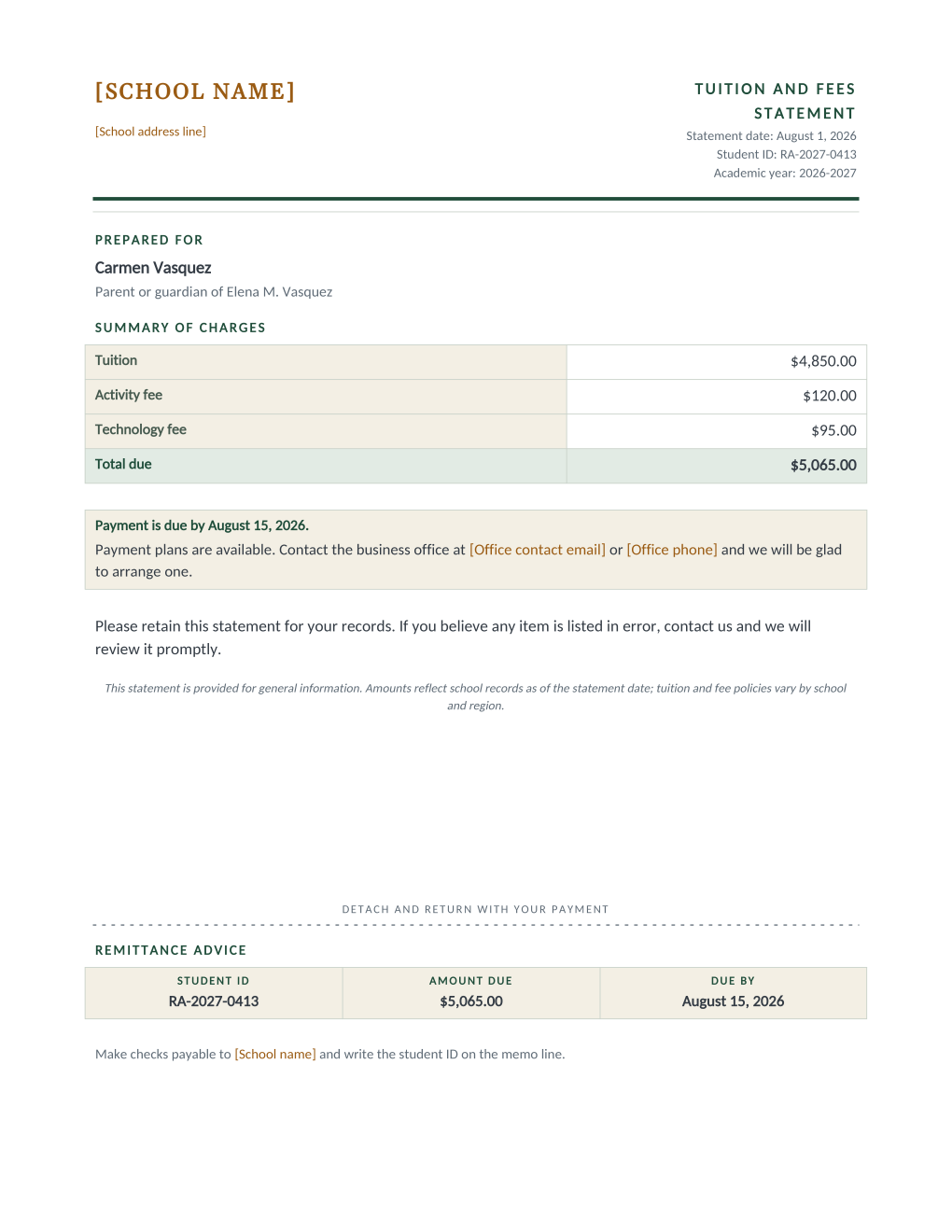
Tuition billing is a statement run: the same layout, once per family, with amounts that must match the ledger to the cent. This template itemizes the three standard charges, tuition, activity fee, and technology fee, above a highlighted total due, with the statement date, student ID, and academic year in the header and the parent named as the addressee. A payment box states the due date and offers payment plans through the business office, and a detachable remittance advice stub at the bottom repeats the student ID, amount due, and due date for families who mail a check.
Every amount, including the total, prints exactly what your billing spreadsheet says: the Word document contains no formulas and computes nothing, so the sheet your bookkeeper reconciles stays the single source of truth.
These templates are general information, not legal advice and not accounting advice. What a tuition bill must state, and how fees may be itemized, can depend on your region and your enrollment contract; review the statement with your administration before the first billing run.
What is in the Word document
More than a block of text an AI chat can improvise: a complete, formatted document built for school offices that use it for real.
- A statement header with the statement date, student ID, and academic year beside the school letterhead
- A prepared-for block naming the parent as addressee, with the student underneath
- A summary of charges table: tuition, activity fee, and technology fee above a highlighted total due
- A payment box with the due date and a payment-plans sentence pointing at the business office
- A detachable remittance advice stub repeating the student ID, amount due, and due date for mailed checks
- Ten mail merge fields, so one billing-sheet row fills the statement and its stub
The document
Copy the plain text below, or download the formatted Word document with the letterhead and layout built in.
FIELD REFERENCE (top to bottom on the statement)

HEADER BLOCK
Statement Date ...... August 1, 2026
Student ID .......... RA-2027-0413
Academic Year ....... 2026-2027

PREPARED FOR
Parent Name ......... Carmen Vasquez
Student Name ........ Elena M. Vasquez (as "Parent or guardian of")

SUMMARY OF CHARGES
Tuition Amount ...... $4,850.00
Activity Fee ........ $120.00
Technology Fee ...... $95.00
Total Due ........... $5,065.00

PAYMENT NOTE
Payment Due Date .... August 15, 2026

REMITTANCE ADVICE STUB
Student ID .......... RA-2027-0413
Total Due ........... $5,065.00
Payment Due Date .... August 15, 2026
Merge fields, one spreadsheet column each
- Academic Year
- 2026-2027
- Activity Fee
- $120.00
- Parent Name
- Carmen Vasquez
- Payment Due Date
- August 15, 2026
- Statement Date
- August 1, 2026
- Student ID
- RA-2027-0413
- Student Name
- Elena M. Vasquez
- Technology Fee
- $95.00
- Total Due
- $5,065.00
- Tuition Amount
- $4,850.00
Sender settings, edit once in the template
- Office contact email
- office@rosemont-academy.example
- Office phone
- (555) 318-2260
- School address line
- 18 Whitfield Road, Rosemont, OH
- School name
- Rosemont Academy
Before you send
- 1.Make the Total Due a formula in the spreadsheet, a sum of the three fee columns, and audit it there; the template prints the column as-is and will faithfully print a wrong total.
- 2.Spot-check the largest and the smallest balance in the run against the ledger before releasing the batch.
- 3.Families with several children get one statement per student; decide whether that is your policy or whether the sheet should consolidate per family first.
- 4.If statements go out by email, send the first one to yourself and confirm the charges table and remittance stub render correctly in the PDF.
When to use this template
Term billing runs
The billing sheet becomes every family’s statement in one run at the start of each term, due dates and all.
Adjusted statements
Discounts and scholarships are just different numbers in the row; each family’s statement prints their actual charges.
Programs with fees
Rename the fee rows in Word for music schools, sports academies, or tutoring centers billing by session or block.
Generate it for the whole class at once
One document, one class list, one personalized copy per student. That is what MailMergic is for.
Upload the document template
Use the Word download as-is, or edit it first. The mail merge fields are already in place.
Upload your class list
One row per student: names, grades, homerooms, whatever the document needs. Excel, CSV, and Google Sheets all work.
Generate and deliver
One personalized document per student. Download the whole set as PDFs, or email each family with delivery and open tracking.
Tuition statement FAQ
Can the statement calculate the total?
What if we charge different fees than these three?
Is this a tax invoice or an official receipt?
What is the remittance stub for?
Other school document templates
Enrollment confirmation
Admissions letter with a boxed enrollment details table, one per accepted student.
Attendance certificate
Course title, dates, and hours on a formal record, one per student on the roster.
Absence notification
Recorded absences, the period reviewed, and a reserved meeting time, one per family.
Field trip permission slip
Trip details plus a detachable signed return stub, one per student.
Student report card
Five-subject grade table with GPA and comments, one per student from your gradebook.
Scholarship award letter
Award box with the amount in large type, plus conditions stated plainly.
Course completion letter
Registrar-signed verification of completion, result, and hours, one per participant.
Parent event notice
Event name in large type, a when-where-RSVP band, and a bring list, per family.
Welcome back letter
Classroom assignment panel and a what-to-pack list, one letter per student.
All school document templates
Browse the full set of free school document templates.
These templates are general information, not legal advice. School policies and education rules vary by region and district; review the wording with your administration before sending.