


School document template
School event notice to parents
A warm letter home with the event name in large type, a scannable when, where, and RSVP band, and a short what-to-bring list. Invite one family, or every family in the school from one list, each notice naming the right parent and the right child.
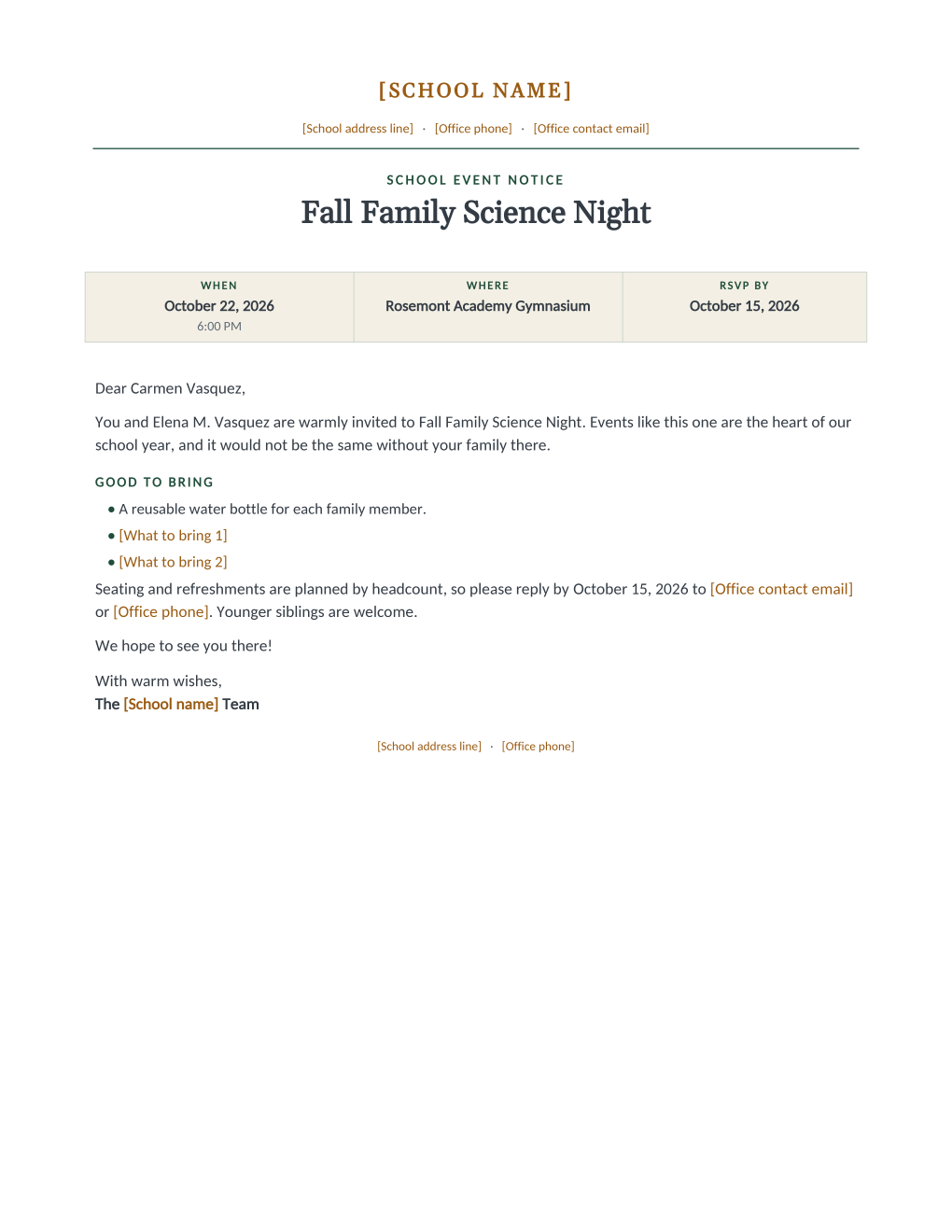
A flyer in a backpack is easy to ignore; a letter that greets the parent by name and says their child is invited gets read. This template is the second kind. The event name sits in large type under a notice eyebrow, and a three-column band answers the questions in the order families ask them: when (with the time underneath), where, and RSVP by. A good-to-bring list keeps the packing question answered, and the RSVP sentence explains itself, seating and refreshments are planned by headcount, which is what turns a request into replies.
Because the parent and student names are mail merge fields, the whole school’s mailing generates from one family list in one run, on paper or by email per family, with each letter naming the right child.
What is in the Word document
More than a block of text an AI chat can improvise: a complete, formatted document built for school offices that use it for real.
- A notice header: an eyebrow line, the event name in large type, and a three-column when, where, and RSVP band
- A warm invitation paragraph naming the parent and the student
- A good-to-bring list: one built-in line plus two items edited once per event
- An RSVP sentence that explains the headcount reason and welcomes younger siblings
- Seven mail merge fields, so one family-list row fills each notice
The document
Copy the plain text below, or download the formatted Word document with the letterhead and layout built in.
SCHOOL EVENT NOTICE
[Event Name]

WHEN ................ October 22, 2026, 6:00 PM
WHERE ............... Rosemont Academy Gymnasium
RSVP BY ............. October 15, 2026

Dear [Parent Name],

You and [Student Name] are warmly invited to [Event Name]. Events like this one are the heart of our school year, and it would not be the same without your family there.

GOOD TO BRING
A reusable water bottle for each family member.
[What to bring 1]
[What to bring 2]

Seating and refreshments are planned by headcount, so please reply by [RSVP Deadline] to [Office contact email] or [Office phone]. Younger siblings are welcome.

We hope to see you there!

With warm wishes,
The [School name] Team
Merge fields, one spreadsheet column each
- Event Date
- October 22, 2026
- Event Location
- Rosemont Academy Gymnasium
- Event Name
- Fall Family Science Night
- Event Time
- 6:00 PM
- Parent Name
- Carmen Vasquez
- RSVP Deadline
- October 15, 2026
- Student Name
- Elena M. Vasquez
Sender settings, edit once in the template
- Office contact email
- office@rosemont-academy.example
- Office phone
- (555) 318-2260
- School address line
- 18 Whitfield Road, Rosemont, OH
- School name
- Rosemont Academy
- What to bring 1
- Comfortable shoes for the activity stations
- What to bring 2
- A jacket for the outdoor telescope station
Before you send
- 1.Set the RSVP deadline far enough before the event for catering and seating decisions to actually use the count.
- 2.Keep the two bring items short and literal; two specific items beat a paragraph of suggestions.
- 3.One row per student means multi-child families get several near-identical letters for a whole-school event; deduplicate to one row per family first if that reads better.
- 4.If classes have different arrival times, put the time in a per-row column and double-check it; the band is the part families screenshot.
When to use this template
Family events
Science nights, open houses, and seasonal celebrations invite the whole school with each letter naming the right child.
Class-level events
Filter the list to one class and the same template covers recitals, exhibitions, and class parties.
Recurring series
Save the field mapping once; the next event is the same template with new event columns and the same three clicks.
Generate it for the whole class at once
One document, one class list, one personalized copy per student. That is what MailMergic is for.
Upload the document template
Use the Word download as-is, or edit it first. The mail merge fields are already in place.
Upload your class list
One row per student: names, grades, homerooms, whatever the document needs. Excel, CSV, and Google Sheets all work.
Generate and deliver
One personalized document per student. Download the whole set as PDFs, or email each family with delivery and open tracking.
School event notice FAQ
Why personalize an event notice at all?
How do we collect the RSVPs?
Can different classes get different details?
What about families with several children?
Other school document templates
Enrollment confirmation
Admissions letter with a boxed enrollment details table, one per accepted student.
Attendance certificate
Course title, dates, and hours on a formal record, one per student on the roster.
Absence notification
Recorded absences, the period reviewed, and a reserved meeting time, one per family.
Field trip permission slip
Trip details plus a detachable signed return stub, one per student.
Student report card
Five-subject grade table with GPA and comments, one per student from your gradebook.
Tuition statement
Itemized fees, a highlighted total due, and a remittance stub, one per family.
Scholarship award letter
Award box with the amount in large type, plus conditions stated plainly.
Course completion letter
Registrar-signed verification of completion, result, and hours, one per participant.
Welcome back letter
Classroom assignment panel and a what-to-pack list, one letter per student.
All school document templates
Browse the full set of free school document templates.