


School document template
Enrollment confirmation letter
An admissions letter that confirms the place and answers the first-week questions in one details table: student ID, grade, academic year, homeroom, and a highlighted first day of school. Confirm one student, or every accepted student from one spreadsheet in a single mail merge run.
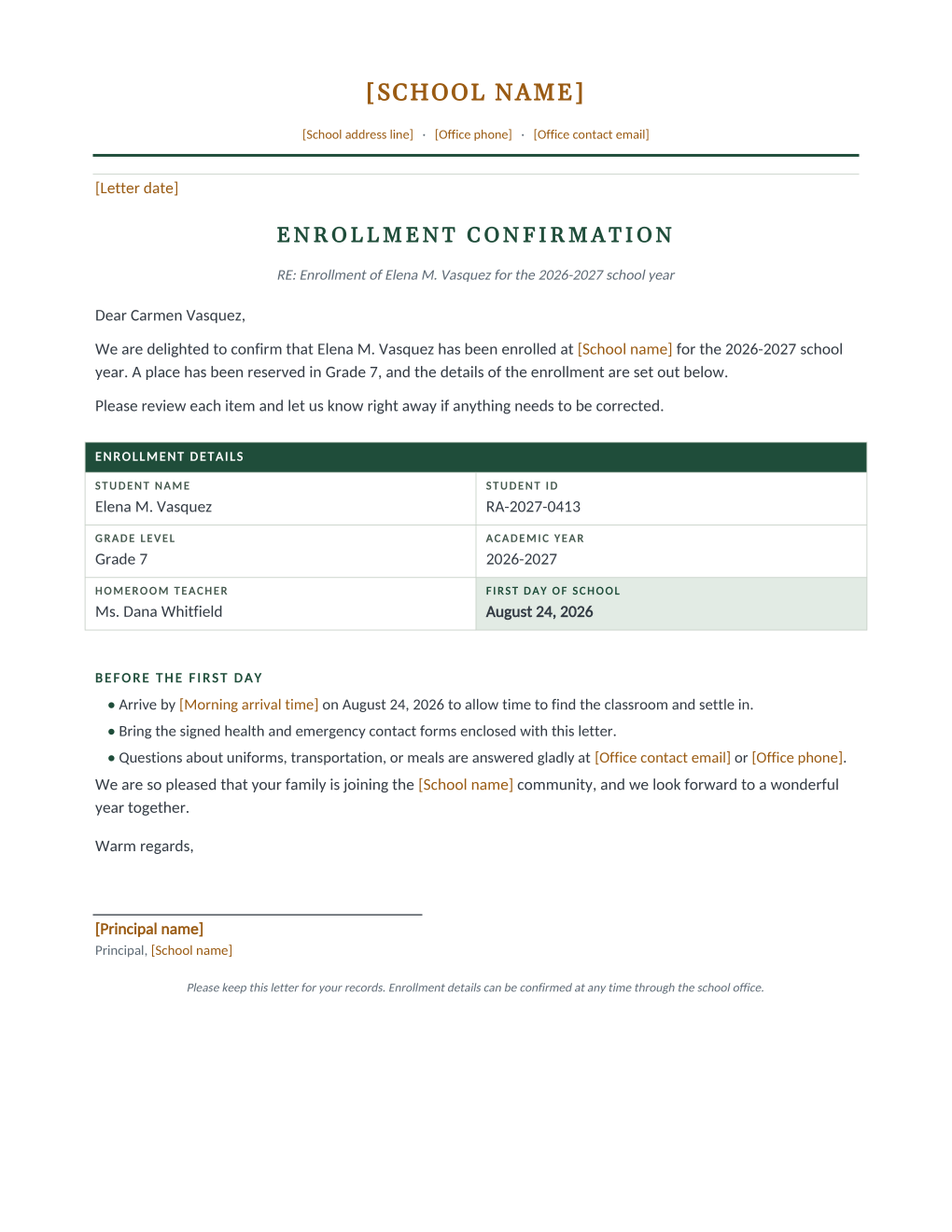
Admissions season ends with the same letter to every family: your child has a place, and here is everything you need to know. This template confirms the enrollment in one sentence, then puts the facts families actually look up later in a details table: student name, student ID, grade level, academic year, homeroom teacher, and a highlighted first day of school. The student ID sits in the table because it is the number the office will ask the family to quote in every later call, and this letter is where they learn it.
Below the table, a short before-the-first-day checklist covers arrival time, the enclosed health and emergency contact forms, and where questions about uniforms, transportation, or meals go. A closing line asks families to report anything incorrect right away, so records get fixed in August instead of at the first parent evening.
Write one letter by hand, or connect the accepted-student spreadsheet and MailMergic renders a personalized confirmation per row, ready to print or to email to each family the day decisions are final.
What is in the Word document
More than a block of text an AI chat can improvise: a complete, formatted document built for school offices that use it for real.
- School letterhead with editable name, address, and contact lines
- A confirmation paragraph under an RE line naming the student and school year
- A dark-headed enrollment details table: name, student ID, grade, academic year, homeroom, and a highlighted first day
- A before-the-first-day checklist covering arrival time, enclosed forms, and where questions go
- A keep-this-letter footer and a principal signature line
- Seven mail merge fields, so one row of the accepted-student list fills the whole letter
The document
Copy the plain text below, or download the formatted Word document with the letterhead and layout built in.
[Letter date]

ENROLLMENT CONFIRMATION
RE: Enrollment of [Student Name] for the [Academic Year] school year

Dear [Parent Name],

We are delighted to confirm that [Student Name] has been enrolled at [School name] for the [Academic Year] school year. A place has been reserved in [Grade Level], and the details of the enrollment are set out below.

Please review each item and let us know right away if anything needs to be corrected.

ENROLLMENT DETAILS
Student Name ........ Elena M. Vasquez
Student ID .......... RA-2027-0413
Grade Level ......... Grade 7
Academic Year ....... 2026-2027
Homeroom Teacher .... Ms. Dana Whitfield
First Day of School . August 24, 2026

BEFORE THE FIRST DAY
Arrive by [Morning arrival time] on [First Day Date] to allow time to find the classroom and settle in.
Bring the signed health and emergency contact forms enclosed with this letter.
Questions about uniforms, transportation, or meals are answered gladly at [Office contact email] or [Office phone].

We are so pleased that your family is joining the [School name] community, and we look forward to a wonderful year together.

Warm regards,
[Principal name]
Principal, [School name]
Merge fields, one spreadsheet column each
- Academic Year
- 2026-2027
- First Day Date
- August 24, 2026
- Grade Level
- Grade 7
- Homeroom Teacher
- Ms. Dana Whitfield
- Parent Name
- Carmen Vasquez
- Student ID
- RA-2027-0413
- Student Name
- Elena M. Vasquez
Sender settings, edit once in the template
- Letter date
- May 15, 2026
- Morning arrival time
- 8:00 AM
- Office contact email
- office@rosemont-academy.example
- Office phone
- (555) 318-2260
- Principal name
- Dr. Howard Bellamy
- School address line
- 18 Whitfield Road, Rosemont, OH
- School name
- Rosemont Academy
Before you send
- 1.Send only after homeroom assignments are locked; a corrected homeroom letter two weeks later undoes the confidence this one builds.
- 2.Pull the Student ID column from your records system export, not a hand-typed list; this letter is where families learn the number they will quote back to you for years.
- 3.The checklist says the health and emergency contact forms are enclosed; make sure they actually go in the same envelope or email, or edit that line out first.
- 4.Split new and returning students into separate batches if you reword the welcome; a returning family reading "joining the community" will notice.
When to use this template
Admissions decisions
The accepted-student spreadsheet becomes every confirmation letter the day decisions are final, printed or emailed per family.
Re-enrollment season
Returning students get the same details table with next year’s grade and homeroom; only the sheet changes.
Programs and camps
The academic year field reads just as naturally as a session name, so a summer program can confirm its whole intake the same way.
Generate it for the whole class at once
One document, one class list, one personalized copy per student. That is what MailMergic is for.
Upload the document template
Use the Word download as-is, or edit it first. The mail merge fields are already in place.
Upload your class list
One row per student: names, grades, homerooms, whatever the document needs. Excel, CSV, and Google Sheets all work.
Generate and deliver
One personalized document per student. Download the whole set as PDFs, or email each family with delivery and open tracking.
Enrollment confirmation letter FAQ
Can this letter serve as proof of enrollment?
How do I handle siblings?
Can I confirm by email and on paper at once?
What if a homeroom changes after letters go out?
Other school document templates
Attendance certificate
Course title, dates, and hours on a formal record, one per student on the roster.
Absence notification
Recorded absences, the period reviewed, and a reserved meeting time, one per family.
Field trip permission slip
Trip details plus a detachable signed return stub, one per student.
Student report card
Five-subject grade table with GPA and comments, one per student from your gradebook.
Tuition statement
Itemized fees, a highlighted total due, and a remittance stub, one per family.
Scholarship award letter
Award box with the amount in large type, plus conditions stated plainly.
Course completion letter
Registrar-signed verification of completion, result, and hours, one per participant.
Parent event notice
Event name in large type, a when-where-RSVP band, and a bring list, per family.
Welcome back letter
Classroom assignment panel and a what-to-pack list, one letter per student.
All school document templates
Browse the full set of free school document templates.