


HR document template
Employee onboarding checklist template
A three-part checklist covering before day one, the first day, and the first month, with a named onboarding buddy for every new hire. Copy it, download the Word document, or send a personalized checklist to every new hire in a cohort at once.
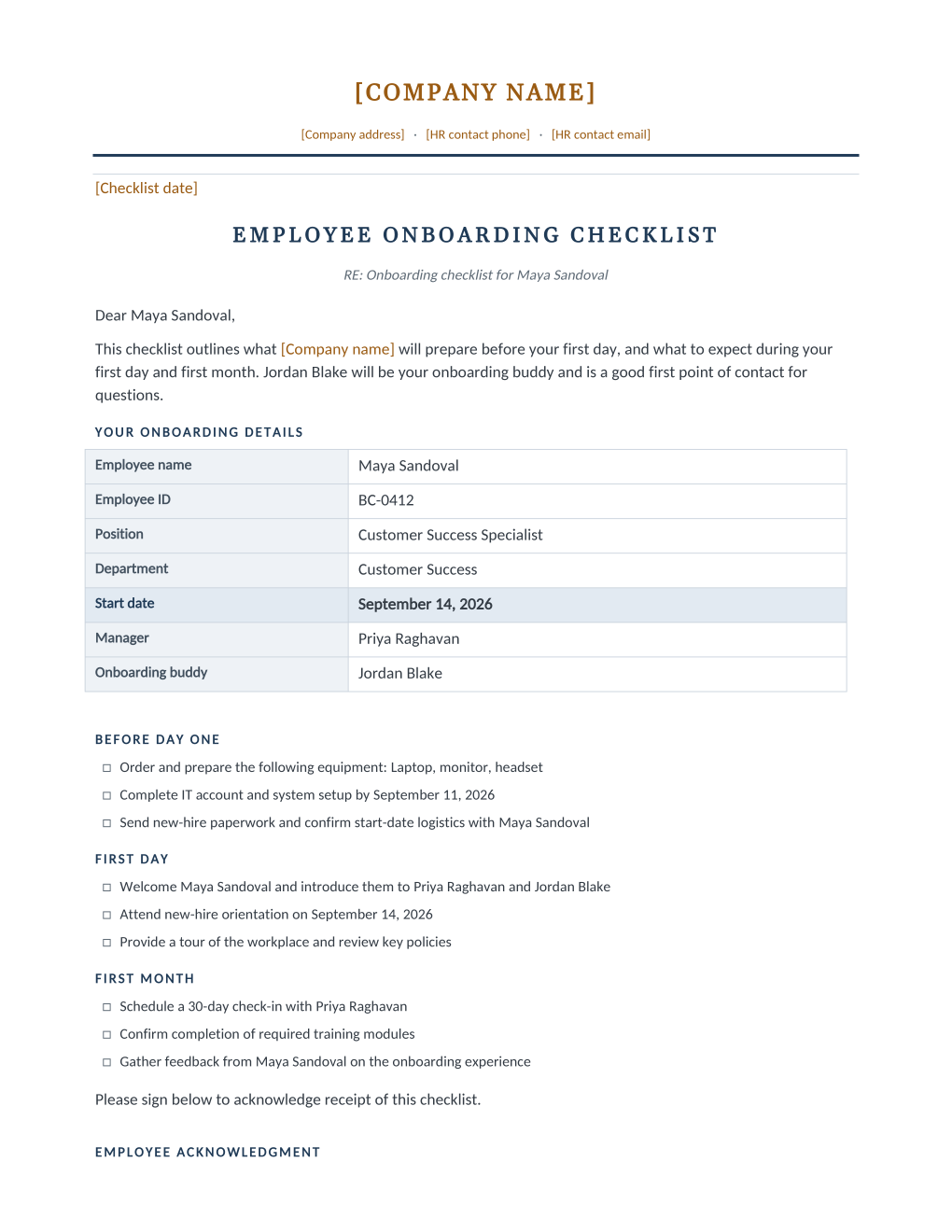
An employee onboarding checklist tracks what a company prepares before a new hire's first day, and what happens on the first day and during the first month: equipment, IT setup, orientation, and check-ins, organized so nothing gets missed. Managers and HR typically use it together starting the moment a start date is confirmed.
New-hire cohorts, like a graduate class or a seasonal hiring wave, need the same checklist personalized for each person's manager, buddy, and dates. Upload this checklist as a Word template to MailMergic, upload a spreadsheet with one row per new hire, and generate one personalized checklist per row.
What is inside the Word download
More than a block of text an AI chat can improvise: a complete, formatted document built for HR teams who send it for real.
- An Onboarding Details table with the manager and a named onboarding buddy up front.
- Three checkbox task groups: Before Day One, First Day, and First Month.
- A receipt acknowledgment signature confirming the new hire got the checklist.
- Native Word merge fields for equipment, IT setup date, and orientation date, wired for a whole hiring cohort.
The document
Copy the plain version below, or download the formatted Word document with your letterhead and layout built in.
{Checklist date}

EMPLOYEE ONBOARDING CHECKLIST
RE: Onboarding checklist for [Employee Name]

Dear [Employee Name],

This checklist outlines what {Company name} will prepare before your first day, and what to expect during your first day and first month. [Buddy Name] will be your onboarding buddy and is a good first point of contact for questions.

YOUR ONBOARDING DETAILS
Employee name: [Employee Name]
Employee ID: [Employee ID]
Position: [Job Title]
Department: [Department]
Start date: [Start Date]
Manager: [Manager Name]
Onboarding buddy: [Buddy Name]

BEFORE DAY ONE
[ ] Order and prepare the following equipment: [Equipment Issued]
[ ] Complete IT account and system setup by [IT Setup Date]
[ ] Send new-hire paperwork and confirm start-date logistics with [Employee Name]

FIRST DAY
[ ] Welcome [Employee Name] and introduce them to [Manager Name] and [Buddy Name]
[ ] Attend new-hire orientation on [Orientation Date]
[ ] Provide a tour of the workplace and review key policies

FIRST MONTH
[ ] Schedule a 30-day check-in with [Manager Name]
[ ] Confirm completion of required training modules
[ ] Gather feedback from [Employee Name] on the onboarding experience

Please sign below to acknowledge receipt of this checklist.

EMPLOYEE ACKNOWLEDGMENT
Your signature confirms that you have received this onboarding checklist.

______________________________
[Employee Name]
Employee
Date: ____________________
Merge fields: one spreadsheet column each
Filled per employee in a bulk run, straight from your HR spreadsheet.
[Employee Name]Isabella Cruz[Employee ID]EMP-8890[Job Title]Junior Data Analyst[Department]Data[Start Date]September 2, 2026[Manager Name]Colin Faraday[Buddy Name]Nate Simmons[Equipment Issued]laptop, monitor, headset, and access badge[IT Setup Date]August 28, 2026[Orientation Date]September 2, 2026Fill in once before sending
Your own details, edited one time in Word (marked in amber in the download). No spreadsheet columns needed.
{Checklist date}August 20, 2026{Company name}Cobalt Insights LLCBefore you send this checklist
- 1.Confirm the IT Setup Date and Orientation Date leave enough lead time before Start Date.
- 2.Assign a real Buddy Name for every new hire; do not leave it blank.
- 3.Tailor Equipment Issued to the actual role.
- 4.Share the checklist with the manager and buddy, not only the new hire.
- 5.Keep the signed acknowledgment as part of your onboarding record.
When to use this template
New-grad or seasonal cohorts
Generate a personalized checklist, with the right manager and buddy, for every person in a hiring cohort.
Multi-location employers
Keep onboarding consistent across every site, even when different managers run it locally.
Repeatable onboarding
Stop rebuilding the checklist for every new hire; personalize the same one from a spreadsheet instead.
Send it to every employee at once
One document, one spreadsheet, one personalized copy per employee. That is what MailMergic is for.
Upload the document template
Use the Word download as-is, or edit it first. The merge fields are already in place.
Upload your employee spreadsheet
One row per employee: name, ID, role, dates, whatever the document needs. Excel, CSV, and Google Sheets all work.
Generate and deliver
One personalized document per employee. Download all as PDFs, or email each employee with delivery and open tracking.
Onboarding checklist FAQ
What should an onboarding checklist include?
Who is responsible for completing an onboarding checklist?
Is an onboarding checklist required by law?
Can I generate onboarding checklists for a whole new-hire class at once?
Other HR templates
Offer letter
A formal offer with a terms summary table and a signature block ready for the candidate to accept.
Employment contract
Nine numbered clauses covering compensation, hours, leave, confidentiality, and termination.
Confidentiality agreement
Protects company information and assigns work inventions, with a state invention-assignment carve-out clause.
Performance improvement plan
Documented concerns, success criteria, support, and a review date, with a receipt-only acknowledgment.
Warning letter
A formal written warning with an incident summary and a receipt-only acknowledgment signature.
Termination letter
A termination summary table plus each state’s final paycheck deadline.
Separation agreement
Severance and release terms on the federal consideration and revocation timeline, with state add-ons noted.
Disciplinary action form
A structured incident record with an acknowledgment signature, not an admission of agreement.
Employee information form
Employment details and emergency contacts in one form, with a signature confirming accuracy.
All HR document templates
Browse the full set of free HR document templates.
These templates and state tables are general information, not legal advice. Employment law varies by state and country and changes often; the tables on these pages cover US states only, while employment documents like these can create binding obligations in any jurisdiction. Confirm the current requirements for your jurisdiction or consult an employment attorney before sending.