


Membership and nonprofit template
Membership certificate template
A formal portrait certificate with the member's name in large serif type, an in-good-standing statement, and signature and date-of-issue lines. Print one, or the whole roster's certificates in one mail merge run.
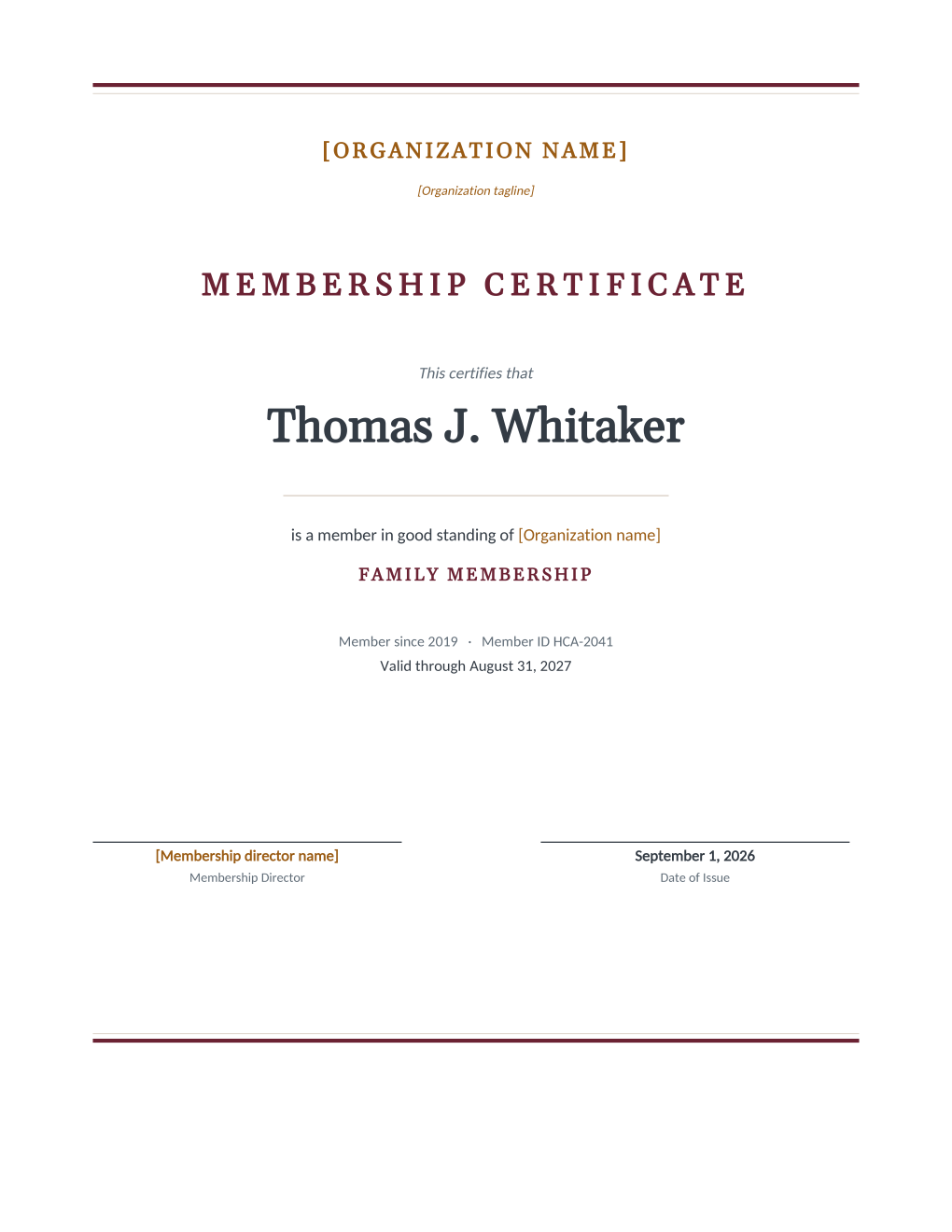
Some memberships are worth putting on a wall: founding members, lifetime honors, professional associations where the certificate hangs in an office and quietly vouches for someone. This design keeps that formality without a design tool. Double rules frame the page, "This certifies that" leads into the member's name in large serif type, an in-good-standing statement names the organization, and the membership type, joining year, ID, and valid-through date sit beneath. A signature line for the membership director and a date-of-issue line finish it.
All six details fill from the roster, so a hundred certificates render as one run. Looking for a more decorative design with seals and script faces? See the certificate designs in our education gallery; this page is the understated, letterhead-serious version.
What is in the Word document
More than a plain letter an AI chat can improvise: a complete, formatted Word document built for membership offices that send it for real.
- A portrait Letter certificate framed by double rules at the head and foot of the page
- A "This certifies that" lead-in with the member's name set in large serif type
- An in-good-standing statement, the membership type in spaced capitals, and member-since and ID lines
- A signature line for the membership director beside a date-of-issue line
- Six mail merge fields, so the roster fills every certificate in one run
Field reference
Copy the plain field list below, or download the formatted Word document with the layout and mail merge fields built in.
FIELD REFERENCE (top to bottom on the certificate)

HEADER
Organization name and tagline, edited once in the template

CERTIFICATE BODY
Member Name ......... Thomas J. Whitaker
Membership Type ..... Family Membership
Member Since Year ... 2019
Member ID ........... HCA-2041
Valid Through Date .. August 31, 2027

SIGNATURE ROW
Membership director signature line, edited once in the template
Issue Date .......... September 1, 2026
Merge fields, one spreadsheet column each
- Issue Date
- September 1, 2026
- Member ID
- HCA-2041
- Member Name
- Thomas J. Whitaker
- Member Since Year
- 2019
- Membership Type
- Family Membership
- Valid Through Date
- August 31, 2027
Sender settings, edit once in the template
- Membership director name
- Grace Odum
- Organization name
- Harborlight Community Association
- Organization tagline
- A community for the harbor, since 1962
Before you print
- 1.Run the longest member name in the roster through a test page first; the name is the largest type on the page, and very long names wrap where short ones sit on one line.
- 2.Choose paper worth the gesture: 200 gsm or heavier matte card stock reads as a certificate, ordinary copy paper reads as a memo.
- 3.Decide what the valid-through line should say for lifetime and honorary members before the run; the field prints text, so a "Lifetime" value in that column beats printing an expiry on an honor.
- 4.Agree who signs before printing hundreds; the signature line is edited once in the template, and an inserted signature image in Word saves a long afternoon of pen work.
When to use this template
New member cohorts
A founding class or an annual intake gets its certificates in one run, each with the member's own joining year.
Recognition tiers
Lifetime and honorary members get the same design with the Membership Type field carrying the honor.
Professional associations
Members display these in offices; the annual reissue is a re-run with a new valid-through column.
Generate it for your whole roster at once
One document, one spreadsheet, one personalized copy per row. That is what MailMergic is for.
Upload the Word template
Use the download as-is, or edit the wording first. The mail merge fields are already in place.
Upload your roster spreadsheet
One row per member, donor, or volunteer: names, dates, amounts, whatever the document needs. Excel, CSV, and Google Sheets all work.
Generate and deliver
One personalized document per row. Download them all as PDFs, or email each recipient with delivery and open tracking.
Membership certificate template FAQ
What size and orientation is the certificate?
Can I make it more decorative?
How does the whole roster become certificates?
Does the certificate prove membership legally?
Other membership templates
Member welcome letter
A warm first letter with a membership summary table, one per new member from the roster.
Renewal notice
Formal renewal notice with a details table and three ways to renew, one per expiring member.
Win back letter
A no-guilt win back letter with the member's own history and an easy rejoin path.
Membership card
Two wallet-size cards per sheet with cut guides, one pair per member from the roster.
Donation receipt
Acknowledgment letter with a receipt table, one per donor at year end.
Donation thank you
An impact letter with a your-gift-at-work highlight, one per donor while the gift is fresh.
AGM notice
Formal meeting notice with agenda and quorum note, addressed to every voting member.
Dues invoice
Invoice-style dues statement with a charges table, one per member per billing cycle.
Volunteer appreciation
A thank-you letter that sets the volunteer's own hours center page, one per volunteer.
All membership templates
Browse the full set of free membership and nonprofit templates.