


Membership and nonprofit template
Volunteer appreciation letter
A thank-you letter that sets the volunteer's own hours at the center of the page, names their program and season, and quotes their coordinator by name. Thank one volunteer, or the whole roster before the appreciation event, in one mail merge run.
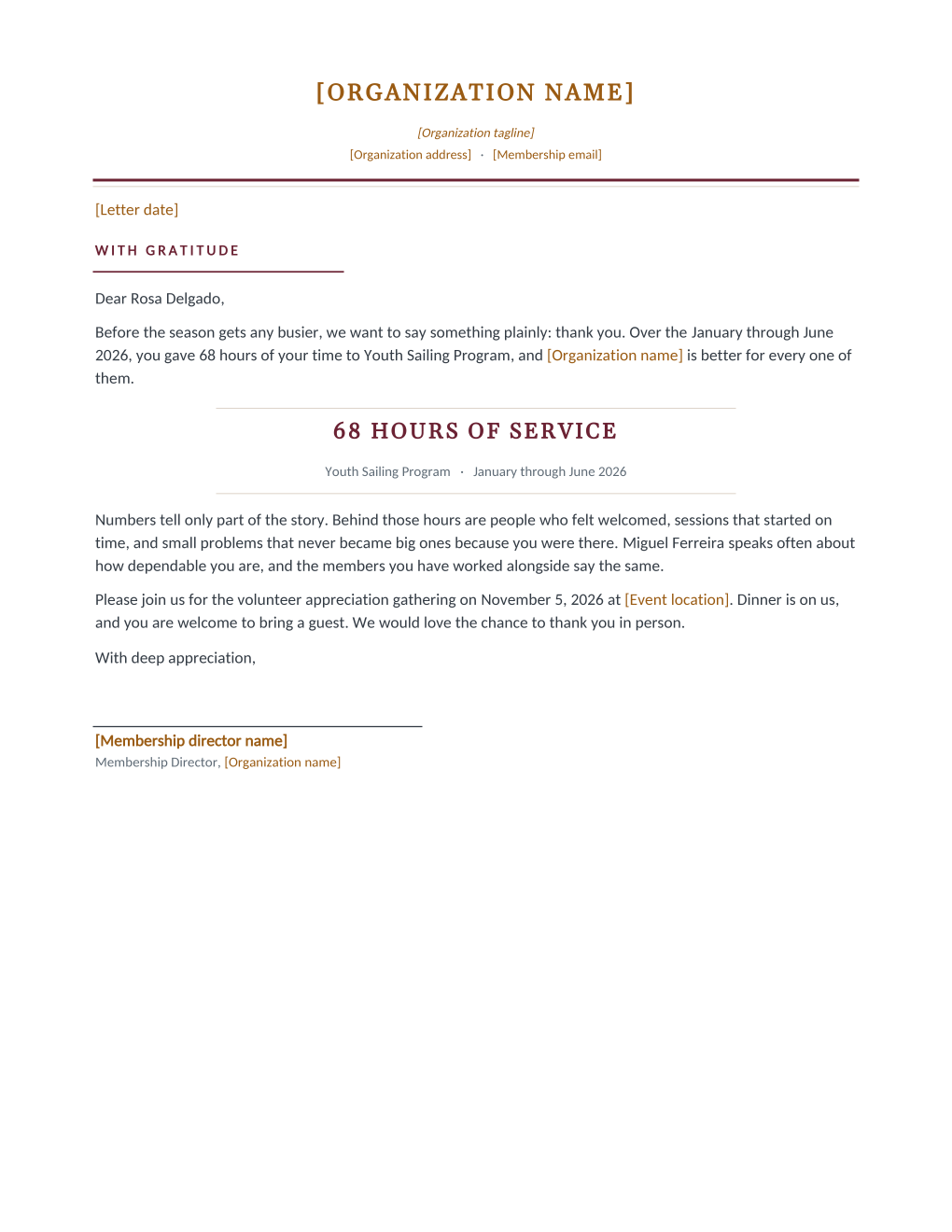
Volunteer thanks fail in two opposite ways: the blast that thanks "our wonderful volunteers" collectively, and the personal note that never gets written because there are sixty of them. This letter threads the needle. The volunteer's own hours are set large in the middle of the page with their program and season beneath, and the paragraph that follows cites their coordinator by name, the person who actually saw them show up. The letter itself is signed by the membership director, so the coordinator's words arrive with the organization's signature.
It closes with an invitation to the appreciation gathering. Connect the volunteer log export and MailMergic renders one letter per volunteer, each carrying its own hours, program, and coordinator, in one run.
What is in the Word document
More than a plain letter an AI chat can improvise: a complete, formatted Word document built for membership offices that send it for real.
- Organization letterhead with a with-gratitude heading
- An opening that names the volunteer's season, hours, and program in the first sentence
- A centered hours-of-service band that makes the number the visual heart of the page
- A paragraph quoting the volunteer's own coordinator by name, and an invitation to the appreciation gathering
- Six mail merge fields, so the volunteer log fills every letter
Field reference
Copy the plain field list below, or download the formatted Word document with the layout and mail merge fields built in.
Dear [Volunteer Name],

Before the season gets any busier, we want to say something plainly: thank you. Over the [Service Period], you gave [Volunteer Hours] hours of your time to [Program Name], and [Organization name] is better for every one of them.

[VOLUNTEER HOURS] HOURS OF SERVICE
Program ............. Youth Sailing Program
Service period ...... January through June 2026

Numbers tell only part of the story. Behind those hours are people who felt welcomed, sessions that started on time, and small problems that never became big ones because you were there. [Coordinator Name] speaks often about how dependable you are, and the members you have worked alongside say the same.

Please join us for the volunteer appreciation gathering on [Appreciation Event Date] at [Event location]. Dinner is on us, and you are welcome to bring a guest. We would love the chance to thank you in person.

With deep appreciation,
[Membership director name]
Merge fields, one spreadsheet column each
- Appreciation Event Date
- November 5, 2026
- Coordinator Name
- Miguel Ferreira
- Program Name
- Youth Sailing Program
- Service Period
- January through June 2026
- Volunteer Hours
- 68
- Volunteer Name
- Rosa Delgado
Sender settings, edit once in the template
- Event location
- Harborlight Community Hall
- Letter date
- October 12, 2026
- Membership director name
- Grace Odum
- Membership email
- members@harborlight.example
- Organization address
- 12 Beacon Street, Harborlight, ME
- Organization name
- Harborlight Community Association
- Organization tagline
- A community for the harbor, since 1962
Before you send
- 1.Verify the hours against the log the day you run this; an inflated number reads as flattery, a lowballed one stings, and volunteers know their own hours better than the spreadsheet does.
- 2.Give each row the coordinator that volunteer actually worked with; one name across all sixty letters quietly turns a personal letter back into a blast.
- 3.Read the low-hours rows before sending: a large "4 hours of service" centerpiece can land worse than no letter, so set a threshold and write those few a personal line instead.
- 4.Send two to three weeks before the appreciation gathering; the closing paragraph doubles as the invitation, and thanks and invitation land best together.
When to use this template
Season wrap-up
The whole volunteer roster thanked before the appreciation dinner, each letter naming its own program and coordinator.
Program milestones
A mid-year run for one program's crew after a big push, with the Service Period column scoped to exactly that stretch.
Committee and board thanks
Hours are not only field work; the same letter thanks the treasurer who gave sixty-eight evenings to the books.
Generate it for your whole roster at once
One document, one spreadsheet, one personalized copy per row. That is what MailMergic is for.
Upload the Word template
Use the download as-is, or edit the wording first. The mail merge fields are already in place.
Upload your roster spreadsheet
One row per member, donor, or volunteer: names, dates, amounts, whatever the document needs. Excel, CSV, and Google Sheets all work.
Generate and deliver
One personalized document per row. Download them all as PDFs, or email each recipient with delivery and open tracking.
Volunteer appreciation letter FAQ
Where do the hours come from?
What about volunteers with very few logged hours?
Can the coordinator sign instead of the director?
Does this pair with an appreciation event?
Other membership templates
Member welcome letter
A warm first letter with a membership summary table, one per new member from the roster.
Renewal notice
Formal renewal notice with a details table and three ways to renew, one per expiring member.
Win back letter
A no-guilt win back letter with the member's own history and an easy rejoin path.
Membership certificate
A formal certificate of membership in good standing, one per member from the roster.
Membership card
Two wallet-size cards per sheet with cut guides, one pair per member from the roster.
Donation receipt
Acknowledgment letter with a receipt table, one per donor at year end.
Donation thank you
An impact letter with a your-gift-at-work highlight, one per donor while the gift is fresh.
AGM notice
Formal meeting notice with agenda and quorum note, addressed to every voting member.
Dues invoice
Invoice-style dues statement with a charges table, one per member per billing cycle.
All membership templates
Browse the full set of free membership and nonprofit templates.