


Membership and nonprofit template
Donation receipt template
A donation acknowledgment letter with a gift details table for the amount, date, designation, and receipt number, and an editable goods-and-services statement. Send one, or thank and receipt every donor on the list in one mail merge run.
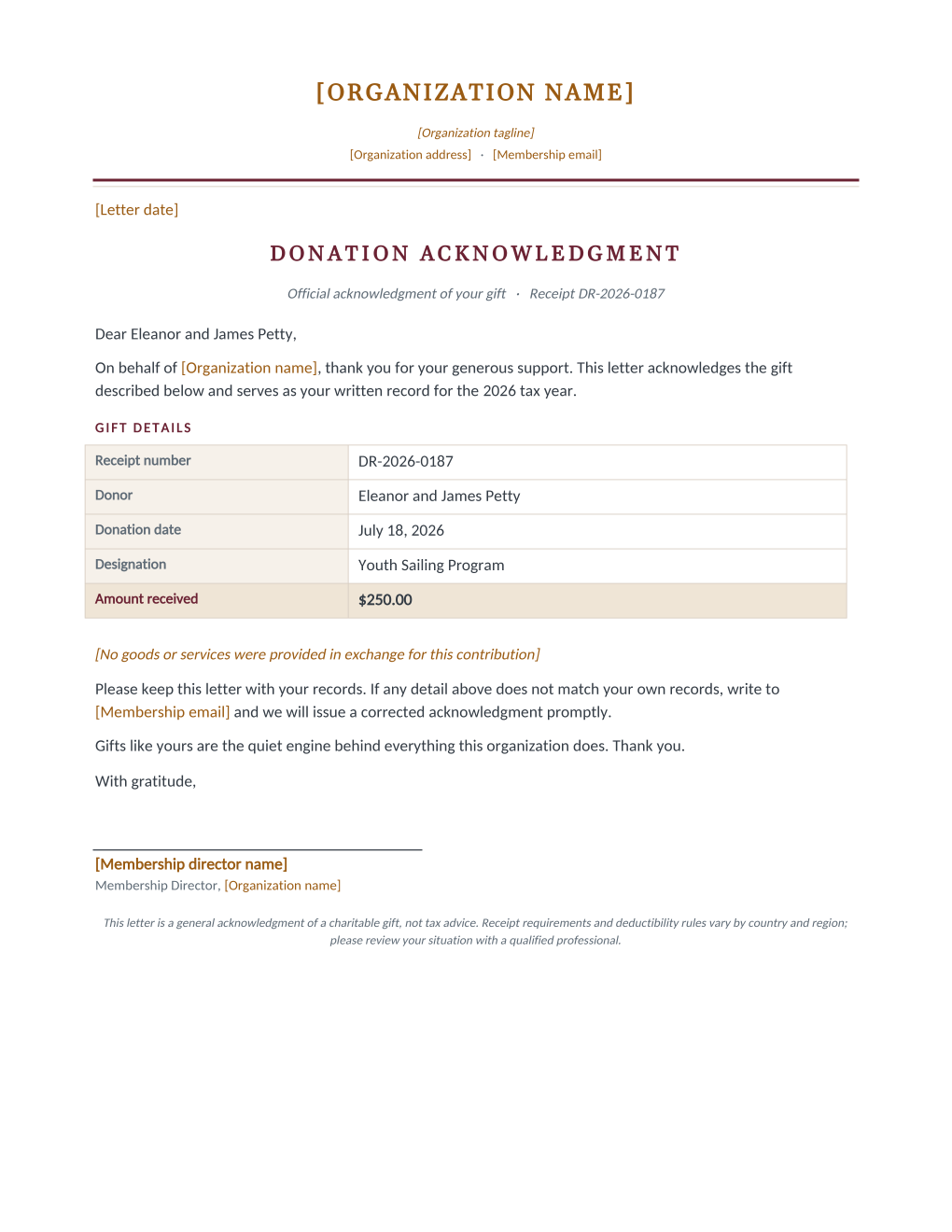
Year-end receipting is the same letter, once per donor, with four values that must be exactly right. This template holds the letter fixed and mail merges the donor's name, the gift amount and date, the designation, and a sequential receipt number from your donation spreadsheet. The goods-and-services statement is an editable sentence in the template, so your organization states its own position once, in its own words.
These templates are general information, not legal advice and not tax advice. Receipt requirements differ by country and by organization type; review the wording with your accountant or board before the year-end run.
What is in the Word document
More than a plain letter an AI chat can improvise: a complete, formatted Word document built for membership offices that send it for real.
- Organization letterhead with editable name, tagline, address, and contact lines
- A warm acknowledgment paragraph that reads like a letter, not a form
- A gift details table: receipt number, donor, date, designation, and amount received
- An editable goods-and-services sentence and a signature block
- Six mail merge fields, so one donation-list row fills the whole receipt
Field reference
Copy the plain field list below, or download the formatted Word document with the layout and mail merge fields built in.
Dear [Donor Name],

On behalf of [Organization name], thank you for your generous support. This letter acknowledges the gift described below and serves as your written record for the [Tax Year] tax year.

GIFT DETAILS
Receipt number ...... DR-2026-0187
Donor ............... Eleanor and James Petty
Donation date ....... July 18, 2026
Designation ......... Youth Sailing Program
Amount received ..... $250.00

[No goods or services statement, edited once in the template]

Please keep this letter with your records. If any detail above does not match your own records, write to [Membership email] and we will issue a corrected acknowledgment promptly.

With gratitude,
[Membership director name]
Merge fields, one spreadsheet column each
- Donation Amount
- $250.00
- Donation Date
- July 18, 2026
- Donation Designation
- Youth Sailing Program
- Donor Name
- Eleanor and James Petty
- Receipt Number
- DR-2026-0187
- Tax Year
- 2026
Sender settings, edit once in the template
- Letter date
- January 15, 2027
- Membership director name
- Grace Odum
- Membership email
- members@harborlight.example
- Organization address
- 12 Beacon Street, Harborlight, ME
- Organization name
- Harborlight Community Association
- Organization tagline
- A community for the harbor, since 1962
Before you send
- 1.Have your accountant or board review the goods-and-services sentence once; it is a statement your organization makes, not one this template makes for you.
- 2.Receipt numbers should come from the same sheet you archive; the template prints what the column says.
- 3.Spot-check the largest gift in the list on the first generated letter before releasing the batch.
- 4.If receipts go out by email, send the first one to yourself and check the PDF renders the amount and date correctly.
When to use this template
Year-end receipting
One donation export becomes every donor letter in one run, numbered in sequence.
Per-gift acknowledgment
Run weekly on the new rows only; the mapping stays saved.
Campaign wrap-ups
The designation field lets one run cover several funds with each donor seeing their own.
Generate it for your whole roster at once
One document, one spreadsheet, one personalized copy per row. That is what MailMergic is for.
Upload the Word template
Use the download as-is, or edit the wording first. The mail merge fields are already in place.
Upload your roster spreadsheet
One row per member, donor, or volunteer: names, dates, amounts, whatever the document needs. Excel, CSV, and Google Sheets all work.
Generate and deliver
One personalized document per row. Download them all as PDFs, or email each recipient with delivery and open tracking.
Donation receipt template FAQ
Is this receipt tax-deductible proof?
Can it number receipts automatically?
Can each donor get their receipt by email?
Does it work for in-kind gifts?
Other membership templates
Member welcome letter
A warm first letter with a membership summary table, one per new member from the roster.
Renewal notice
Formal renewal notice with a details table and three ways to renew, one per expiring member.
Win back letter
A no-guilt win back letter with the member's own history and an easy rejoin path.
Membership certificate
A formal certificate of membership in good standing, one per member from the roster.
Membership card
Two wallet-size cards per sheet with cut guides, one pair per member from the roster.
Donation thank you
An impact letter with a your-gift-at-work highlight, one per donor while the gift is fresh.
AGM notice
Formal meeting notice with agenda and quorum note, addressed to every voting member.
Dues invoice
Invoice-style dues statement with a charges table, one per member per billing cycle.
Volunteer appreciation
A thank-you letter that sets the volunteer's own hours center page, one per volunteer.
All membership templates
Browse the full set of free membership and nonprofit templates.
These templates are general information, not legal advice and not tax advice. Donation receipt and meeting notice requirements vary by country and by your organization's own bylaws; review the wording with a professional before sending.