


Membership and nonprofit template
Membership dues invoice template
An invoice-style dues statement with a billed-to block, a membership charges table, and three ways to pay. Bill one member, or the whole roster's renewal cycle in one mail merge run.
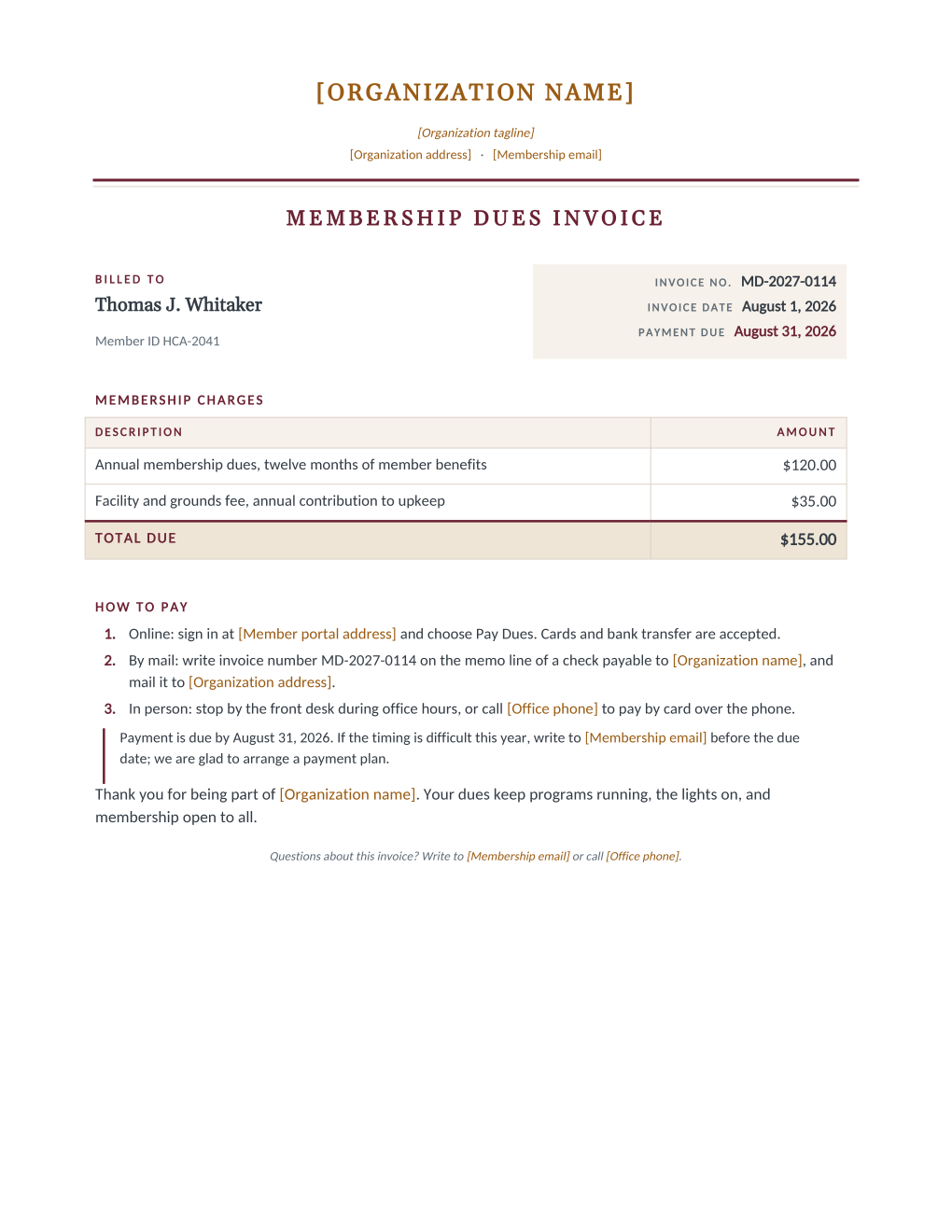
Dues billing sits awkwardly between friendship and accounting: the letter must be warm enough for a member and precise enough for the treasurer. This template splits the difference with an invoice-shaped page. A billed-to block carries the member's name and ID beside the invoice number, date, and due date; a charges table lists the annual dues and the facility fee above a highlighted total; three plain payment paths follow, with a boxed note offering a payment plan to anyone having a tight year.
Every amount prints exactly what your spreadsheet holds, including the total, which your sheet computes; the document calculates nothing, so the treasurer's ledger and the member's invoice can never disagree. Invoicing customers rather than members? The Excel invoice template carries working VAT and total formulas built for business billing. This dues statement is general information, not legal advice; billing and receipting rules vary by organization type and region, so review the wording with your treasurer or a professional before the run.
What is in the Word document
More than a plain letter an AI chat can improvise: a complete, formatted Word document built for membership offices that send it for real.
- Organization letterhead with a membership dues invoice banner
- A billed-to block with the member's name and ID beside the invoice number, date, and due date
- A membership charges table with description lines, amounts, and a highlighted total due
- Three numbered payment paths and a boxed payment-plan note for members in a tight year
- Eight mail merge fields, so one roster row fills the whole invoice
Field reference
Copy the plain field list below, or download the formatted Word document with the layout and mail merge fields built in.
FIELD REFERENCE (top to bottom on the invoice)

BILLED TO
Member Name ......... Thomas J. Whitaker
Member ID ........... HCA-2041

INVOICE BLOCK
Invoice Number ...... MD-2027-0114
Invoice Date ........ August 1, 2026
Payment Due Date .... August 31, 2026

MEMBERSHIP CHARGES
Annual Dues Amount .. $120.00
Facility Fee ........ $35.00
Total Due ........... $155.00 (computed in your spreadsheet, printed as-is)

HOW TO PAY (edited once in the template)
Member portal address, organization name and address, office phone, and membership email
Merge fields, one spreadsheet column each
- Annual Dues Amount
- $120.00
- Facility Fee
- $35.00
- Invoice Date
- August 1, 2026
- Invoice Number
- MD-2027-0114
- Member ID
- HCA-2041
- Member Name
- Thomas J. Whitaker
- Payment Due Date
- August 31, 2026
- Total Due
- $155.00
Sender settings, edit once in the template
- Member portal address
- members.harborlight.example
- Membership email
- members@harborlight.example
- Office phone
- (555) 260-4418
- Organization address
- 12 Beacon Street, Harborlight, ME
- Organization name
- Harborlight Community Association
- Organization tagline
- A community for the harbor, since 1962
Before you send
- 1.Make the Total Due column a spreadsheet formula over the charge columns; the template prints it as-is, so a computed total can never drift from the charges the way a hand-typed one eventually does.
- 2.Invoice numbers should come from the sheet you archive: one sequence, no gaps you cannot explain to next year's auditor.
- 3.Check the fee columns row by row for members with waivers or discounts; a waived facility fee should print $0.00 deliberately, not sit blank accidentally.
- 4.Set the due date before the new term starts, so a member who pays on the last day is still continuous rather than technically lapsed.
When to use this template
Renewal-cycle billing
The whole roster billed in one run at the top of the cycle, each invoice numbered and dated from the sheet.
Mid-year joiners
The amount columns print whatever the sheet computes, so pro-rated dues need arithmetic in the spreadsheet, not a special template.
Facilities and add-ons
Boat slips, lockers, or grounds fees bill through the same charges table; rename the description line once in Word.
Generate it for your whole roster at once
One document, one spreadsheet, one personalized copy per row. That is what MailMergic is for.
Upload the Word template
Use the download as-is, or edit the wording first. The mail merge fields are already in place.
Upload your roster spreadsheet
One row per member, donor, or volunteer: names, dates, amounts, whatever the document needs. Excel, CSV, and Google Sheets all work.
Generate and deliver
One personalized document per row. Download them all as PDFs, or email each recipient with delivery and open tracking.
Membership dues invoice FAQ
Does the template add up the total?
Can I add more charge lines?
Is this the right template for business invoicing?
What if a member cannot pay by the due date?
Other membership templates
Member welcome letter
A warm first letter with a membership summary table, one per new member from the roster.
Renewal notice
Formal renewal notice with a details table and three ways to renew, one per expiring member.
Win back letter
A no-guilt win back letter with the member's own history and an easy rejoin path.
Membership certificate
A formal certificate of membership in good standing, one per member from the roster.
Membership card
Two wallet-size cards per sheet with cut guides, one pair per member from the roster.
Donation receipt
Acknowledgment letter with a receipt table, one per donor at year end.
Donation thank you
An impact letter with a your-gift-at-work highlight, one per donor while the gift is fresh.
AGM notice
Formal meeting notice with agenda and quorum note, addressed to every voting member.
Volunteer appreciation
A thank-you letter that sets the volunteer's own hours center page, one per volunteer.
All membership templates
Browse the full set of free membership and nonprofit templates.
These templates are general information, not legal advice and not tax advice. Donation receipt and meeting notice requirements vary by country and by your organization's own bylaws; review the wording with a professional before sending.