


Membership and nonprofit template
Membership card template
Two identical wallet-size cards per sheet, one for the wallet and one spare, with dashed cut guides and a found-card return line. Print one member's pair, or the whole roster's cards in one mail merge run.
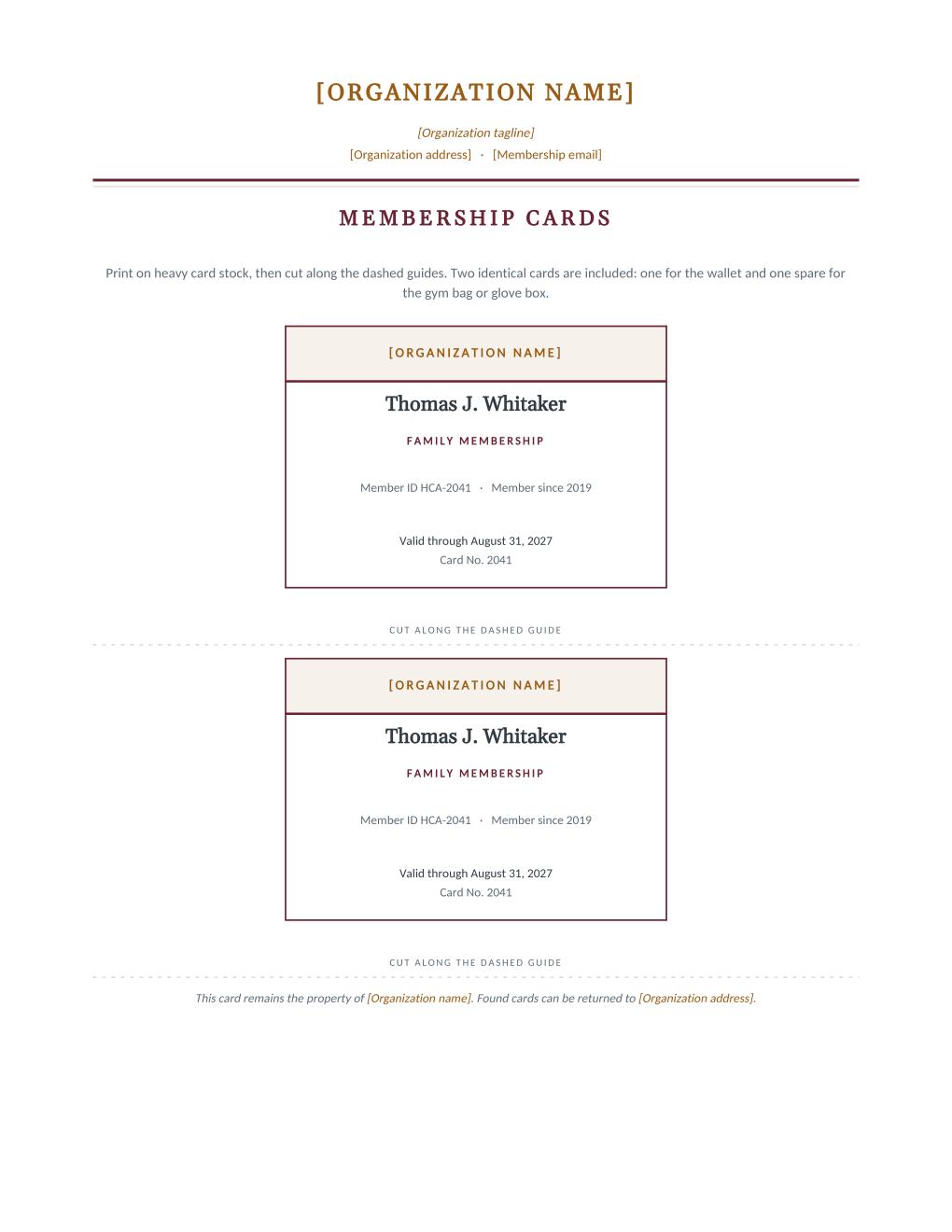
Plastic card printers make sense at ten thousand members; at two hundred, a well-set Word template and heavy card stock do the same job the same afternoon. Each sheet carries two identical cards for one member, a deliberate redundancy: one lives in the wallet, the spare goes in the gym bag or glove box, and a lost card becomes a shrug instead of a reprint request. The card face holds the organization band, the member's name and membership type, the ID and joining year, and a valid-through line with the card number.
A footer line notes that found cards can be returned to the organization's address, one of those touches that costs nothing at print time and occasionally saves a member real grief. Connect the roster and MailMergic renders a personalized sheet per member, ready to cut, in one PDF.
What is in the Word document
More than a plain letter an AI chat can improvise: a complete, formatted Word document built for membership offices that send it for real.
- Two identical cards per Letter sheet, sized close to a standard wallet card
- A colored organization band, the member's name, and the membership type on each card
- Member ID, joining year, valid-through date, and card number lines
- Dashed cut guides between the cards and a found-card return line in the sheet footer
- Six mail merge fields, so both cards on every sheet fill from one roster row
Field reference
Copy the plain field list below, or download the formatted Word document with the layout and mail merge fields built in.
FIELD REFERENCE (top to bottom on each card; both cards on a sheet are identical)

CARD BAND
Organization name, edited once in the template

CARD FACE
Member Name ......... Thomas J. Whitaker
Membership Type ..... Family Membership
Member ID ........... HCA-2041
Member Since Year ... 2019
Valid Through Date .. August 31, 2027
Card Number ......... 2041

SHEET FOOTER
Found-card return line naming the organization and its address, edited once
Merge fields, one spreadsheet column each
- Card Number
- 2041
- Member ID
- HCA-2041
- Member Name
- Thomas J. Whitaker
- Member Since Year
- 2019
- Membership Type
- Family Membership
- Valid Through Date
- August 31, 2027
Sender settings, edit once in the template
- Membership email
- members@harborlight.example
- Organization address
- 12 Beacon Street, Harborlight, ME
- Organization name
- Harborlight Community Association
- Organization tagline
- A community for the harbor, since 1962
Before you print
- 1.Print one test sheet on plain paper, cut it, and try it in an actual wallet before ordering card stock for the whole roster.
- 2.Use the heaviest stock your printer accepts, 250 gsm or more, and consider laminating pouches; a flimsy membership card gets treated like a receipt.
- 3.Keep the card number and member ID as two columns even where they look redundant: the ID follows the person, the card number follows the physical card and increments on reissue.
- 4.Check the valid-through column against renewal records the day you print; cards outlive spreadsheets, and a wrong expiry in someone's wallet is oddly durable misinformation.
When to use this template
The annual reissue
Renewal season ends with one run: fresh valid-through dates for everyone who renewed, straight from the updated roster.
New member onboarding
The card pair rides along in the same envelope as the welcome letter, both generated from the same roster row.
Front desk check-in
Clubs, pools, and societies that check membership visually get a consistent card without a badge system or a card printer.
Generate it for your whole roster at once
One document, one spreadsheet, one personalized copy per row. That is what MailMergic is for.
Upload the Word template
Use the download as-is, or edit the wording first. The mail merge fields are already in place.
Upload your roster spreadsheet
One row per member, donor, or volunteer: names, dates, amounts, whatever the document needs. Excel, CSV, and Google Sheets all work.
Generate and deliver
One personalized document per row. Download them all as PDFs, or email each recipient with delivery and open tracking.
Membership card template FAQ
What size are the cards?
Can the cards carry a barcode or QR code?
How durable are paper cards really?
Can I reprint one lost card?
Other membership templates
Member welcome letter
A warm first letter with a membership summary table, one per new member from the roster.
Renewal notice
Formal renewal notice with a details table and three ways to renew, one per expiring member.
Win back letter
A no-guilt win back letter with the member's own history and an easy rejoin path.
Membership certificate
A formal certificate of membership in good standing, one per member from the roster.
Donation receipt
Acknowledgment letter with a receipt table, one per donor at year end.
Donation thank you
An impact letter with a your-gift-at-work highlight, one per donor while the gift is fresh.
AGM notice
Formal meeting notice with agenda and quorum note, addressed to every voting member.
Dues invoice
Invoice-style dues statement with a charges table, one per member per billing cycle.
Volunteer appreciation
A thank-you letter that sets the volunteer's own hours center page, one per volunteer.
All membership templates
Browse the full set of free membership and nonprofit templates.