
Fillable IRS form · Rev. December 2017
Form 2553 for every S corp election
The IRS S corporation election with readable field names, already connected to a spreadsheet. One row per corporation fills Part I, the shareholder table and the name and EIN on every page.
Free plan, no signup needed to try.
Electing for just one corporation? Use the free Form 2553 filler
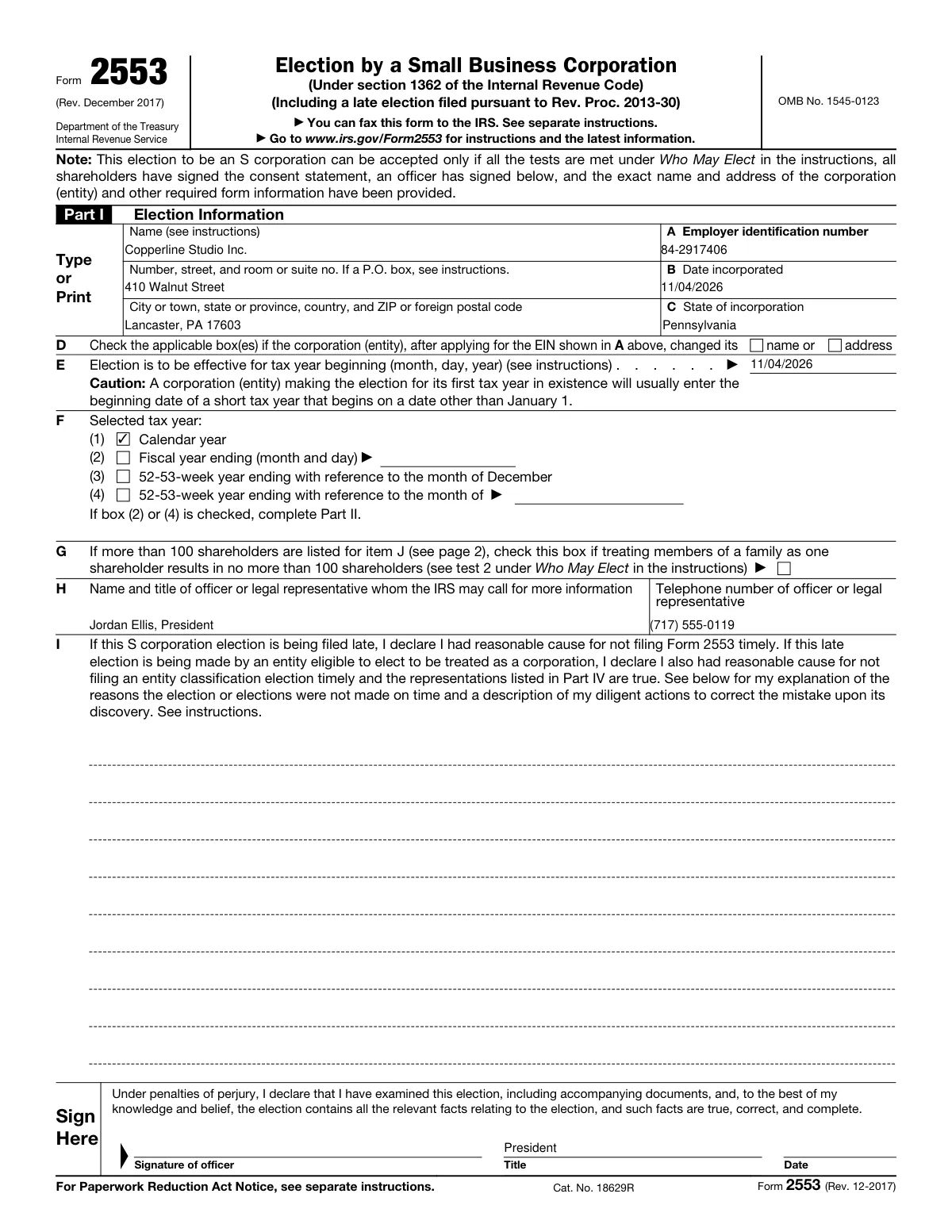
Tax and formation firms file Form 2553 for each client that elects S corporation status, usually soon after forming the company or before the year the election should take effect. The details already live in the firm’s client list: legal name, EIN, date of incorporation, officers and shareholders.
This template is the four-page 2553 with readable field names, Part I connected to columns and the first three rows of the shareholder table on page 2. The corporation’s name and EIN repeat at the top of every page. The officer signs page 1, and every shareholder signs their consent in column K.
What is in the fillable PDF
- All four pages of Form 2553, the current revision (December 2017)
- Part I connected to columns, with one Tax year column for the calendar or fiscal box
- Shareholder rows 1 to 3 connected: name and address, shares, date acquired, SSN or EIN, tax year end
- The corporation’s name and EIN at the top of pages 2, 3 and 4
- Parts II and III and the late-election explanation with readable names, ready to connect
- Every signature and consent date left empty
The columns your list needs
One row per corporation. These are the columns the form is connected to, with the first example row the template opens with.
- Corporation name
- Copperline Studio Inc.
- Street address
- 410 Walnut Street
- City, state, and ZIP code
- Lancaster, PA 17603
- EIN
- 84-2917406
- Date incorporated
- 11/04/2026
- State of incorporation
- Pennsylvania
- Election effective date
- 11/04/2026
- Tax year
- Calendar year
- Fiscal year end month and day
- (empty)
- Officer name and title
- Jordan Ellis, President
- Officer phone
- (717) 555-0119
- Officer title
- President
- Shareholder 1 name and address
- Jordan Ellis, 22 Orchard Road, Lancaster, PA 17601
- Shareholder 1 shares or percentage
- 600
- Shareholder 1 date acquired
- 11/04/2026
- Shareholder 1 SSN or EIN
- ***-**-2048
- Shareholder 1 tax year end
- 12/31
Shareholders 2 and 3 have the same five columns. Tax year ticks Calendar year or Fiscal year. Rows 4 to 7 of the table, Parts II and III and the late-election lines have readable names and connect in one click.
Before you file
- 1.Every shareholder at the time of the election signs the consent in column K, or a separate consent statement.
- 2.An officer signs page 1. Check the effective date against the deadline in the instructions: generally no later than 2 months and 15 days after the start of the tax year the election takes effect.
- 3.Fax or mail the signed form to the IRS address in the instructions. MailMergic does not file with the IRS.
- 4.Keep a copy, and the IRS acceptance letter when it arrives, with the corporation’s records.
Who sends the Form 2553 with MailMergic
Formation services
An S election for every new corporation or LLC you form, filled from the intake sheet.
Tax practices
Elections for every client switching to S status next year, prepared in one run each fall.
Law firms
A 2553 for each entity alongside its formation documents, with every shareholder row filled from the cap table.
Fill it for everyone on your list at once
One form, one spreadsheet, one finished copy per row.
Open the form
It opens in MailMergic with every box connected and three example rows, so you see a finished form first.
Upload your list
One row per person with the columns below. Excel, CSV, and Google Sheets all work, and different column names get matched once.
Generate and deliver
One PDF per row, named after the person, with its own password if you like. Print them, or email each one to the people who agreed to it.
Form 2553 template FAQ
Can an LLC use this form?
Who has to sign?
What about more than three shareholders?
How do I file it?
Can every PDF have its own password?
Who holds the SSNs and tax data I upload?
Other tax form templates
Form 1099-NEC
Nonemployee compensation for every contractor, Copy B and Copy 2 from one row.
Form 1099-MISC
Rents, royalties and other income, one recipient copy per owner or payee.
Form 1095-C
Employer health coverage offers, every month box for every full-time employee.
Form W-9
Request taxpayer details from every vendor, pre-filled from your vendor list.
Form W-8BEN
Foreign status certificates for every foreign investor or payee, pre-filled from your list.
Form W-4
Withholding certificates for every new hire, Employers Only section included.
Form I-9
Employment eligibility forms for every new hire, with your employer details filled in.
Form 941
Quarterly payroll returns for every client, voucher included, from one export.
MailMergic for accountants
Client letters, statements and tax forms, one PDF per client.
These templates are general information, not tax or legal advice. The forms are the IRS’s own (the USCIS’s for the I-9), with readable field names added; check each one against the current revision and instructions on irs.gov or uscis.gov before you use it. MailMergic fills and delivers documents. It does not file anything with the IRS or USCIS. Facts last reviewed October 2026.