
Fillable IRS form · Rev. March 2024
Form W-9, pre-filled for every vendor
Send each vendor or contractor a W-9 that already carries their name, address and your requester details. They check it, add their TIN and sign. One PDF per row, ready to email.
Free plan, no signup needed to try.
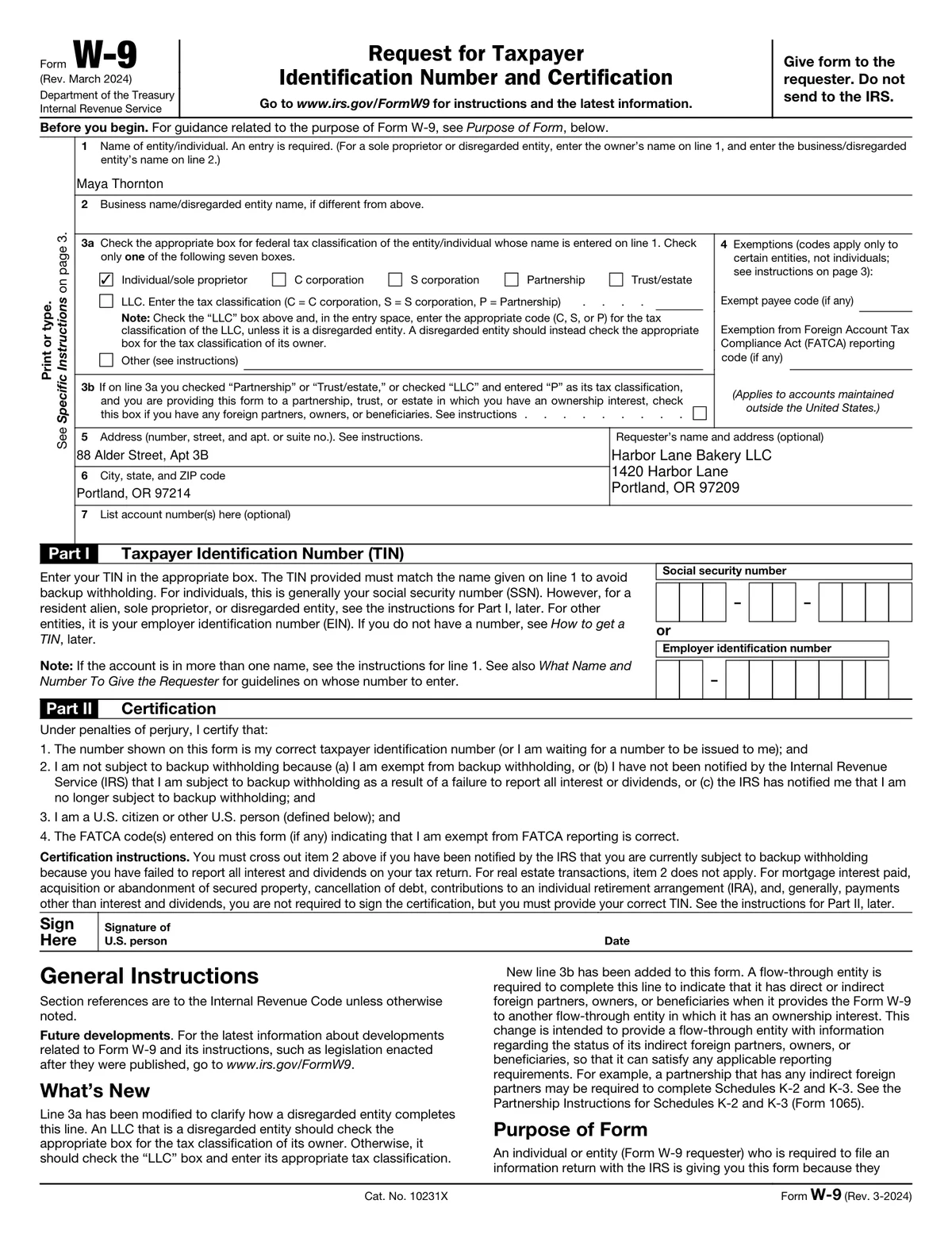
Before January comes the other half of 1099 season: collecting a W-9 from every vendor you will report. A blank form gets returned half filled in, with the wrong name or no classification ticked. A pre-filled one gets returned signed.
This template is the W-9 page with readable field names, connected to a vendor list. The name, address and requester block come from your list, and one Tax classification column ticks the right one of the seven boxes. Each vendor checks the details, adds their TIN and signs.
What is in the fillable PDF
- The W-9 form page, current revision, without the instruction pages
- One Tax classification column that ticks the right one of the seven boxes
- SSN and EIN as single fields that fill the IRS digit boxes
- A multiline requester block for your name and address
- Exemption codes, account numbers and line 3b with readable names, ready to connect
- The signature and date left empty for the vendor
The columns your list needs
One row per person. These are the columns the form is connected to, with the first example row the template opens with.
- Name
- Maya Thornton
- Business name
- (empty)
- Tax classification
- Individual/sole proprietor
- LLC tax classification
- (empty, or C, S or P)
- Address
- 88 Alder Street, Apt 3B
- City, state, and ZIP
- Portland, OR 97214
- Requester name and address
- Harbor Lane Bakery LLC, 1420 Harbor Lane, Portland, OR 97209
- SSN
- (empty, the vendor adds it)
- EIN
- (empty, the vendor adds it)
Tax classification ticks one box by its label: Individual/sole proprietor, C corporation, S corporation, Partnership, Trust/estate, LLC or Other. SSN and EIN fill the digit boxes when written with dashes, such as 123-45-6789 or 12-3456789.
Before you send them
- 1.Pre-fill only what you know to be right. The vendor certifies the form, so they check and sign it.
- 2.Leave the TIN empty unless you already have it from the vendor.
- 3.Send each vendor their own PDF, with a password if it carries a TIN.
- 4.Keep the signed W-9s; they are for your records and do not go to the IRS.
Who sends the Form W-9 with MailMergic
Before 1099 season
Collect a W-9 from every new contractor of the year in October instead of chasing them in January.
Dioceses and franchise groups
One W-9 for each parish, school or location from the master list, ready for the vendors who ask.
Onboarding vendors
Every new vendor gets a pre-filled W-9 in the welcome email, so purchasing is not held up by paperwork.
Fill it for everyone on your list at once
One form, one spreadsheet, one finished copy per row.
Open the form
It opens in MailMergic with every box connected and three example rows, so you see a finished form first.
Upload your list
One row per person with the columns below. Excel, CSV, and Google Sheets all work, and different column names get matched once.
Generate and deliver
One PDF per row, named after the person, with its own password if you like. Print them, or email each one to the people who agreed to it.
W-9 template FAQ
Can I fill in a W-9 for someone else?
How does the tax classification column work?
Does the W-9 go to the IRS?
Can every PDF have its own password?
Can vendors sign electronically?
Other tax form templates
Form 1099-NEC
Nonemployee compensation for every contractor, Copy B and Copy 2 from one row.
Form 1099-MISC
Rents, royalties and other income, one recipient copy per owner or payee.
Form 1095-C
Employer health coverage offers, every month box for every full-time employee.
Form W-8BEN
Foreign status certificates for every foreign investor or payee, pre-filled from your list.
MailMergic for accountants
Client letters, statements and tax forms, one PDF per client.
These templates are general information, not tax or legal advice. The forms are the IRS’s own, with readable field names added; check each one against the current revision and instructions on irs.gov before you use it. MailMergic fills and delivers documents. It does not file anything with the IRS. Facts last reviewed October 2026.