
Fillable IRS form · 2026
Form 1095-C for every employee
Part I and the 39 monthly boxes of Part II, filled from the ACA spreadsheet you already keep. One finished 1095-C per employee, named after them, ready to print or email.
Free plan, no signup needed to try.
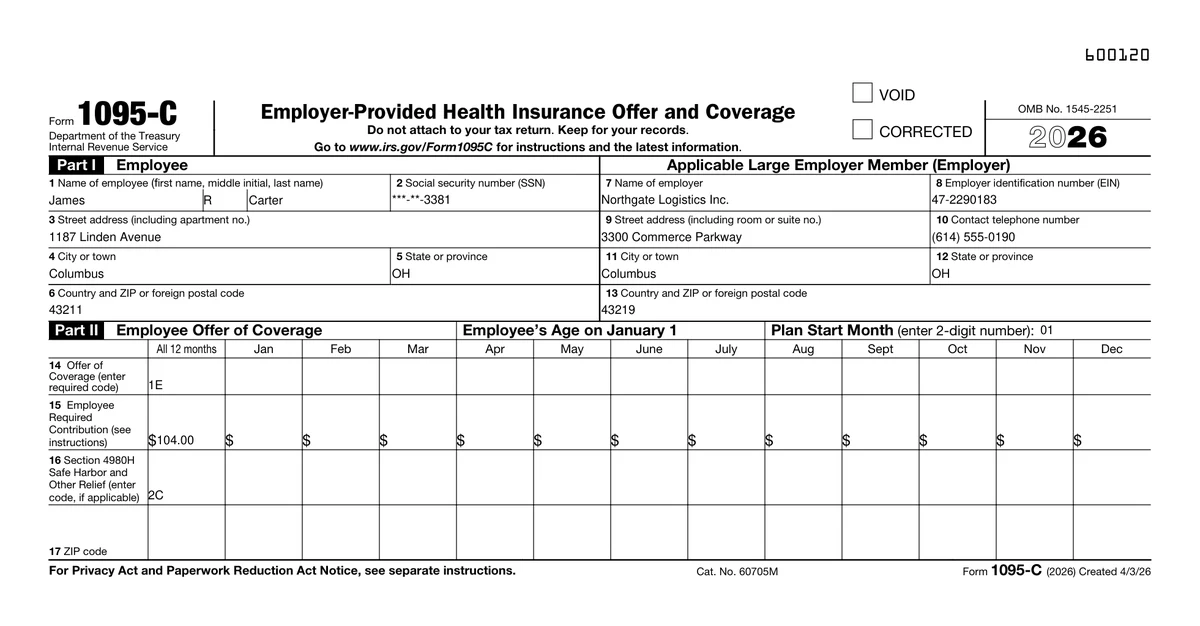
Applicable large employers give every full-time employee a Form 1095-C, and most keep the data for it in a spreadsheet already: one row per employee with an offer code, a contribution amount and a safe harbor code for each month. The IRS fillable PDF has the boxes for those months, but gives them code names like f1_18, so lining up 39 month boxes with 39 columns is the part that takes the afternoon.
This template names every box after its line and month, from Line 14 All 12 months to Line 16 Dec, and connects them to columns with the same names. Fill a column for all 12 months, or one per month for employees whose coverage changed during the year.
What is in the fillable PDF
- Part I (employee and employer) and Part II (offer of coverage), the official IRS layout for the tax year
- The IRS instructions for the employee, including the code tables for lines 14 and 16
- Every month box named after its line and month, such as Line 15 Mar
- 55 boxes already connected, with three example employees
- Line 17 and the Void and Corrected checkboxes with readable names, ready to connect
- No Part III: covered individuals apply only to self-insured plans
The columns your list needs
One row per person. These are the columns the form is connected to, with the first example row the template opens with.
- Employee first name
- James
- Employee middle initial
- R
- Employee last name
- Carter
- Employee SSN
- ***-**-3381
- Employee street address
- 1187 Linden Avenue
- Employee city
- Columbus
- Employee state
- OH
- Employee country and ZIP
- 43211
- Employer name
- Northgate Logistics Inc.
- Employer EIN
- 47-2290183
- Employer street address
- 3300 Commerce Parkway
- Employer phone
- (614) 555-0190
- Employer city
- Columbus
- Employer state
- OH
- Employer country and ZIP
- 43219
- Plan start month
- 01
- Line 14 All 12 months … Line 14 Dec
- 1E
- Line 15 All 12 months … Line 15 Dec
- 104.00
- Line 16 All 12 months … Line 16 Dec
- 2C
Lines 14 to 16 have 13 columns each: All 12 months, then Jan to Dec. Fill All 12 months when nothing changed during the year, or the single months when it did. The example list has one employee hired in April to show both. Line 17 (ZIP code) is on the form, unconnected.
Before you hand them out
- 1.Check the codes for each month against the line 14 and 16 tables in the current IRS instructions.
- 2.Self-insured plans also need Part III (covered individuals), which this template leaves out.
- 3.File with the IRS separately, together with Form 1094-C; e-filing applies from 10 returns.
- 4.Email only the employees who agreed to electronic delivery, and print the rest.
- 5.Check this year’s furnishing deadline and any alternative furnishing option in the IRS instructions.
Who sends the Form 1095-C with MailMergic
Employers with 50+ staff
HR fills every full-time employee’s 1095-C from the benefits export instead of a paid add-on to the payroll system.
Benefits consultants
One saved template, one ACA workbook per client, and a named PDF for every employee in each client folder.
Corrections
Fill the Corrected box and generate the forms again for only the rows that changed.
Fill it for everyone on your list at once
One form, one spreadsheet, one finished copy per row.
Open the form
It opens in MailMergic with every box connected and three example rows, so you see a finished form first.
Upload your list
One row per person with the columns below. Excel, CSV, and Google Sheets all work, and different column names get matched once.
Generate and deliver
One PDF per row, named after the person, with its own password if you like. Print them, or email each one to the people who agreed to it.
1095-C template FAQ
Why are there 13 columns per line?
Does it include Part III?
Can I file with the IRS from this template?
Can I email the 1095-C to each employee?
Can every PDF have its own password?
Can I use the PDF from irs.gov instead?
Other tax form templates
Form 1099-NEC
Nonemployee compensation for every contractor, Copy B and Copy 2 from one row.
Form 1099-MISC
Rents, royalties and other income, one recipient copy per owner or payee.
Form W-9
Request taxpayer details from every vendor, pre-filled from your vendor list.
Form W-8BEN
Foreign status certificates for every foreign investor or payee, pre-filled from your list.
MailMergic for accountants
Client letters, statements and tax forms, one PDF per client.
These templates are general information, not tax or legal advice. The forms are the IRS’s own, with readable field names added; check each one against the current revision and instructions on irs.gov before you use it. MailMergic fills and delivers documents. It does not file anything with the IRS. Facts last reviewed October 2026.