


Add a Watermark: Stamp DRAFT, CONFIDENTIAL, or Your Brand on Every Page

Sometimes a document needs to say a little more than what’s printed on it. Is this the final version, or just a draft? Is it meant to stay private? Did it come from you, or could anyone have made it? A plain page leaves those questions wide open, and the answers usually only matter once something has already gone to the wrong person.
The new MailMergic Watermark tool answers them at a glance. Stamp a word like “DRAFT” or “CONFIDENTIAL” across your pages, or your own company name, and everyone who opens the file knows exactly where it stands, without you having to explain a thing.
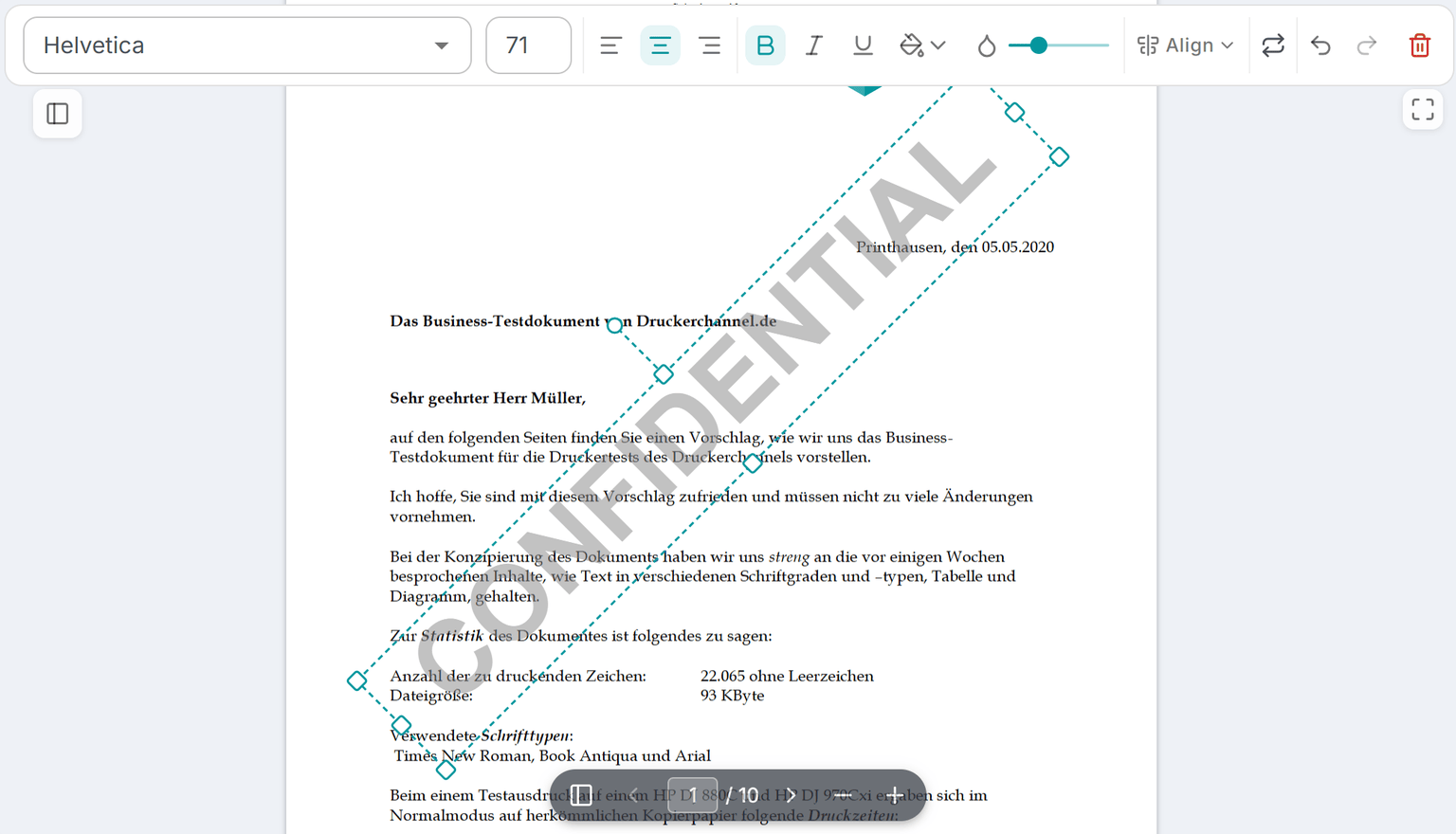
How it works
You choose the words. Type whatever you need, whether that’s “DRAFT”, “CONFIDENTIAL”, “SAMPLE”, your company name, or even a date, and the watermark appears across the page, sitting quietly behind your content. There’s no fixed list to pick from, so the stamp says exactly what you want it to say.
From there you can adjust the look and how see-through it is. Make it bold and obvious when you want it noticed, or soft and faint when you want it to stay in the background without getting in the way of the words people actually need to read. A faint stamp still does its job, and your text stays perfectly easy to follow.
Best of all, you set it up once. The watermark is then added to every document your merge produces, whether you’re sending out ten letters or five hundred. And it works for both PDF and Word files, so it doesn’t matter which format you’re working with.
Where it helps
A watermark is one of those small touches that quietly saves you trouble. Here are a few ways people use it:
- Mark the status: stamp “DRAFT” on a batch so nobody mistakes a work-in-progress for the final copy, then remove it when you’re ready
- Keep things private: a clear “CONFIDENTIAL” tells everyone a document isn’t meant to be passed around
- Discourage copying: a visible stamp makes it harder for someone to lift your page and pass it off as their own
- Add a brand touch: a faint company name behind your content gives certificates, invoices, and letters a polished, finished feel
Ready when you are
There’s nothing to learn and nothing to set up beforehand. Type your text, pick how it looks, and run your merge. Every page comes out stamped and ready to send. When the moment passes and you no longer need the mark, simply clear it and run the merge again.
Open your template, add a watermark, and give your documents the extra bit of clarity they deserve.