


Put Your Logo on Every Page — Without Copying It Manually

Multi-page documents come with a familiar headache: you want the same logo in the top corner of every page, a footer with legal text on pages 2 through 5, or a “CONFIDENTIAL” stamp on specific pages. Doing this by hand means duplicating placeholders page by page and hoping nothing shifts when you make a change.
MailMergic now lets you repeat any placeholder across multiple pages with a single setting.
How it works
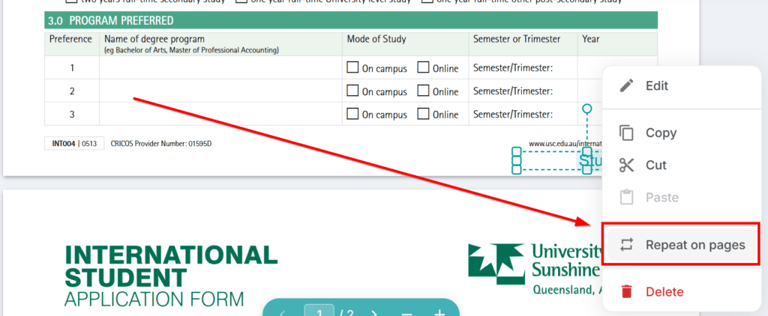
Right-click any placeholder on your template and choose Repeat on pages. You’ll see two options:
- All pages — the placeholder appears on every page of the document, same position.
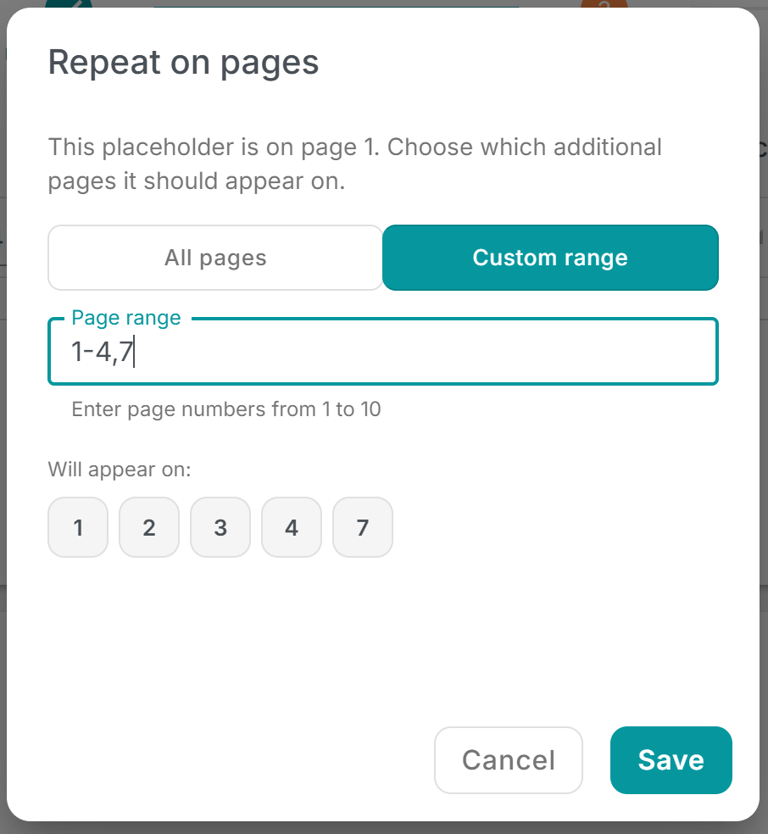
- Custom range — enter specific pages or ranges, like
1, 3-5, 7. The placeholder only appears on the pages you list.
That’s it. The element stays in sync — if you move or resize it on the original page, the repeated copies update to match.
Where it shines
This is one of those features that sounds simple but saves a surprising amount of time in practice:
- Company logos on every page of a multi-page contract or report
- Page headers or footers with a department name or document title
- Legal disclaimers (“Confidential”, “Draft”, “For internal use only”) repeated where needed
- Decorative borders or watermarks on select pages
Instead of maintaining separate copies of the same element — which drift out of sync the moment you adjust anything — you set it once and let MailMergic handle the rest.
Works with any placeholder type
Repeat on pages isn’t limited to images. It works with text placeholders, shapes, QR codes, barcodes — anything you can place on the canvas. So whether it’s a static logo or a dynamic field like a recipient’s name in a header, you can repeat it wherever it’s needed.
Give it a try — right-click any placeholder in your template editor and select Repeat on pages. Your multi-page documents just got a lot easier to manage.