
New in MailMergic: Fillable Tax Forms, Example Data and Safer Email Campaigns

Since our last roundup, MailMergic has picked up ready-to-fill US tax forms, a clearer start when you pick a design from the gallery, and fewer surprises when you send emails. Here is what’s new.
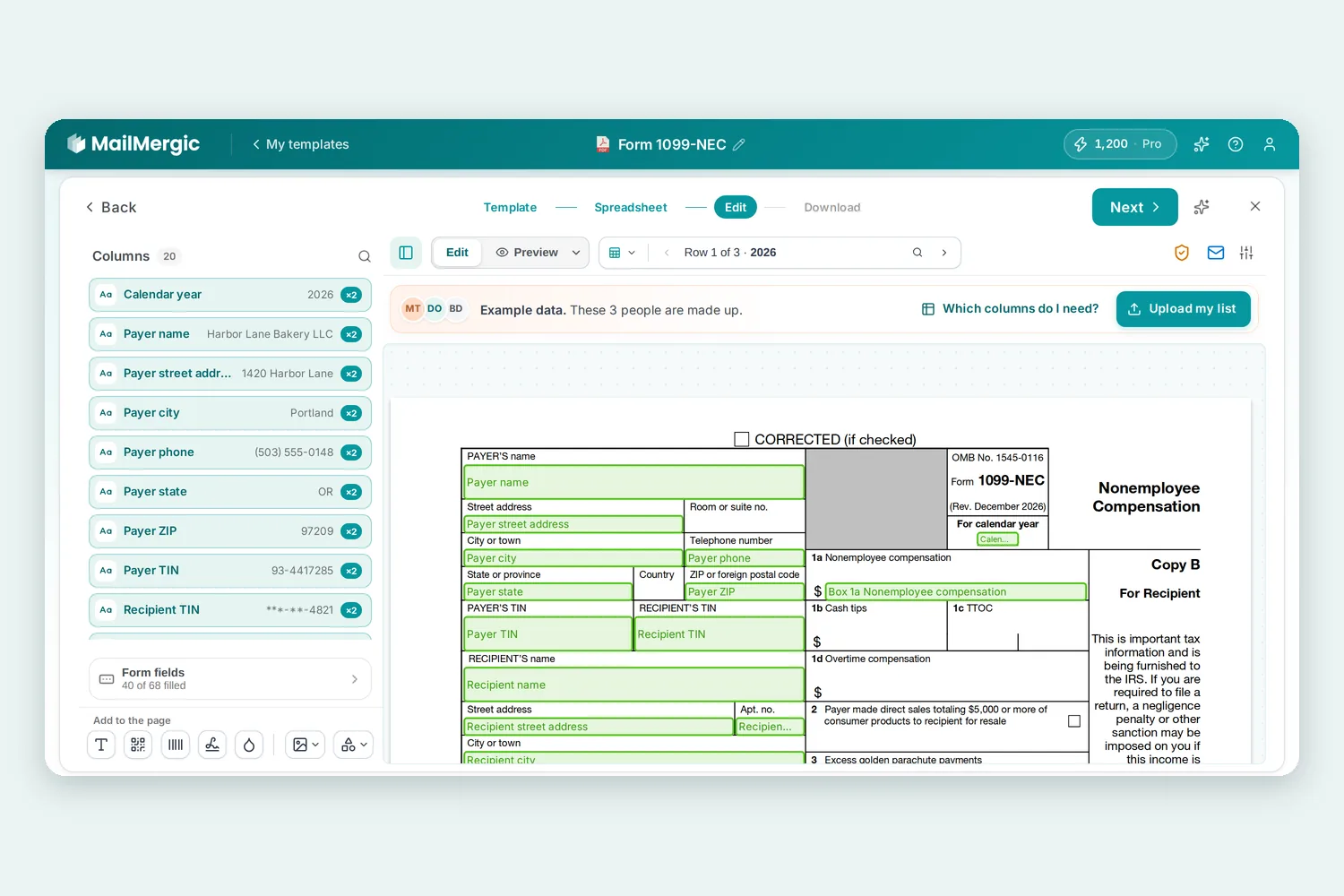
Fillable US tax forms, already connected to your columns
Tax season means filling in the same form for every contractor, employee or client. The template gallery (under Or start from a ready-made design) now has a Tax forms category with nine fillable forms: W-9, W-8BEN, W-4, I-9, 1099-NEC, 1099-MISC, 1095-C, 941 and 2553.
Each form was rebuilt from the official PDF (the IRS original, and the USCIS one for the I-9) with clear field names, and the fields you need are already connected to spreadsheet columns. Every form also comes with three example rows, so you see it filled in before you upload anything. The 1099s include Copy B, the instructions for the recipient and Copy 2, all filled from the same row.
Want to look at the forms first? Browse all nine tax form templates.
Donation receipts with the right statement for each donor
A US donation receipt usually says whether the donor got anything in return for the gift. The Donation Acknowledgment Letter in the Membership category now has a Goods or Services Statement column for exactly that.
Leave the cell empty and the letter says “No goods or services were provided in exchange for this contribution.” Fill it in, for example with the value of a gala dinner ticket the donor received, and that row’s own statement is printed instead.
Example data you can tell apart from your own
When you pick a design from the gallery, MailMergic fills it with made-up rows so you can see the result straight away. Until now, it wasn’t always clear that those rows were only examples, or what your own spreadsheet should look like.
A line above the page now says Example data. These 3 people are made up. Next to it are two buttons:
- Which columns do I need? lists the columns your spreadsheet needs: one row per person, with these names in the first row. Download them as an Excel file to fill in gives you the example rows as a spreadsheet you can type over.
- Upload my list swaps the examples for your own spreadsheet. You can also drag the file anywhere onto the window.
Once your own data is in, the line disappears. And if you haven’t created an account yet, picking a template now opens it straight in the editor.
Email campaigns: stop, send now and plain words
A few changes on the campaign page make sending feel safer:
- Stop sending now asks before it acts and tells you how many emails are still waiting. Emails already sent stay sent, and Keep sending closes the question without changing anything.
- A scheduled campaign now has a Send now button. MailMergic shows the number of emails and the planned date before it sends, and Keep the schedule leaves everything as it was.
- Schedule for later and Download documents are now buttons with words instead of small icons.
The words for what happened to each email are plainer too, in every language MailMergic speaks. Instead of “Delivered”, “Hard Bounce” or “Soft Bounce”, you now see Arrived, Address does not exist or Did not arrive. Emails that haven’t left yet are Waiting to be sent, and a spam report shows as Marked as spam.
Your plan at a glance
If you have a subscription, open Billing from your account menu. A Your plan card at the top shows your plan, its price per month or year, whether it is active and the date it renews. It also shows how many documents you have left this month and when that number resets.
If you have cancelled, the card tells you until when your plan stays active and that nothing more will be charged. One button, Manage subscription in Stripe, takes you to our payment provider, where you can cancel, change your plan or card, or download invoices. If a payment fails, the card says so and offers Update card in Stripe.
Want to try them yourself? Upload a PDF or pick a ready-made design and start for free.
