
More New in MailMergic This November: Six Small Changes That Save You Time

Besides the big changes this month, filling several templates at once and a clearer last step, we fixed a lot of small things that got in your way. Most of them came straight from your messages to support. Here are six.
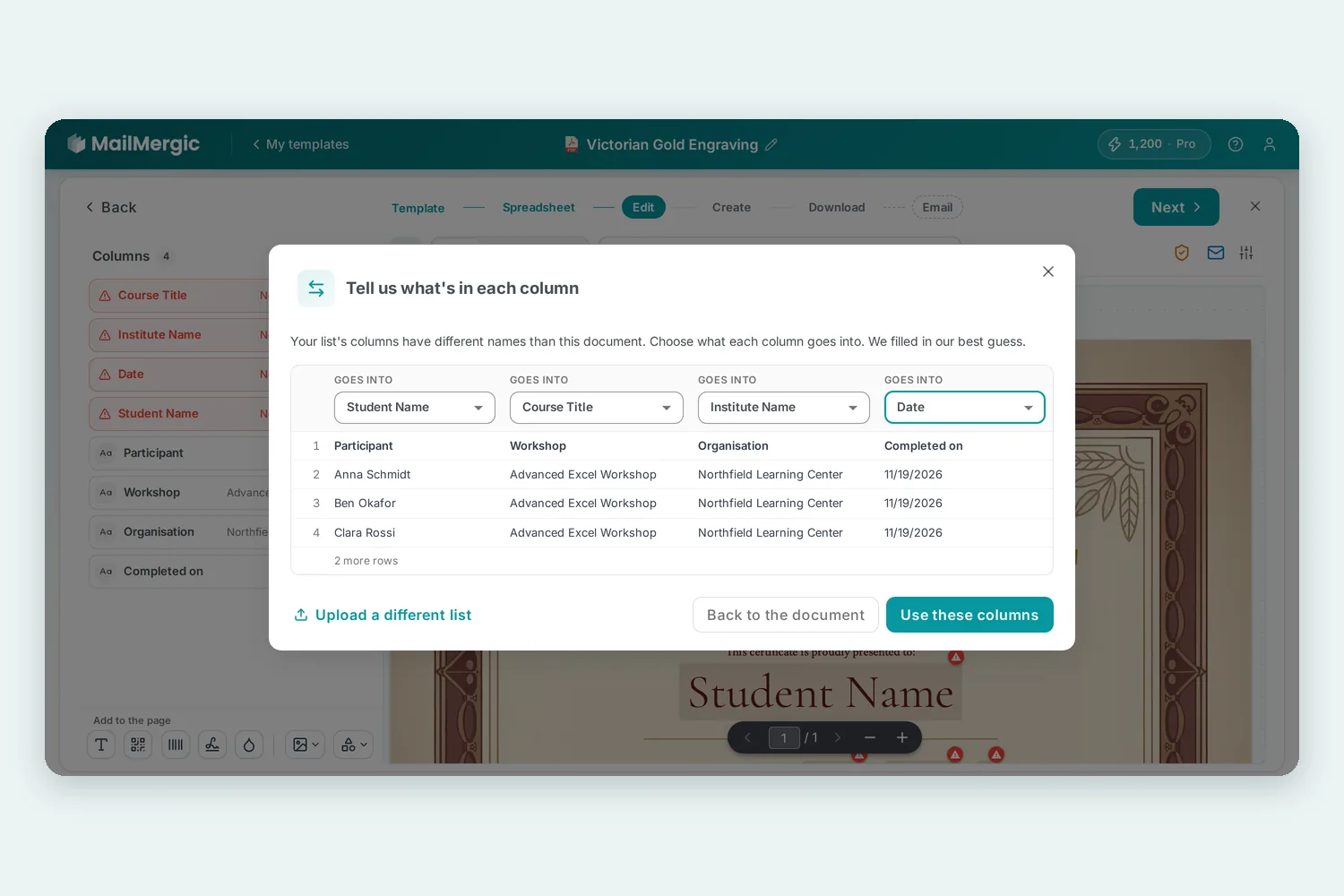
Your columns have other names? Just tell us
Say your template expects “Name” and “Address”, but your list calls them “Customer” and “Street”. Until now, MailMergic stopped with a message that nothing matched, and the only button was Close. Now a window opens instead: Tell us what’s in each column. It shows the first rows of your list, with a choice above each column of where it Goes into. We fill in our best guess, you correct what is wrong and click Use these columns.
If the first row of your list looks like a person instead of column names, the window says so, because that row would not get a document. If only some of your fields have no column, nothing stops you any more: you can carry on and fix them when you like.
Try a ready-made design before you upload a list
When you click a design in our template gallery, the preview now shows what it needs from your list under Your list fills in, and its paper size. Every design comes with 3 example rows, so you can try it right away and upload your own list later. One big button, Use this design, gets you started.
A clearer first step
The first screen of a new template now asks one plain question: Choose the document you want to fill. A PDF, a Word file or a picture all work. Click Choose my document, or drag your file into the box.
Rows that do not fit your table
Some templates put several rows into one document, like an invoice with a table of items. If one customer has more items than your table has lines, the extra items would simply be missing from their invoice. The check of your data before you create the documents now warns you: Not all rows fit in your table. Choose Leave them out to skip those documents in this run, and Download their rows to handle them separately.
Too big a job? We can do it for you
Sometimes you need a few hundred documents once and do not want to learn a new tool for it. When a job needs more credits than your plan has, MailMergic now also offers Let us do it for you: send us your template and your list, and we make all your documents and send you a download link. You get a fixed price first, within two business days. Read more about our done-for-you service.
Fixes you asked for
- The right language in Safari. Browsers that only list a regional language, like German (Germany), sometimes got the English app. They now get their own language.
- Times from Excel. Cells like 9:30 AM no longer come out as a date in the year 1899.
- The next document, typed in. After one or two documents, the card below them now asks One more for someone else? and Type them in opens the form for the next person. Read more about typing the details in.
Try it
All of this is live now for everyone. Open MailMergic and pick up where you left off, or upload a PDF and start for free.

Upload PDF · Get PDF