
Rent Rolls from One Portfolio Workbook: One File per Property, Every Month

The refinancing underwriter’s email asks for a current rent roll, and in practice current means dated within the last 30 days or so. The roll on file is dated March 3. Since then: one scheduled increase never applied, one tenant gone, one new lease missing entirely.
Rebuilding it tonight means retyping 16 units of rents under deadline. And a roll that contradicts the lease file in due diligence costs money at closing, not just face.
The fix is not a better template. It is a monthly cycle: one rent roll per property, generated from one portfolio workbook, each file dated. The current roll exists because the first of the month already produced it. This is the full build: the portfolio workbook (14 properties, 83 units, 9 owners), the grain rule that decides which sheet drives which document, the rent roll template with its variable unit table handled honestly, owner statements from the same data, tenant letters from the Units sheet, and a cycle whose byproduct is the due diligence folder.
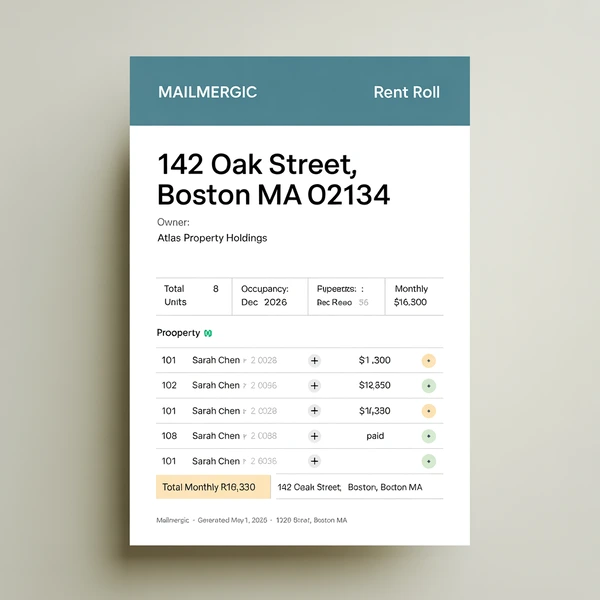
Free workbook
rent-roll-template.xlsx
The complete portfolio from this article: all four data sheets, the roll and statement templates, and the sixteen-row tenant table already wired. No signup.
Table of contents
- What the bank reads in a rent roll
- The portfolio workbook: fourteen properties, eighty-three units, nine owners
- One workbook, three grains: each run points at one sheet
- The rent roll template: one page per property
- The owner statement: nine owners, nine statements, one workbook
- Delivery: each owner sees exactly their own numbers
- The unit grain: tenant letters from the same workbook
- The first of the month, and the day the bank writes
- Frequently asked questions
- The rent roll that is always current
What the bank reads in a rent roll
A rent roll is a point-in-time snapshot of scheduled rent, unit by unit, with every unit listed, vacant ones included. It shows what the leases say is owed, not what arrived in the account; collections belong to the ledger and the owner statement. A roll that hides vacancies is the kind lenders learn to distrust.
One contrast prevents a common mix-up: the rent roll is the as-of snapshot of scheduled rent, and the T-12 is trailing twelve months of actuals. Lenders usually want both, because neither substitutes for the other.
Who asks for it: the lender at refinancing, the buyer in due diligence, the insurer at renewal, and the owner every month. In diligence the roll gets audited line by line against executed leases, and the audit finds exactly what hand-maintained rolls accumulate: stale rents, scheduled increases never applied, and delinquent balances behind a full-occupancy claim.
A hand-assembled roll fails in two ways. It goes stale, because it was built once in March and decays with every move-out. And it gets retyped; each retyping is a fresh chance to disagree with the lease.
One more thing worth saying plainly: at a few dozen doors, per-door pricing and unit minimums make property management software a big step. Your workbook is fine. The document assembly around it is the broken part, and everything the roll needs already lives in two sheets of one workbook.
The portfolio workbook: fourteen properties, eighty-three units, nine owners
The worked portfolio for this build: 14 properties, 83 units, 9 owners. The largest is Alder Court (P-03) with 16 units. The smallest are three single-family houses with one unit each. The awkward middle is Marsh Point, 10 units with 2 vacant. Occupancy is 79 of 83, call it 95 percent. Scheduled rent portfolio-wide: call it 98,400 a month.
The workbook has four sheets. Properties (14 rows) is the row source for rolls. Units (83 rows, one per unit) holds tenants, rents, and statuses. Owners (9 rows) drives statements. Expenses (one row per repair or charge, roughly 40 rows a month: A property_id, B month as text in 2026-08 style, C owner_id, D description, E amount) is data only, never a row source.
| Column | Example | Where it lands |
|---|---|---|
property_id (A) |
P-03 | Key cell and filename |
property_name (B) |
Alder Court | Roll title and email subject |
address (C) |
14 Alder Ct | Header block |
owner_id (D) |
O-04 | Joins Units and Expenses to owners |
owner_name (E) |
R. Calloway | Header block |
owner_email (F) |
r.calloway@example.com | Recipient column |
unit_count (G) |
16 | Feeds the tripwire |
fee_pct (H) |
0.08 | Owner’s rate, mirrored on the Owners sheet for the statement run |
as_of (I) |
2026-08-01 | Dated snapshot line and filename |
notes (J) |
Unit 12 turns Aug 15; painter booked | Whole-cell placeholder |
The Units sheet uses columns A through N, in this order: A property_id, B unit_no, C tenant_name, D monthly_rent (scheduled), E market_rent (asking rent, filled for vacant rows), F lease_start, G lease_end, H occupancy (Occupied, Vacant, Notice), I rent_status (Paid, Pending, Overdue), J balance_due, K security_deposit, L rent_collected (filled during your reconciliation), M owner_id, computed once with =VLOOKUP(A2, Properties!$A$2:$D$15, 4, FALSE) filled down, and N unit_key (computed; built in the tenant-table section). Vacant rows keep their asking rent in market_rent and leave the tenant fields blank.
Five hard cases earn names now, because the build keeps returning to them: the single-family house (its roll must print 15 blank table rows, not errors), Marsh Point (vacant rows show asking rent and no tenant), the Overdue tenant carrying a 2,850 balance, the one tenant on Notice, and R. Calloway, who owns three of the fourteen properties.
The notes column pays off before any document exists: 14 notes cells written in one sitting while the month is fresh, instead of 14 files opened one at a time.
Download this build. rent-roll-template.xlsx is the portfolio this article walks through: all four data sheets, the roll and statement templates, the sixteen-row tenant table, and the tripwire already wired. Free, no signup. A run reads a single sheet as its data source, which is the grain rule made concrete: the file ships with Properties first, so an unchanged upload generates rolls, and you point the next run at Owners or Units for the other two grains. Replace the data sheets with your portfolio when you are ready; the machinery does not change.
Housekeeping in one paragraph: underscore names keep inline placeholders working in generated files; whole-cell placeholders accept spaces, and they are the kind the editor’s live preview resolves, so give any field you want to watch its own cell. Header detection scans the first 15 rows with a “Change” banner, and the workbook can be .xlsx, .csv, .ods among others, or a Google Sheet via OAuth, imported as a snapshot at connect time (reselect to refresh). Assembling Units and Expenses from the accounting export is input-side work; the Power Query comparison walks that side of the pipeline. Three of the four sheets can drive a run. Deciding which one does is the grain rule, and it comes next.
One workbook, three grains: each run points at one sheet
The grain rule: the row source is the sheet whose rows match the documents you owe. Rolls are per property, so Properties is the row source. Statements are per owner, so Owners is. Tenant letters are per unit, so Units is. Same workbook, different grain per run.
The engine generates one file per row of whatever sheet you point it at. The mechanism underneath is Excel to Excel mail merge, and the complete guide walks every wizard screen, so this article stays on the property-specific parts. The macro version of exactly this cycle is the no-VBA guide’s workflow 4: the 2021 macro whose developer left in 2022, and the 30-minute breath-holding window every month.
| Document owed | Row source sheet | One row per | Rows this month | Files out |
|---|---|---|---|---|
| Rent roll | Properties | property | 14 | 14 PDFs |
| Owner statement | Owners | owner | 9 | 9 PDFs |
| Rent increase letter | Units, filtered copy | unit | 11 | 11 letters |
| Late rent notice | Units, filtered copy | unit | 2 | 2 notices |
Two limits, before the build begins. Each run has exactly one row source: rolls and letters are two runs, not one pass, and four document types this month means four short runs against the same workbook. And before anyone asks: R. Calloway owns three properties and receives three rolls. No setting staples them into one PDF; the combined single PDF renders all records into one internal read-through document and is never a per-owner bundle. The per-owner document is the statement, its own grain, built below.
The rent roll template: one page per property
The target is one page per property that a lender can read in thirty seconds: header block, occupancy and rent aggregates, the tenant table, the manager’s notes. Three pieces follow: the key cell and its aggregates, the tenant table (the hard part), and the date that makes it a snapshot.
The property key drives every number on the page
B2 on the template holds the whole-cell placeholder @property_id, and D2 holds @unit_count. This is the key-cell technique from the month-end build: one cell holds the key, every formula references it, and each Properties row substitutes its id at generation. This article applies it to a harder case, a table whose row count changes per property.
The header gives @property_name, @address, and @owner_name each a cell of their own, a static “Rent roll as of” label beside a cell holding @as_of, and @notes as a whole-cell placeholder. Then the aggregates:
=COUNTIFS(Units!$A$2:$A$100, $B$2, Units!$H$2:$H$100, "<>Vacant")
In plain words: count the Units rows that belong to this property and are not vacant. A unit on Notice still has a lease and a paying tenant, so it counts as occupied until it is empty; the Notice flag matters in the table, not in the count. Print occupancy as “8 of 10”: the COUNTIFS on the left, @unit_count on the right.
=SUMIFS(Units!$D$2:$D$100, Units!$A$2:$A$100, $B$2, Units!$H$2:$H$100, "<>Vacant")
That is scheduled monthly rent: add up this property’s rents on every lease still standing. Balance outstanding is the same shape against column J, without the occupancy criterion. The Vacant count is the same COUNTIFS with “Vacant” as the criterion; the Overdue count keeps the property criterion but points the second range at column I, rent_status, with “Overdue”. The ranges reach row 100 on purpose, so new Units rows never land outside them.
Two lines lenders compute anyway, so print them: annualized scheduled rent is the scheduled-rent SUMIFS times 12 (call it 273,600 for Alder Court), and gross potential rent adds a SUMIFS over market_rent on the Vacant rows before multiplying, pricing the vacancies at asking.
Last, the tripwire, adapted from the month-end build’s check cell:
=IF(COUNTIFS(Units!$A$2:$A$100, $B$2)=$D$2, "", "CHECK UNITS")
If Units carries fewer rows for this property than unit_count says it should, the cell says so before an underwriter finds the hole. One editor expectation: before any row substitutes, B2 holds the literal text @property_id, so the aggregates legitimately read 0 and the tripwire reads CHECK UNITS until you step the preview.
The tenant table: sixteen rows because the largest building has sixteen
The problem, stated plainly: a rent roll needs a per-unit table, and this portfolio’s properties have anywhere from 1 to 16 units. One template must serve all fourteen without changing shape per property.
One helper column on Units makes the table addressable. Column N, unit_key:
=A2 & "-" & COUNTIFS(A$2:A2, A2)
In plain words: a running count per property, so Alder Court’s units key as P-03-1 through P-03-16. Put the key in the last column, N, clear of the column letters the template’s own table formulas occupy; the in-app spreadsheet editor tracks lookup ranges by column, and a key that shares a letter with template formulas can trip its circular-reference check.
The template’s table rows are numbered 1 to 16 in column A (rows 12 to 27). Every field cell is the same guarded pull; here is tenant name in full:
=IF(COUNTIFS(Units!$N$2:$N$100, $B$2&"-"&$A12)=0, "", INDEX(Units!$C$2:$C$100, MATCH($B$2&"-"&$A12, Units!$N$2:$N$100, 0)))
Walk it in two beats. COUNTIFS asks whether a unit with this number exists at this property; if not, the cell prints nothing. If it does, INDEX/MATCH pulls that unit’s field, with the exact-match 0 mandatory. Rent, lease end, occupancy, rent status, and balance repeat the pattern against their own Units columns.
The honest trade-off: the table is sized to the largest property, so the single-family house prints 1 filled row and 15 blank ones. Blank rows are the price of one template serving every property, and a lender would rather see blank rows than a roll hand-rebuilt per property. Vacant units appear with asking rent and no tenant name, which is how a roll should list them. And when a 17-unit building joins the portfolio, the table gains a row by hand: template maintenance, once, not monthly.
One discipline keeps the math safe: the table is display only. Every printed total comes from SUMIFS against Units, never SUM over the table, so the guard’s empty-text cells can never poison a sum.
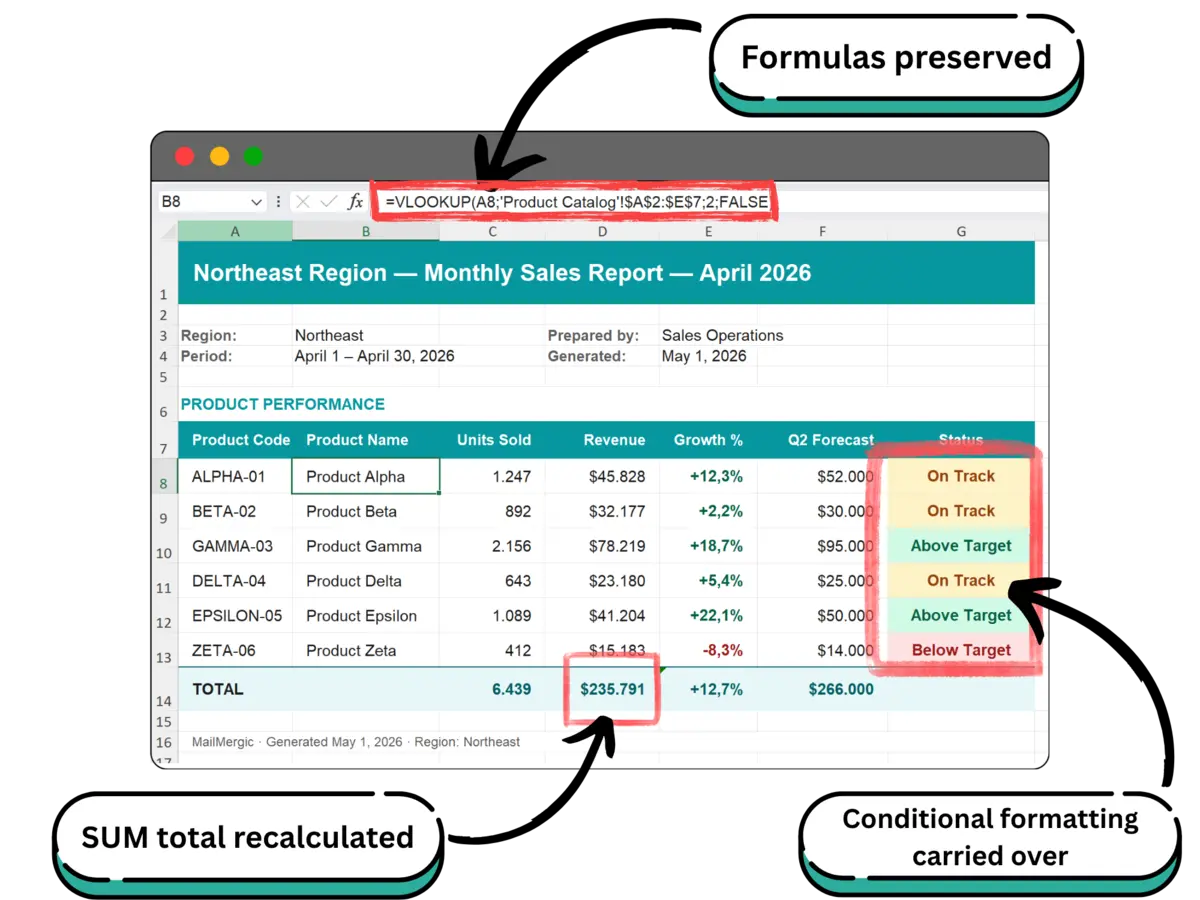
Formatting: cell-value color rules on the table’s rent status column (green Paid, yellow Pending, red Overdue) are documented survivors; a formula rule painting a whole row is exactly what the one-row test exists to confirm, and the compound guarded INDEX/MATCH earns the same hedge. The tempting one-function answers to a variable-length table are not on the documented preservation list, so this build uses only functions that are: SUM, VLOOKUP, IF, INDEX/MATCH, SUMIFS, COUNTIFS. The full preservation list is in the foundation guide, and the formula preservation deep dive covers the full story.
A dated snapshot with a filename to match
The as_of column does double duty: printed under the title (“Rent roll as of 2026-08-01”) and in the filename pattern, RentRoll_@property_id_@as_of.pdf, so the ZIP sorts by property and every file self-declares its date. That date line is the entire difference between a roll and a current roll.
Set the page from the Print Settings ribbon tab: landscape, a per-sheet print area so the table never spills to page two. Right-click Units, Owners, and Expenses and exclude them from the output. The roll ships as PDF, and the workbook holding every owner’s numbers never leaves your machine. If an .xlsx is ever requested, run the one-row test and look at the delivered file rather than assuming what excluded-sheet references display.
Preview with the floating “Row N of M” pill, and not just row 1, because row 1 is the property the template was designed around. Step the breakers, glancing at the tripwire cell each time:
- The single-family house. Rows 2 to 16 must blank, not error.
- Marsh Point. Asking rent, no tenant name, occupancy reads 8 of 10.
- The Overdue property. The red rule must actually fire; a rule that never fires looks identical to a rule that broke.
- Alder Court. The table must fill to row 16.
- The longest property name. Title and filename must survive it.
- The increase effective this month.
monthly_rentmust show the new number.
Then the one-row test: generate Alder Court alone, open it, and give it the thirty-second read an underwriter would.
The owner statement: nine owners, nine statements, one workbook
The monthly owner statement is the artifact owners judge a manager by. Convention says it lands by the 10th to the 15th, and statements that slip past the 20th read as bookkeeping trouble.
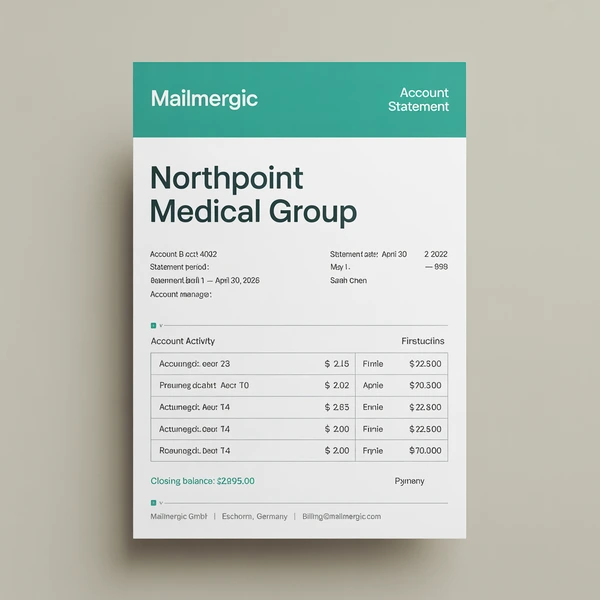
Per the grain rule, Owners is the row source: 9 rows, 9 statements, each row carrying owner_id, owner_name, owner_email, and fee_pct, because a run’s merge fields come from its row source sheet. One source-of-truth file in, one personalized statement per owner out. B2 holds @owner_id, C4 holds @fee_pct, and D4 holds the period, typed once a month: 2026-08. The spine of the statement is four cells.
Rent collected (C8): =SUMIFS(Units!$L$2:$L$100, Units!$M$2:$M$100, $B$2), crossing all of an owner’s properties in one number, because owner_id was resolved onto Units by that one VLOOKUP.
Expenses (C9): =SUMIFS(Expenses!$E$2:$E$200, Expenses!$C$2:$C$200, $B$2, Expenses!$B$2:$B$200, $D$4), the month criterion keeping August’s charges out of September’s statement.
Management fee (C10): =ROUND(C8*$C$4, 2). Owner draw (C11): =C8-C9-C10. Income, expenditures, fee, distribution, on a cash basis.
The per-property breakdown reuses the tenant-table pattern at a different grain: a fixed three-row table (no owner here holds more than three properties), keyed by a property_key helper on Properties (=D2 & "-" & COUNTIFS(D$2:D2, D2), D being owner_id), each row a guarded INDEX/MATCH for the property’s name, with the row’s collected rent a SUMIFS against Units keyed on that property’s id. The pattern is already taught; the grain is the only thing that changed.
One honest limit, stated flat: the run assembles documents from reconciled numbers; it does not reconcile. rent_collected is filled during your normal first-of-month reconciliation, before any document exists. A tool that claims otherwise is claiming your job. And to keep the two per-owner ideas distinct: the statement summarizes R. Calloway’s three properties because SUMIFS crosses them inside one document. That is not the same as bundling her three rent rolls into one PDF, which no setting does.
Delivery: each owner sees exactly their own numbers
The attachment picked in a hurry is the portfolio workbook itself, sent to one owner. Every other owner’s rents and balances sit one tab away, and there is no recall. Nine owners in one file is a disclosure problem, not a formatting one.
The answer is structure, not diligence. A roll generated from P-03’s row contains P-03 and nothing else, because the other thirteen properties were never in it. The general argument is five properties only a file has, and the format call is what you ship decides what customers see: rolls and statements ship as PDF, because banks and owners read them and nobody should edit them.
Email mechanics: the recipient column is owner_email, and the subject builds itself from merge fields, @property_name rent roll, @as_of, so “Alder Court rent roll, 2026-08-01” arrives self-labeled. Each attachment comes from the same row as its address, so the wrong-attachment failure mode is closed structurally. The honest arithmetic follows the same shape as eight reports, eight files: R. Calloway’s address sits on three Properties rows, so she receives three roll emails. Her inbox on the first holds four emails, three rolls and one statement, each scoped to exactly what she owns and nothing anyone else owns.
Receipts land per recipient in a dashboard: delivery, opens, and the bounce that is an owner’s changed email caught on day one. Own-domain sending is a paid-plan feature, and a per-file PDF password is available (one password across the run), best treated as transport protection. Data handling in one sentence: files are processed in EU data centers and encrypted in transit and at rest; MailMergic is GDPR and CCPA compliant, files are never used for AI training, and retention is configurable from 1 to 180 days (privacy).
The unit grain: tenant letters from the same workbook
Point the next run at Units and the same workbook writes to tenants instead of about properties. This month: 11 units get a 4 percent increase, 2 get a late rent notice. The technique is a filtered copy: copy the rows you owe letters into a run sheet, make that sheet the row source, and the engine generates one letter per row.
Two computed columns do the arithmetic before any letter exists: new_rent with =ROUND(E2*1.04, 0) filled down, and an effective_date column typed once. The letter reads @tenant_name, @monthly_rent, @new_rent, and @effective_date: current rent and new rent in one sentence each.
Statuses drive audiences all month. Overdue rows feed late notices, Notice rows feed the vacate paperwork, the increase columns feed the annual batch. The Units sheet you already maintain is the mailing list.
The copied-file failure mode takes a specific shape here: the letter with the previous tenant’s name in the salutation, because last cycle’s file was the starting point. A generated letter can only contain the row it came from; there is no previous tenant in it.
And the legal reality, which stays yours: increases and notices often need to be papered and provably delivered, with notice periods that vary by state, which is why these remain individual letters and why one clean PDF per tenant matters. The free rent increase letter, late rent notice, and notice to vacate Word templates carry the wording specifics, along with the rest of the landlord template library. Letters are document-shaped, so a Word template is the right starting point; the grain rule does not care what the template is. The row source is the Units sheet either way.
The first of the month, and the day the bank writes
- Days 1 to 3: reconcile. Your work, not the tool’s. Fill
rent_collected, updaterent_status, log the month’s Expenses rows. Record move-outs, notices, and new leases. Move any increase whose effective date arrived intomonthly_rent; an increase signed in June that never moved intomonthly_rentunderstates every roll after the effective date. - Day 3: date and annotate. Fill
as_ofdown with the first of the month. Write the 14 notes cells while the month is fresh. Fill-down check onunit_keyandowner_idfor new rows. - Day 4: preview. Step the breakers, glance at the tripwire on each, run the one-row test after any template edit.
- Day 5: run and send. Rolls against Properties (14 files), statements against Owners (9 files), send with receipts. Statements out with days to spare.
- After: archive. Drop each ZIP into a folder named for the period, 2026-08 next to 2026-07.
- Any day: the bank writes. The current roll is already in this month’s folder. If current has to mean mid-month, update the rows that changed and re-run; re-runs take about a minute, the first run about five.
The archive is the quiet payoff. A buyer’s diligence wants dated snapshots, and twelve dated folders are the portfolio’s history without a single retroactive rebuild. The folder was never prepared for diligence; it accumulated.
Nothing runs unattended: the configuration persists, so the month’s work is paste, preview, run, and sending is one click. One credit per generated row makes the full cycle here 14 rolls plus 9 statements plus 13 letters, call it 36 credits (pricing), and the free plan covers a real pilot. The 25 MB and 100,000-row limits are nowhere in sight at 83 units, and generation makes most of the pre-send checklist true by construction.

Frequently asked questions
Q: What does a lender mean by a current rent roll?
A: In practice, one dated within roughly the last 30 days, though conventions vary by lender. It is not a T-12; that is trailing actuals, the roll is the as-of snapshot. Because @as_of drives the title and filename, a freshly dated roll is a fill-down and a re-run of about a minute.
Q: What should a rent roll include, and do vacant units belong on it?
A: Unit, tenant, lease dates, scheduled rent, status, and balance, for every unit. Vacant units belong on it, listed with asking rent and no tenant name, never hidden.
Q: Does a rent roll show scheduled rent or collected rent?
A: Scheduled rent, what the leases say is owed. Collection state lives in the status and balance columns; what actually arrived is the owner statement’s job, not the roll’s.
Q: How do I create a rent roll for each property from one Excel workbook?
A: Keep one row per property on a Properties sheet and a template whose key cell holds @property_id, with every aggregate a SUMIFS against it. A mail merge run generates one scoped PDF per row: 14 rows produce 14 rolls, and the first run takes about five minutes.
Q: How do I handle properties with different unit counts in one rent roll template?
A: Size a fixed table to the largest property and fill each row with a guarded INDEX/MATCH on a property-and-sequence key; excess rows print blank. The cost is blank rows on small properties, and compound guards earn a one-row test before the batch.
Q: What goes on a monthly owner statement from a property manager?
A: Rent collected, expenses, the management fee, and the net distribution, on a cash basis. One statement generates per Owners row, each line a SUMIFS or one arithmetic cell keyed on the owner id.
Q: Can an owner with several properties get one combined PDF each month?
A: No. One file per row means three properties produce three rolls. The consolidated per-owner view is the statement, which crosses their properties with SUMIFS inside one document.
Q: How do I send rent increase letters to all my tenants at once?
A: Make a filtered copy of the Units rows that get the increase, use it as the row source, and each row generates one letter with that tenant’s current and new rent. The free rent increase letter template carries the wording.
Q: How many units can you manage in a spreadsheet before you need property management software?
A: The ledger usually is not what breaks; document assembly is. A workbook plus a mail merge run carries a portfolio well into dozens of doors, and the honest switch signal is when your books, not your documents, outgrow the sheet.
Q: Can the rent rolls generate automatically on the first of every month?
A: There is no timer. The configuration persists, so the monthly rhythm is: reconcile, update the workbook, re-run in about a minute, and sending is one click. If unattended runs are a hard requirement, a workflow platform is the honest answer, monitoring burden included.
The rent roll that is always current
The roll the bank asked for was generated on the first, filed in a dated folder, and matches the lease file because nothing was retyped. Current stopped being a scramble and became a date column.
The first run takes about five minutes on the free plan with your own portfolio workbook. That is less time than retyping one property’s units.
New to the mechanism? Start with the complete guide. Replacing the macro? The no-VBA guide walks the migration. Weighing tool classes? Read the decision guide. The customer-facing variant is the pricing sheet build, the finance variant is the month-end pack, and the HR variant is the per-employee build. The Power Query comparison and the formula preservation deep dive are live; the series is complete.
