


Invoice and billing document template
Statement of account template
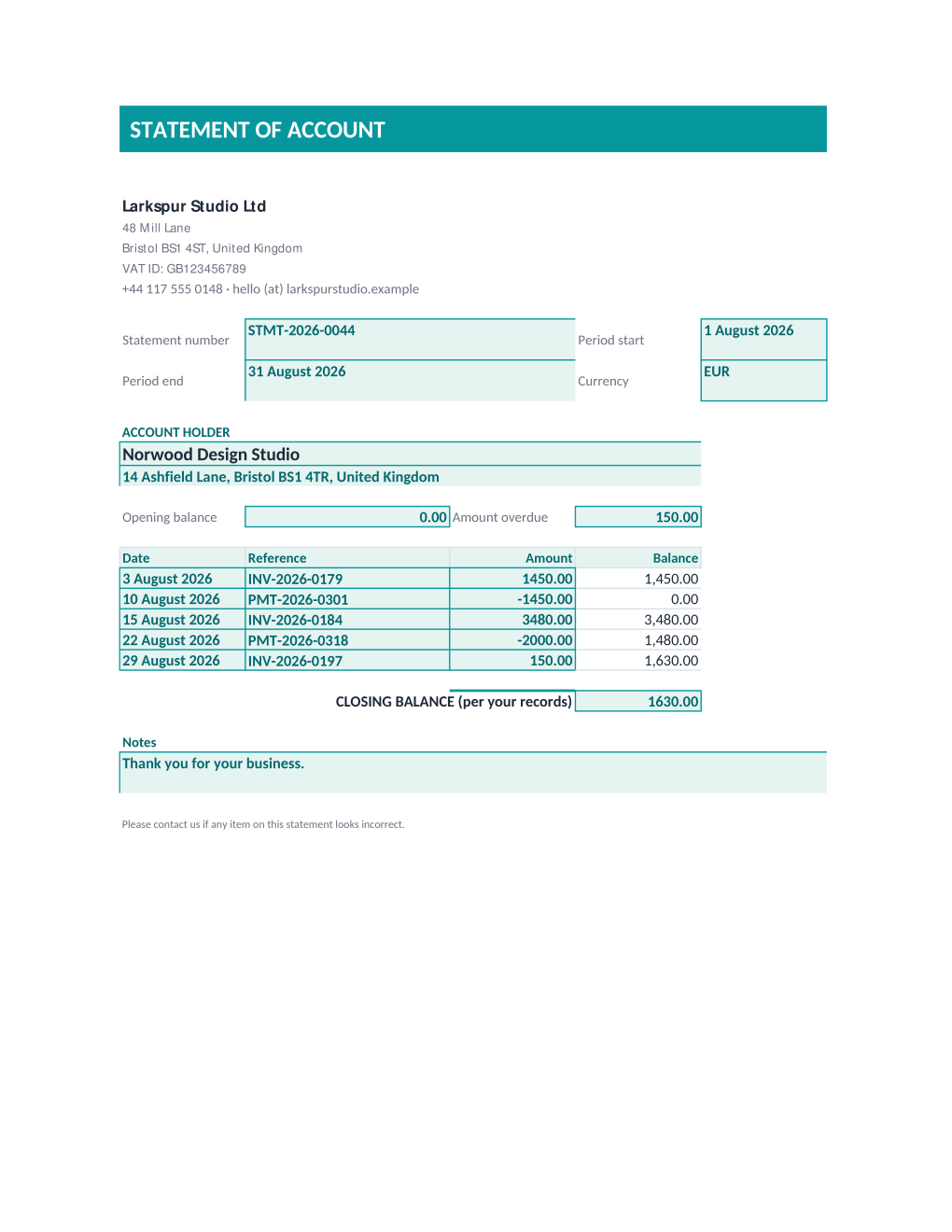
A statement of account with an opening balance, five transactions, and a running balance calculated automatically as invoices and payments are entered. Copy the field reference, download the Excel workbook, or send a personalized statement to every customer on your books at once.
E-invoicing notice
A spreadsheet or PDF invoice generated here is not a structured e-invoice. Germany, Italy, Poland, France, and Spain each require, or are actively phasing in, a specific electronic format (like XRechnung, FatturaPA, KSeF, Factur-X, or Verifactu) delivered through a government platform or accredited network, not an emailed spreadsheet or PDF. Check whether your country's mandate already applies to your business before relying on this template for a sale that has to be reported that way.
A statement of account summarizes everything that moved on a customer's account over a period: the opening balance, each invoice and payment, and the balance after each one, ending in a closing balance the customer can check against their own records. Businesses that extend credit or bill on account send one regularly, often monthly, so a customer always knows what they owe.
Sending statements to an entire customer ledger one at a time does not scale past a handful of accounts. Upload this workbook as an Excel template to MailMergic, upload a spreadsheet with one row per customer and their transactions for the period, and generate one personalized statement per row.
What is inside the Excel download
More than a plain spreadsheet an AI chat can improvise: a complete, formula-driven workbook built for billing and shipping teams who use it for real.
- Business details filled in once at the top, so every statement carries your name, address, and VAT ID without retyping them.
- A running-balance formula layer across five transaction rows, adding each amount to the balance above it so you never total a ledger by hand.
- An opening balance and an amount overdue field shown side by side, so a customer sees where the period started and what is already late.
- A closing balance field kept separate from the calculated running balance, so you can enter your own records' figure and a mismatch is easy to spot.
- Native @token merge fields already wired for sending statements to a whole customer ledger at once.
Field reference
Copy the plain field list below, or download the formatted Excel workbook with the formulas and layout built in.
STATEMENT OF ACCOUNT - FIELD REFERENCE

Spreadsheet columns, not letter prose: every @token below is bound to a cell
in the workbook, listed in the order it reads down the page. Your own
business details (name, address, VAT ID, bank details) are typed directly
into the template and are not @tokens, so they are not listed here.

DOCUMENT DETAILS
@statement_number        STMT-2026-0044
@period_start            August 1, 2026
@period_end              August 31, 2026
@currency                EUR

ACCOUNT HOLDER
@buyer_name              Norwood Design Studio
@buyer_address           14 Ashfield Lane, Bristol BS1 4TR, United Kingdom

OPENING FIGURES
@opening_balance         0.00
@amount_overdue          150.00

TRANSACTIONS (Date / Reference / Amount, five rows; Balance calculates automatically)
@txn1_date               August 3, 2026
@txn1_reference          INV-2026-0179
@txn1_amount             1450.00
@txn2_date               August 10, 2026
@txn2_reference          PMT-2026-0301
@txn2_amount             -1450.00
@txn3_date               August 15, 2026
@txn3_reference          INV-2026-0184
@txn3_amount             3480.00
@txn4_date               August 22, 2026
@txn4_reference          PMT-2026-0318
@txn4_amount             -2000.00
@txn5_date               August 29, 2026
@txn5_reference          INV-2026-0197
@txn5_amount             150.00

CLOSING
@closing_balance         1630.00
@notes                   Thank you for your business.
Merge fields: one spreadsheet column each
Filled per document row in a bulk run, straight from your billing spreadsheet.
@statement_numberSTMT-2026-0044@period_startAugust 1, 2026@period_endAugust 31, 2026@currencyEUR@buyer_nameNorwood Design Studio@buyer_address14 Ashfield Lane, Bristol BS1 4TR, United Kingdom@opening_balance0.00@amount_overdue150.00@txn1_dateAugust 3, 2026@txn1_referenceINV-2026-0179@txn1_amount1450.00@txn2_dateAugust 10, 2026@txn2_referencePMT-2026-0301@txn2_amount-1450.00@txn3_dateAugust 15, 2026@txn3_referenceINV-2026-0184@txn3_amount3480.00@txn4_dateAugust 22, 2026@txn4_referencePMT-2026-0318@txn4_amount-2000.00@txn5_dateAugust 29, 2026@txn5_referenceINV-2026-0197@txn5_amount150.00@closing_balance1630.00@notesThank you for your business.Before you send this statement
- 1.Confirm the opening balance matches the closing balance from the prior statement period for that customer.
- 2.Check that the closing balance you enter matches the running balance the formula calculates; a mismatch usually means a missing or misdated transaction.
- 3.List transactions in date order so the running balance reads correctly.
- 4.Confirm the amount overdue reflects only invoices actually past their due date, not the full balance.
- 5.Keep a copy of every statement sent so a later dispute can be checked against what the customer actually received.
When to use this template
Businesses billing on account
Send every customer a clear, running-balance statement on a regular schedule instead of chasing individual invoices.
Accounts receivable follow-up
Surface the amount overdue on every account at once, ahead of a collections call or email.
Monthly customer ledgers
Generate a personalized statement for a whole customer book from one spreadsheet export.
Generate it for your whole list at once
One document, one spreadsheet, one personalized, correctly totaled copy per row. That is what MailMergic is for.
Upload the workbook template
Use the Excel download as-is, or edit it first. The @token merge fields and formulas are already in place.
Upload your billing spreadsheet
One row per document: buyer, line items, dates, whatever it needs. Excel, CSV, and Google Sheets all work.
Generate and deliver
One personalized, correctly totaled document per row. Download them all as PDFs, or email each customer with delivery and open tracking.
Statement of account FAQ
What is a statement of account used for?
Is a statement of account the same as an invoice?
Why does the closing balance not calculate automatically?
Can I send statements to my whole customer list at once?
Other invoice and billing templates
Invoice
A five-line invoice that calculates VAT, subtotal, and the total due automatically as you fill in each row.
Receipt
Confirms an amount received against an invoice, with the payment method and date.
Quotation
A priced offer with a validity date and lead time, clearly marked as not a tax invoice.
Purchase order
Confirms what you are buying, from whom, and where it should be delivered, with the total calculated for you.
Proforma invoice
An estimated total and delivery terms a buyer can use for a deposit, an import, or a letter of credit, marked as not a VAT invoice.
Credit note
Reduces a specific invoice by a stated amount and reason, calculated with the same VAT and total formula as the invoice it corrects.
Commercial invoice
The customs declaration fields an export shipment needs (HS code, incoterms, country of origin, weight), with the declared value calculated for you.
Packing list
What is inside a shipment and how it was packed, carrier and tracking included, with no prices or amounts.
Delivery note
What was delivered and a signature confirming it arrived in good condition, with no prices or amounts.
All invoice and billing templates
Browse the full set of free invoice and billing templates.
These templates and country tables are general information, not legal advice, and not tax advice. VAT and invoicing rules vary by country and change often, and several of the countries in the table are actively phasing in new e-invoicing mandates. Confirm the current requirements for your jurisdiction, or consult a tax advisor or accountant, before relying on them for a real invoice.