


Preview Your Merged PDF Instantly — Before You Generate the Whole Batch

You’ve designed your template, mapped your columns, and you’re ready to generate 500 certificates. But a small voice in the back of your head asks: does it actually look right?
Until now, the only way to know for sure was to run the full merge and check afterward. If something was off — a misaligned name, a date in the wrong format — you’d have to fix it and run the whole batch again.
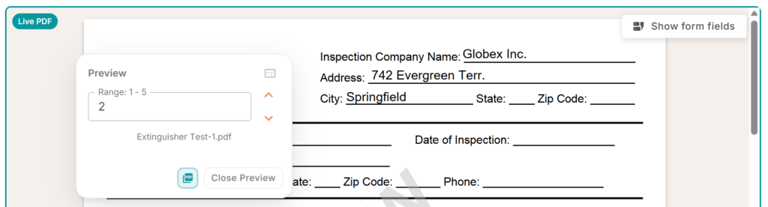
Now there’s a better way. MailMergic’s Live PDF Preview shows you the actual merged result for any single row, right inside the editor. No credits used, no waiting.
How it works
While you’re working on your template, click the preview button to see a real, merged PDF for one row of your data. The result opens in a dialog where you can page through multi-page documents, checking every detail — text, images, placeholders, formatting — exactly as they’ll appear in the final output.
Since it’s a real PDF render (not just a rough approximation), what you see is what your recipients will get.
Why it matters
The preview uses no credits from your plan. You can check as many rows as you like, tweak your layout, and preview again — all without touching your document allowance. It turns the design process from “cross your fingers and merge” into a confident, iterative workflow.
This is especially valuable for templates with lots of placeholders, conditional formatting, or multi-page layouts where small alignment issues can easily slip through.
Perfect for getting it right the first time
Whether you’re generating report cards, personalized invoices, or compliance letters, the live preview helps you catch problems before they reach your recipients. Spot a typo? Fix it. Column mapped wrong? Swap it. All before a single final document is created.
Try it now — open any template with data loaded and click the preview button to see your merged PDF come to life.