
How should my Excel file be formatted?

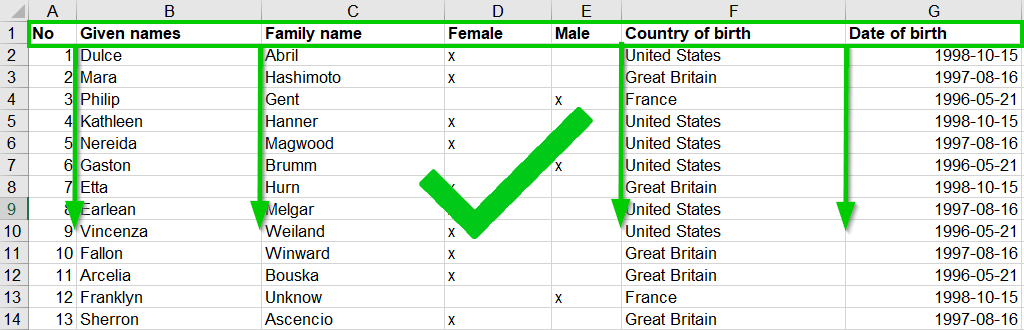
Your Excel file must adhere to a few easy formatting guidelines so that we can process the data it contains correctly:
Correct
Missing header row
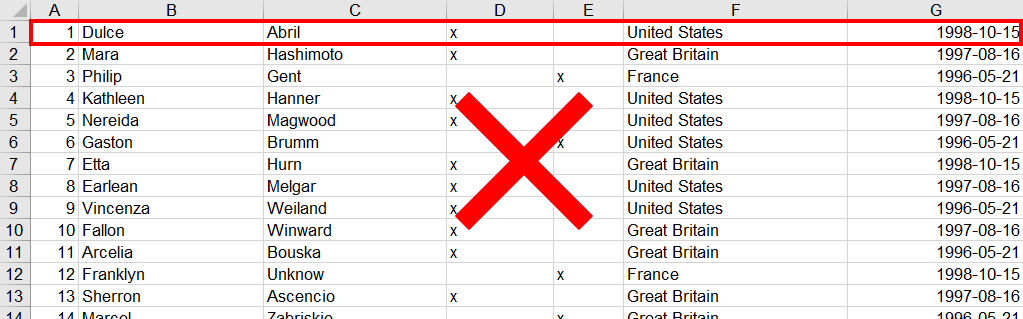
The first row of your table should hold column names like Name or Email. If it holds data instead, MailMergic shows “Your file has no column names.”, and that row won’t get a document. Add a row with column names at the top and upload the file again.
Horizontal table

The data must run downwards: one row per record, one column per piece of information.
Which sheet and which header row?
Your table does not have to be on the first sheet, and the column names do not have to be in the first row. MailMergic looks for them itself and tells you what it picked, for example “We detected row 3 as your header row.”
To check or change this, go to the “Edit” step and open the “Spreadsheet” tab on the left:
- If your file has more than one sheet, click the sheet name at the top and pick the right sheet from the list. If MailMergic thinks your data may be on another sheet, it shows a warning with a link to fix it: either “Switch to "Customers"” (with the name of the better sheet) or “Pick another sheet”.
- To change the header row, click “Change”. In the “Change spreadsheet” window, click the row that contains your column names, choose another sheet at the bottom if needed, and click “Confirm”.
If you have any other problems with your Excel file, please contact our support. We are happy to help you!