


One Email, Many Audiences: Show or Hide Content Per Recipient

You’ve probably been there. You want to send one email to your whole list, but not everyone should see the same thing. The customers in one city get a special offer. A handful of people need a renewal reminder. One team should get a different sign-off. So you end up copying the email three times, editing each version, and praying you sent the right one to the right group.
MailMergic now lets you show or hide whole sections of an email based on each recipient’s details, so you write one email, and it quietly adapts to everyone on your list.
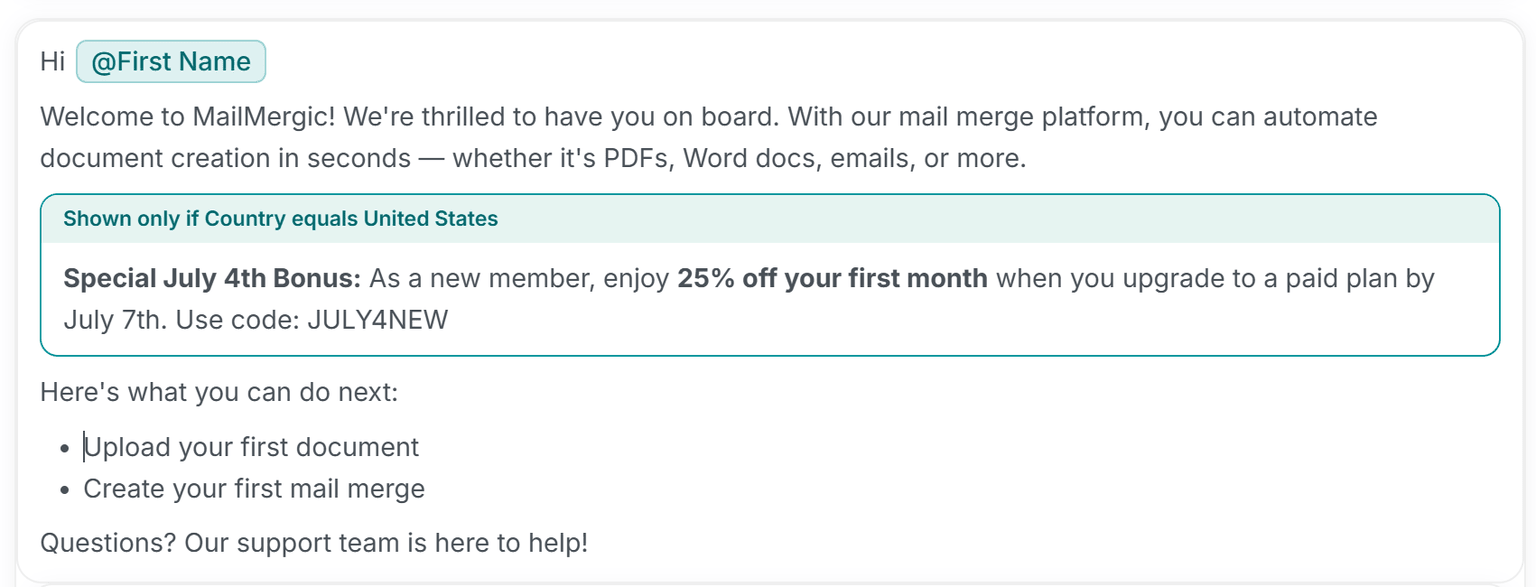
How it works
It works a lot like a name placeholder, but for entire chunks of content instead of a single word. You wrap a section of your email in a conditional block, then set one simple rule.
A rule has three plain parts:
- A column: pick any column from your spreadsheet, such as “City”, “Plan”, or “Team”
- A condition: choose how to check it, like equals, contains, or is empty
- A value: type what you’re looking for, such as “Berlin” or “Expiring”
For every person on your list, MailMergic looks at their row and decides: does this section belong in their email or not? If the rule matches, the block is included. If it doesn’t, the block simply disappears for that person. They never see it, and they never know it was there.
Best of all, everything stays in one tidy draft. You write and read the whole email top to bottom, set your rule, and let it adapt for each person when it goes out, instead of keeping several near-identical versions side by side.
Where it helps
Once you start thinking in “show this only when…”, the everyday uses come quickly:
- A local offer: show a discount only to customers in a certain city, while everyone else reads a clean, offer-free email
- A renewal nudge: include a friendly reminder only for the people whose plan is about to expire
- A team-specific note: add a different sign-off, contact person, or set of instructions for one particular group
- Optional extras: hide a paragraph for anyone who’s missing a piece of information, so they never see an awkward blank space
The best part is that it all happens behind the scenes. To each reader, the email looks like it was written just for them, because, in a way, it was.
Written once, right for everyone
No more juggling three near-identical drafts. No more checking and re-checking who gets which version. You write the email a single time, add a rule or two, and let MailMergic handle the rest for every recipient.
Open the email editor, wrap a section in a conditional block, and set your first rule. One email, written once, that fits everyone on your list.