


Open Rates You Can Trust: Real Human Opens vs. Automated Scans

You send out a campaign, check the report, and the open rate looks great, almost too great. Then a quiet doubt creeps in: did that many people really open my email, or is the number not telling me the whole story?
It’s a fair question, and for a long time the honest answer was “a bit of both.” That’s why MailMergic now separates real human opens from automated ones, so the number you see is one you can actually trust.
Why open rates get inflated
Email open tracking has a well-known problem: a lot of “opens” aren’t people at all. Here are the two biggest culprits.
- Apple Mail Privacy Protection. To protect its users’ privacy, Apple Mail quietly loads the images in your email in the background, before anyone has even looked at it. Helpful for privacy, but it can register as an “open” when no one has read a word.
- Bots and security scanners. Many company mail systems, Gmail, and security tools automatically check an email before it reaches the inbox. That check often trips the open count too, even though it’s just a machine looking for threats.
Add those up across a big send and your open rate can look far rosier than reality. That makes it hard to know what’s actually working.
What MailMergic shows you now
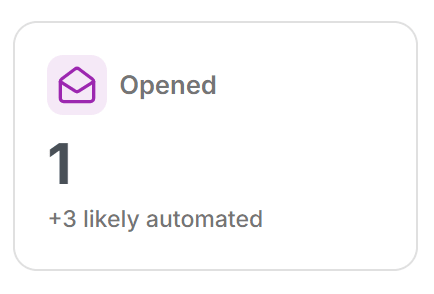
Your campaign report has an Opened tile. The big headline number is the one that matters: confirmed human opens, real people who opened your message. Underneath, in smaller, muted text, you’ll see a count of the rest, labelled “+N likely automated.”
We say likely on purpose. No tool can be perfect about this, so MailMergic is careful not to over-promise. But pulling the obvious machine opens out of the headline gives you a much truer picture than a single, inflated total ever could.
The same clarity carries through to each person. When you look at a recipient’s activity timeline, every open is labelled either “Opened” or “Opened · automatic,” so you can tell at a glance whether it was a real reader or just a background scan.
A number you can act on
Best of all, your open rate is now based on the real, human number, not the padded one. That changes what the report is good for.
- Compare campaigns fairly. See whether a new subject line genuinely got more people to open, instead of chasing noise.
- Trust your follow-ups. When you decide who to nudge again, you’re working from who really read the message.
- Report with confidence. Share a figure with your team or your board that holds up to scrutiny.
Open your latest campaign report and take a look at the Opened tile. For the first time, the number on top is one you can believe.