
Set It Once, Format It Everywhere: Smarter Placeholder Types

Imagine you have a “Date of Birth” column in your spreadsheet, and you use it in three different places on your template — a header, a table row, and a footer. Previously, you’d need to set the date format on each placeholder individually. Change your mind about using DD/MM/YYYY instead of MM/DD/YYYY? That’s three updates.
Now, MailMergic lets you set the type and format once per column, and every placeholder using that column picks it up automatically.
How it works
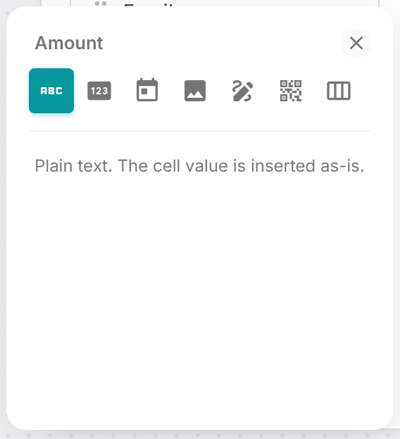
In the editor, click on any column to open its type settings. Choose the type that matches your data:
- Text — plain text, the default
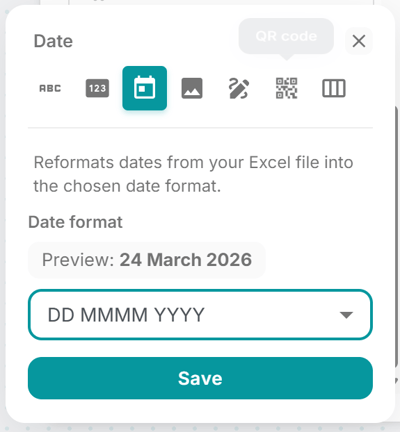
- Date — pick a format like MM/DD/YYYY, DD.MM.YYYY, YYYY-MM-DD, or type your own custom format
- Number — choose a locale (US, German, or Swiss) so thousands separators and decimal points match your audience’s expectations
- Image — the cell contains a link to an image, which gets embedded in the PDF
- QR Code — the cell value is turned into a scannable QR code
- Barcode — the cell value becomes a barcode (Code 128, EAN-13, and more)
- Signature — for e-signature image links
Once you set a column’s type, every placeholder on the canvas that uses that column inherits the same formatting. Change the date format once, and it updates everywhere.
Why this matters
It saves time and prevents mistakes. When a column has a clear type — “this is a date,” “this is a number” — you don’t have to remember to format each placeholder individually. It also means you won’t accidentally have one date showing “03/15/2026” and another showing “15.03.2026” on the same document.
For templates with many placeholders pulling from the same columns, this is a big quality-of-life improvement.
Works alongside everything else
Column types integrate naturally with the rest of MailMergic. Set a column to “Barcode” and it generates barcodes everywhere it’s used. Set it to “Image” and every placeholder pulls in the picture. The type travels with the column, not the placeholder.
Head to the editor and click on any column to explore the available types. Consistent formatting is just one click away.
