PDF Mail Merge —
Automatically Fill and Generate PDF Forms
Effortlessly Mail Merge 10,000+ PDFs with MailMergic.Instantly populate PDF forms from Excel data and optionally send via email — no plugins, no coding, no hassle.Get started today!
✓ Try For Free
✓ 30-Day Money-Back Guarantee
✓ 24/7 Expert Support
Take a free test drive!
Already using MailMergic? Login

Relied on by industry professionals






Is your PDF Mail Merge a tangled mess?
Complex Tools
Outdated solutions and plug-ins that require hours of training.
Human Errors
Every 8th document contains an error. How many have slipped through unnoticed?

Wasted Time
Spending hours manually personalizing PDFs for clients.
Lost Reputation
Errors and delays don’t just cost time—they cost trust, clients, and revenue.
…we’ve been there too!Start now with your first PDF Mail Merge
Change for the better.

Boost Efficiency
Automate document creation at lightning speed and breeze through any task. Free up your team to focus on higher-value tasks.
Save $3,900 annually*
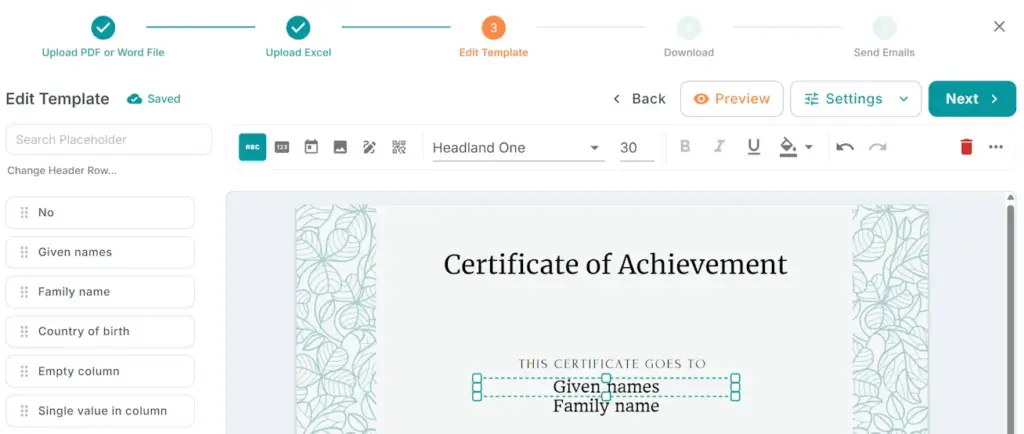
Start Quickly
User-friendly interface with zero learning curve, so you and your colleagues are productive from day one. Integrate seamlessly with your existing workflow.
Save 12 hours per user*
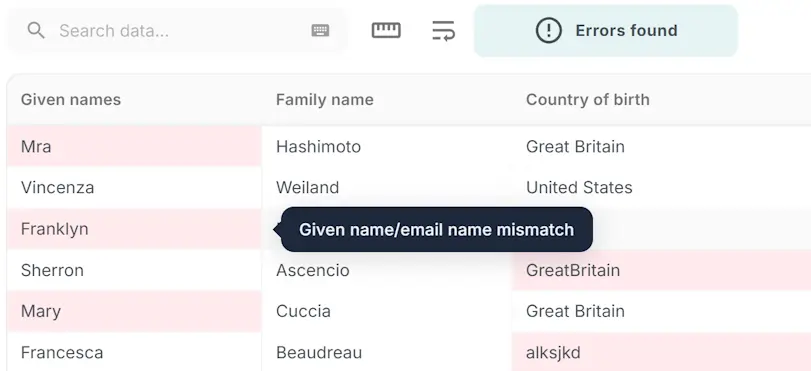
Prevent Mistakes
Our AI model automatically detects and corrects errors before they happen, saving you from lost sales or reputational damage.
Save $2,600 annually*
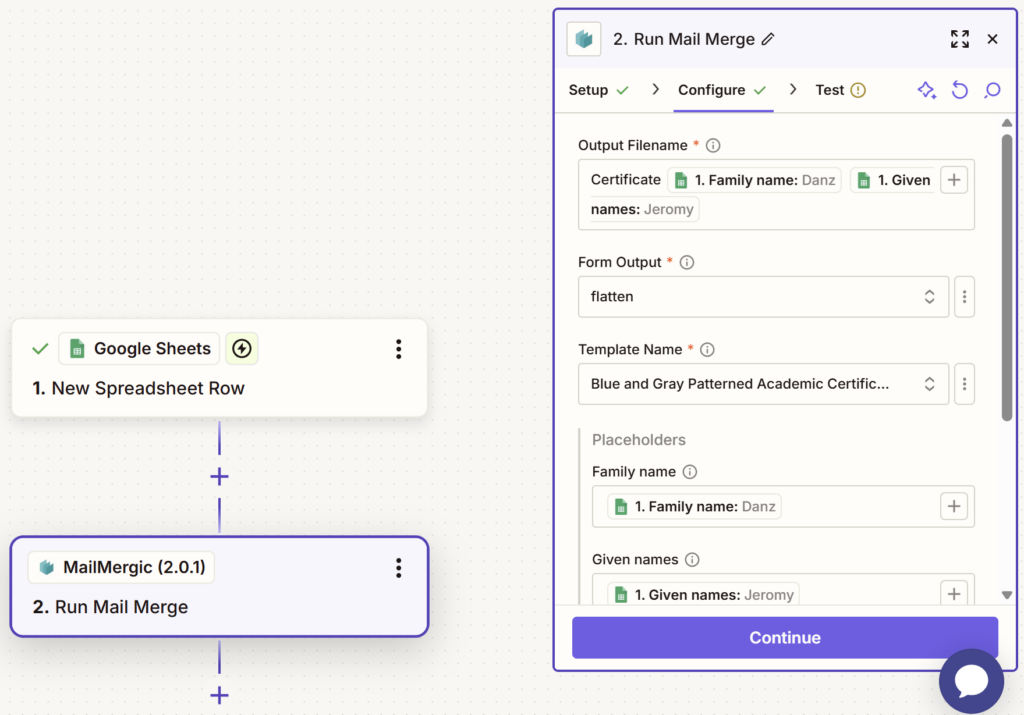
Endless Automation
Unlock unlimited possibilities for your document workflows. MailMergic now seamlessly connects with 6,000+ apps via Zapier.
321% ROI over 3 years*
*Based on internal data analysis of our customers with 5 or more users and a document volume of > 1,000 docs / month.
Try for free
Why MailMergic?
Free Trial Plan
Try MailMergic risk-free. Discover how much easier your workflow becomes.
30-Day Money-Back Guarantee
Not satisfied? Get a full refund, no questions asked.
24/7 Expert Support
Your dedicated account representative is ready to help.
Customers love MailMergic
From small teams to large organizations, users around the world rely on MailMergic to automate their document workflows, save hours of manual work, and deliver perfectly personalized results — every single time.
[uptime_stars number_of_stars=”5″]Average score of our customers in 2024: 4.7/5

“With MailMergic, we’ve been able to scale our business by 25% without adding any extra staff.”
Alex Harper
Real Estate Agent

“Thanks to MailMergic, we’ve eliminated 95% of the errors we used to find in our contracts.”
Anil Kumar
Lawyer

“We’ve saved over 100 hours per month on document preparation.”
Sophia Davis
Sales Representative

“What usually takes a minimum of 2 or 3 hours has been reduced to a mere 2 minutes.”
Isabella Porter
HR Manager

“I was amazed at how easy MailMergic was to learn and use. I was up and running in minutes”
Jamie Miller
Online Teacher

“MailMergic has streamlined our entire document workflow.”
Emily Lewis
Clinic Manager
One Solution, Many Use Cases
Professional Services
Efficiently handle contracts, agreements, and reports to save time for accountants, HR managers, and compliance officers.
Healthcare & Non-Profits
Simplify forms, patient records, and donor communications, allowing healthcare and non-profit workers more time to make a difference.
Education
Create graduation certificates and progress reports swiftly, providing educators and academic registrars with ease and professional results.
Real Estate
Streamline property agreements and project documentation, enhancing workflow for property managers and real estate agents.
Financial Services
Quickly produce invoices and financial reports, making it ideal for payroll specialists and business analysts.
Legal Services
Simplify document creation for contracts and compliance materials, aiding legal consultants with accuracy and efficiency.
Explore all available plans and find the right fit for your needs on our
pricing page
Frequently Asked Questions
What is a PDF mail merge?
A PDF mail merge lets you automatically create many personalized PDF documents from a single template. Instead of editing each file by hand, you upload your template, connect a data source like Excel, and MailMergic generates one customized PDF per row (for example: one contract, invoice, certificate, or letter for each person).
How do I mail merge a PDF with Excel?
Upload your PDF template to MailMergic, upload your Excel file, and add placeholders to our online PDF editor. When you start the mail merge, MailMergic creates a separate PDF for every row in your spreadsheet. There’s nothing to install and no coding required.
How can I email merged PDFs automatically?
After generating your PDFs, you can choose to send each file directly to the corresponding email address in your spreadsheet. MailMergic lets you personalize the subject, message, and attachments for every recipient. Everything is sent automatically in one click.
Does MailMergic support Excel, Google Sheets, and CSV files?
Yes. You can upload Excel files, import data from Google Sheets, or import CSV files. MailMergic automatically detects your columns so you can start mail merging right away.
Does MailMergic store my documents or data?
MailMergic stores your uploaded files and merged PDFs for up to 7 days so you can download them again if needed. After 7 days, everything is deleted automatically.
You can also permanently delete any file at any time from inside the app — deletion is immediate and irreversible.
We do not keep hidden backups.
We do not sell or share your data.
We do not use your files for advertising or AI training.
Our business model is providing secure, trustworthy document-automation tools — not monetizing user data.
If your organization needs maximum data security or must avoid cloud processing entirely (for example, in banking, legal, healthcare, or finance environments), you can use the MailMergic Offline App. It processes all files locally on your computer, with zero cloud storage.
Download the Offline App.
Where are MailMergic’s servers located?
MailMergic runs on Google Cloud Platform in St. Ghislain, Belgium, inside the European Union. Hosting in the EU ensures strong privacy protections, GDPR compliance, and reliable infrastructure for customers in both Europe and the United States.
Is MailMergic HIPAA compliant?
If your organization needs full HIPAA compliance or handles PHI (Protected Health Information), you should use the MailMergic Offline App. The offline version processes all documents locally on your computer, without sending any data to the cloud, making it suitable for HIPAA-regulated workflows.
MailMergic is not an officially certified HIPAA Business Associate and we cannot sign a BAA.
Download the Offline App.
Is MailMergic GDPR compliant?
Yes. MailMergic is 100% GDPR compliant. We enforce strict data-protection measures and security controls to ensure full compliance with the General Data Protection Regulation. All files are encrypted in transit and at rest. Your documents are processed on Google Cloud Platform servers in St. Ghislain, Belgium (EU), which provides strict European data protection for users in both the EU and the United States.
For organizations that need higher data-security controls — such as finance, banking, legal, or healthcare workflows — we also offer an Offline App. It processes all documents locally on your computer, with no cloud connection at all.
Download the Offline App.
Didn’t find your answer? Contact us