


Build Rich Text Blocks Right on Your PDF — Mix Text and Placeholders Freely

Until now, each placeholder on your template held one thing: a single column from your spreadsheet. That works great for names, dates, and numbers. But what about an address block? Or a personalized greeting like “Dear Anna, thank you for joining us at TechConf 2026”? You’d need separate placeholders for each piece, carefully positioned next to each other, and hope they didn’t overlap.
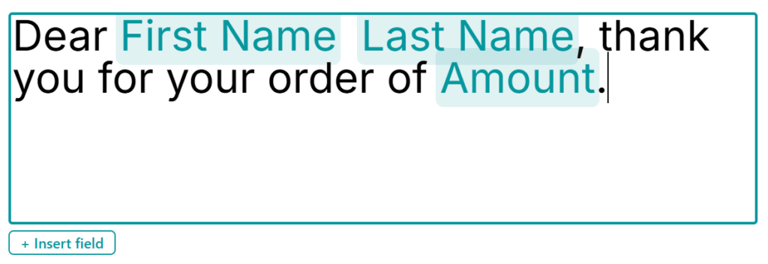
Now you can double-click any placeholder and type directly on the canvas — mixing regular text with merge fields in one flowing block.
How it works
Double-click a placeholder on your PDF template. It switches to an inline editor right there on the canvas — no separate dialogs or pop-ups. Start typing your text, and when you need to insert a merge field, pick a column from the list. It appears as a highlighted chip inside your text, making it easy to see where your data will go.
For example, you might type:
Dear {{First Name}} {{Last Name}},
Thank you for attending {{Event Name}} on {{Date}}. Your certificate is attached.
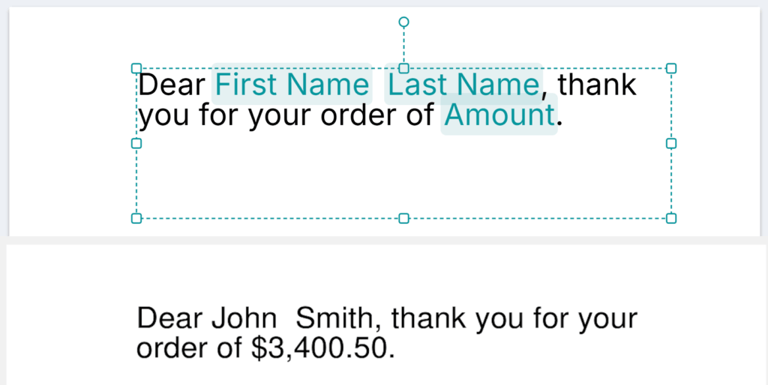
All of that lives in a single text block on the canvas. When you run the merge, each recipient gets their own personalized version with their data filled in.
What you can do with it
- Address blocks — combine street, city, zip, and country in one naturally flowing block
- Personalized paragraphs — write sentences that weave in the recipient’s name, company, or any other field
- Custom labels — create text like “Invoice #{{Invoice Number}} — {{Date}}” without juggling multiple tiny placeholders
- Headers and footers — mix static text with dynamic fields in one clean element
Why it’s better
Instead of aligning five separate placeholders to form one sentence, you write it as a single text block — just like you would in a word processor. The layout stays clean, text wraps naturally, and you spend less time fussing with positioning.
This is one of those changes that feels obvious once you’ve used it. Double-click, type, insert fields, done.
Open the editor, double-click any placeholder, and start typing. Your templates are about to get a lot more expressive.